Introduction: Beyond the Perimeter
The traditional castle-and-moat security model, where organisations built strong perimeters and assumed everything inside was trustworthy, has become fundamentally obsolete. Cloud computing, remote work, mobile devices, and increasingly sophisticated cyber threats have dissolved the concept of a defined network perimeter.
Zero Trust Architecture (ZTA) takes a fundamentally different approach to cybersecurity. Rather than relying on network location as an implicit trust signal, Zero Trust requires explicit verification for every user, device, and application attempting to access resources, regardless of whether they are inside or outside the traditional network perimeter.
“Zero Trust is a security strategy. It isn't a product or a service, but an approach in designing and implementing a set of security principles.”
— Microsoft Security Documentation
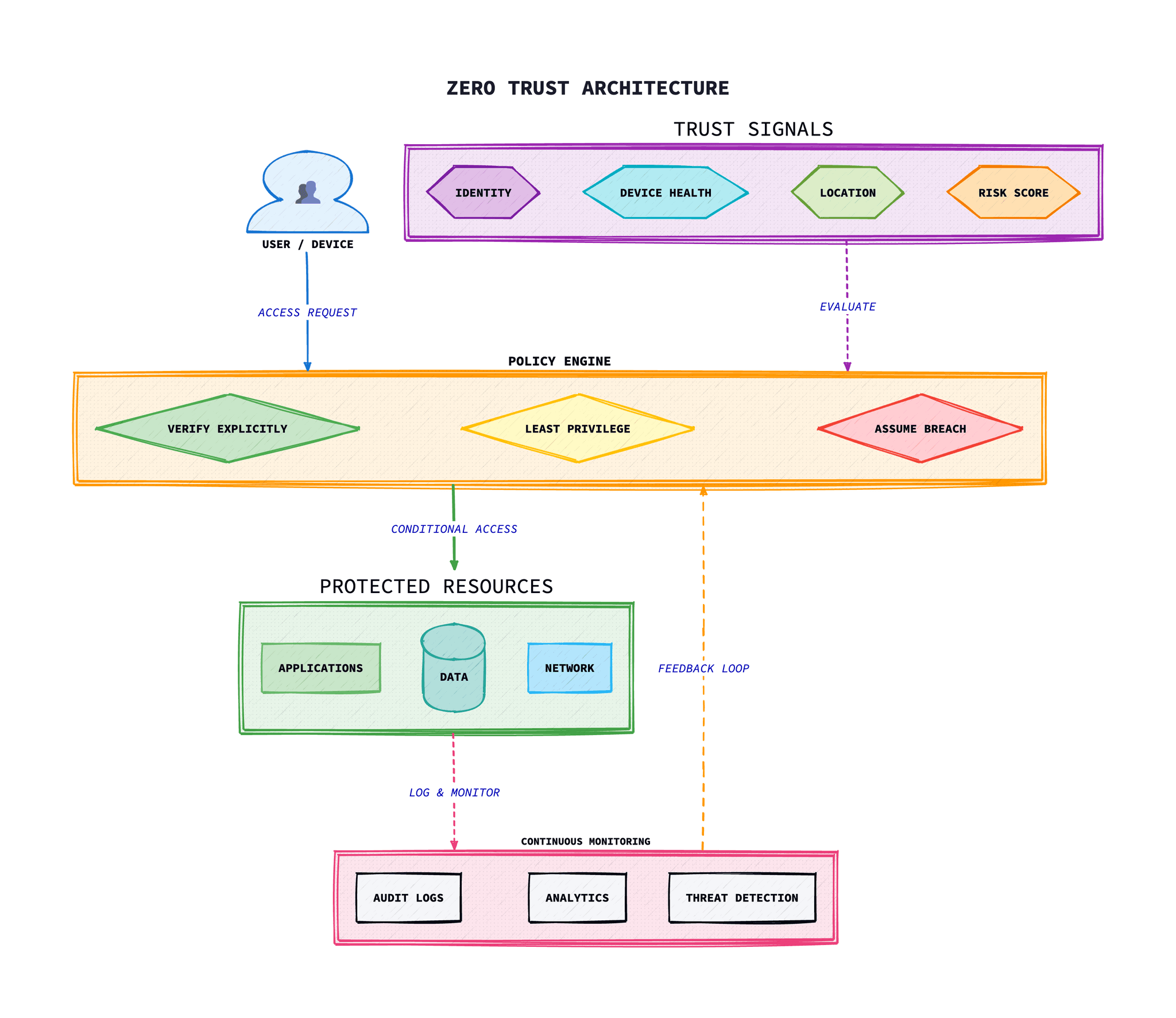
The concept was first articulated by John Kindervag at Forrester Research in 2010, but it has gained significant momentum in recent years. The US Executive Order 14028 on Improving the Nation's Cybersecurity (2021) mandated federal agencies to adopt Zero Trust principles, catalysing widespread adoption across both public and private sectors globally.
Core Principles of Zero Trust
Zero Trust is built upon three fundamental principles that guide all security decisions and architectural choices:
Verify Explicitly
Always authenticate and authorise based on all available data points, including user identity, location, device health, service or workload, data classification, and anomalies.
Use Least Privilege Access
Limit user access with Just-In-Time and Just-Enough-Access (JIT/JEA), risk-based adaptive policies, and data protection to minimise the blast radius of potential breaches.
Assume Breach
Minimise blast radius and segment access. Verify end-to-end encryption and use analytics to gain visibility, drive threat detection, and continuously improve defences.
These principles represent a fundamental shift from the traditional “trust but verify” approach to “never trust, always verify.” Every access request is treated as if it originates from an untrusted network, regardless of where the request originates or what resource it accesses.
Microsoft Zero Trust Framework
Microsoft has developed one of the most complete Zero Trust frameworks, influenced by their experience securing their own global infrastructure and supporting enterprise customers. The framework is designed to adapt to the complexities of modern environments that embrace the mobile workforce whilst protecting user accounts, devices, applications, and data wherever they are located.
The Secure Future Initiative
Launched in November 2023, Microsoft's Secure Future Initiative (SFI) is a multiyear commitment that advances the way Microsoft designs, builds, tests, and operates their technology. SFI represents, in large part, a rigid implementation of Zero Trust for Microsoft's unique environment to improve their security posture.
Key Microsoft Zero Trust Guidance Areas
- Adoption Framework: Phase and step guidance for key business solutions and outcomes
- Deployment Guidance: Technology pillar-specific implementation objectives
- Microsoft 365 Integration: Stepped and detailed design for Microsoft 365 organisations
- Azure Services: Zero Trust protections for Azure workloads and services
- Development Guidance: Zero Trust principles for application development
UK NCSC Zero Trust Principles
The UK National Cyber Security Centre (NCSC) has published detailed guidance on implementing Zero Trust architecture. Their approach emphasises eight key principles that organisations should follow:
1.Know your architecture including users, devices, services and data
You cannot protect what you do not understand. Maintain complete visibility of your assets, data flows, and dependencies.
2.Know your user, service and device identities
Identities are the new perimeter. Implement strong identity management for users, services, and devices accessing your resources.
3.Assess your user behaviour, service and device health
Continuously monitor and assess the trustworthiness of users, services, and devices throughout their session.
4.Use policies to authorise requests
Implement dynamic, context-aware policies that consider multiple signals before granting access.
5.Authenticate and authorise everywhere
Apply authentication and authorisation consistently across all resources, regardless of location.
6.Focus your monitoring on users, devices and services
Thorough monitoring provides the visibility needed to detect threats and inform policy decisions.
7.Do not trust any network, including your own
Treat all networks as hostile, including internal networks. Encrypt traffic and verify all connections.
8.Choose services designed for Zero Trust
When selecting new services, prefer those built with Zero Trust principles in mind.
NCSC Key Insight
The NCSC emphasises that Zero Trust is not a single product or technology, but rather an architectural approach. Organisations should be wary of vendors claiming to offer “Zero Trust in a box” solutions.
The Six Pillars of Zero Trust
A complete Zero Trust architecture addresses security across six foundational pillars. Each pillar requires specific controls and technologies to implement the Zero Trust principles effectively:
1Identities
Whether they represent people, services, or IoT devices, identities define the Zero Trust control plane. When an identity attempts to access a resource, verify that identity with strong authentication, ensure access is compliant and typical for that identity, and follow least privilege access principles.
Key Controls
- Multi-factor authentication (MFA)
- Passwordless authentication
- Conditional access policies
- Identity protection and governance
- Privileged identity management
2Devices
Once an identity has been granted access, data can flow to a variety of devices. This diversity creates a massive attack surface area. Monitor and enforce device health and compliance for secure access.
Key Controls
- Device registration and management
- Endpoint detection and response (EDR)
- Mobile device management (MDM)
- Device compliance policies
- Application protection policies
3Applications
Applications and APIs provide the interface by which data is consumed. They may be legacy on-premises, cloud-based, or SaaS. Apply controls and technologies to discover shadow IT, ensure appropriate in-app permissions, gate access based on real-time analytics, and monitor for abnormal behaviour.
Key Controls
- Cloud access security broker (CASB)
- App consent and permissions
- Real-time session monitoring
- Adaptive access controls
- Application segmentation
4Data
Ultimately, security teams are protecting data. Where possible, data should remain safe even if it leaves the devices, apps, infrastructure, and networks the organisation controls.
Key Controls
- Data classification and labelling
- Data loss prevention (DLP)
- Encryption at rest and in transit
- Rights management
- Data access governance
5Infrastructure
Infrastructure, whether on-premises servers, cloud-based VMs, containers, or micro-services, represents a critical threat vector. Assess for version, configuration, and JIT access to harden defence.
Key Controls
- Just-in-time VM access
- Version and configuration management
- Workload protection
- Telemetry and threat detection
- Security posture management
6Networks
All data is ultimately accessed over network infrastructure. Networking controls can provide critical controls to enhance visibility and help prevent attackers from moving laterally across the network.
Key Controls
- Network segmentation
- Micro-segmentation
- Threat protection and analytics
- End-to-end encryption
- Software-defined perimeter (SDP)
Implementation Roadmap
Implementing Zero Trust is a journey, not a destination. A phased approach allows organisations to build capabilities progressively whilst demonstrating value at each stage:
Phase 1: Foundation
3-6 months
- Asset discovery and inventory
- Identity and access management baseline
- Multi-factor authentication deployment
- Network visibility and segmentation planning
- Security operations centre (SOC) readiness
Phase 2: Enhanced Controls
6-12 months
- Conditional access policies implementation
- Endpoint detection and response (EDR) deployment
- Micro-segmentation implementation
- Data classification and protection
- Cloud security posture management
Phase 3: Advanced Maturity
12-18 months
- Automated threat response
- Continuous verification and validation
- Zero Trust network access (ZTNA)
- Advanced analytics and AI-driven security
- Supply chain security integration
Identity-First Security
In Zero Trust architecture, identity becomes the new perimeter. Strong identity controls are the foundation upon which all other security measures are built. Every access request must be authenticated and authorised based on the identity of the user or service.
Essential Identity Controls
Multi-Factor Authentication
Require multiple forms of verification for all users, especially for privileged access and sensitive resources.
- • Hardware security keys (FIDO2)
- • Authenticator apps
- • Biometric verification
- • Phishing-resistant methods
Conditional Access
Implement dynamic policies that evaluate multiple signals before granting access.
- • User and group membership
- • Device compliance status
- • Location and network
- • Risk level assessment
Privileged Identity Management
Apply just-in-time and just-enough-access principles to privileged accounts.
- • Time-bound access elevation
- • Approval workflows
- • Privileged access workstations
- • Session recording and monitoring
Identity Governance
Maintain visibility and control over identity lifecycle and access rights.
- • Access reviews and certifications
- • Entitlement management
- • Lifecycle automation
- • Separation of duties
Azure AD Conditional Access Policy Example
Configure conditional access policies using Azure AD (Entra ID) to implement Zero Trust identity verification:
# Terraform - Azure AD Conditional Access Policy# Require MFA for all users accessing sensitive applications# Phishing-resistant authentication strength policy# Phishing-resistant authentication strength policy# Phishing-resistant authentication strength policy# Phishing-resistant authentication strength policy# Phishing-resistant authentication strength policy# Phishing-resistant authentication strength policy# Phishing-resistant authentication strength policy# Phishing-resistant authentication strength policy# Phishing-resistant authentication strength policy# Phishing-resistant authentication strength policy# Phishing-resistant authentication strength policy# Phishing-resistant authentication strength policy# Phishing-resistant authentication strength policy# Phishing-resistant authentication strength policy# Phishing-resistant authentication strength policy# Phishing-resistant authentication strength policy# Phishing-resistant authentication strength policy# Phishing-resistant authentication strength policy# Phishing-resistant authentication strength policy# Phishing-resistant authentication strength policy# Phishing-resistant authentication strength policy# Phishing-resistant authentication strength policy# Phishing-resistant authentication strength policy# Phishing-resistant authentication strength policy# Phishing-resistant authentication strength policy# Phishing-resistant authentication strength policy# Phishing-resistant authentication strength policyn strength policy
resource "azuread_authentication_strength_policy" "phishing_resistant" {
  display_name = "Phishing-Resistant MFA"
  description  = "Requires FIDO2 security keys or Windows Hello for Business"

  allowed_combinations = [
    "fido2",
    "windowsHelloForBusiness",
  ]
}
Service Identity with Workload Identity Federation
Implement Zero Trust for service-to-service communication using workload identity:
# GitHub Actions - AWS OIDC Workload Identity (no long-lived credentials)# AWS IAM Role for GitHub Actions (Terraform)# AWS IAM Role for GitHub Actions (Terraform)# AWS IAM Role for GitHub Actions (Terraform)# AWS IAM Role for GitHub Actions (Terraform)# AWS IAM Role for GitHub Actions (Terraform)# AWS IAM Role for GitHub Actions (Terraform)# AWS IAM Role for GitHub Actions (Terraform)# AWS IAM Role for GitHub Actions (Terraform)# AWS IAM Role for GitHub Actions (Terraform)# AWS IAM Role for GitHub Actions (Terraform)# AWS IAM Role for GitHub Actions (Terraform)# AWS IAM Role for GitHub Actions (Terraform)# AWS IAM Role for GitHub Actions (Terraform)# AWS IAM Role for GitHub Actions (Terraform)# AWS IAM Role for GitHub Actions (Terraform)# AWS IAM Role for GitHub Actions (Terraform)# AWS IAM Role for GitHub Actions (Terraform)# AWS IAM Role for GitHub Actions (Terraform)m)
resource "aws_iam_role" "github_actions" {
  name = "GitHubActionsRole"

  assume_role_policy = jsonencode({
    Version = "2012-10-17"
    Statement = [{
      Effect = "Allow"
      Principal = {
        Federated = "arn:aws:iam::${data.aws_caller_identity.current.account_id}:oidc-provider/token.actions.githubusercontent.com"
      }
      Action = "sts:AssumeRoleWithWebIdentity"
      Condition = {
        StringEquals = {
          "token.actions.githubusercontent.com:aud" = "sts.amazonaws.com"
        }
        StringLike = {
          # Only allow specific repository and branch
          "token.actions.githubusercontent.com:sub" = "repo:myorg/myrepo:ref:refs/heads/main"
        }
      }
    }]
  })
}
Network Security in Zero Trust
While Zero Trust de-emphasises the network perimeter, network security remains critically important. The focus shifts from perimeter defence to micro-segmentation, encryption, and continuous verification of network traffic.
Zero Trust Network Access (ZTNA)
ZTNA replaces traditional VPNs by providing application-level access rather than network-level access. Users are granted access only to specific applications they need, based on identity and context, rather than being placed on the network.
| Aspect | Traditional VPN | ZTNA |
|---|---|---|
| Access Model | Network-level access | Application-level access |
| Trust Model | Implicit trust after connection | Continuous verification |
| Visibility | Limited application visibility | Full application and user visibility |
| Lateral Movement | Possible once connected | Prevented by design |
| Scalability | Limited by infrastructure | Cloud-native scalability |
Micro-Segmentation
Micro-segmentation divides the network into small, isolated segments, limiting the ability of attackers to move laterally. Each segment has its own security policies and access controls.
- Application-level segmentation: Isolate applications from each other based on data sensitivity and risk profile.
- Workload segmentation: Apply security policies at the workload level, regardless of network location.
- Environment segmentation: Separate development, testing, and production environments.
Kubernetes Network Policies for Micro-Segmentation
Implement Zero Trust network segmentation in Kubernetes using NetworkPolicies:
# Default deny all ingress and egress traffic# Allow frontend to communicate only with API service# Allow frontend to communicate only with API service# Allow frontend to communicate only with API service# Allow frontend to communicate only with API service# API service can only talk to database# API service can only talk to database# API service can only talk to database# API service can only talk to database# API service can only talk to database# API service can only talk to database# API service can only talk to database# API service can only talk to database# API service can only talk to database# API service can only talk to database# API service can only talk to database# API service can only talk to database# API service can only talk to database# API service can only talk to database# API service can only talk to database# API service can only talk to database# API service can only talk to database# API service can only talk to database# API service can only talk to database# API service can only talk to database# API service can only talk to database# Database accepts connections only from API service# Database accepts connections only from API service# Database accepts connections only from API service# Database accepts connections only from API service# Database accepts connections only from API service# Database accepts connections only from API service# Database accepts connections only from API service# Database accepts connections only from API service# Database accepts connections only from API service# Database accepts connections only from API service# Database accepts connections only from API service# Database accepts connections only from API service# Database accepts connections only from API service# Database accepts connections only from API service# Database accepts connections only from API servicee
apiVersion: networking.k8s.io/v1
kind: NetworkPolicy
metadata:
  name: database-policy
  namespace: production
spec:
  podSelector:
    matchLabels:
      app: database
  policyTypes:
    - Ingress
    - Egress
  ingress:
    - from:
        - podSelector:
            matchLabels:
              app: api-service
      ports:
        - protocol: TCP
          port: 5432
  egress: []  # No egress allowed
Service Mesh mTLS with Istio
Enable automatic mutual TLS between all services for Zero Trust service-to-service communication:
# Enable strict mTLS mesh-wide# AuthorizationPolicy - Only allow specific service communication# AuthorizationPolicy - Only allow specific service communication# AuthorizationPolicy - Only allow specific service communication# Deny all other traffic by default# Deny all other traffic by default# Deny all other traffic by default# Deny all other traffic by default# Deny all other traffic by default# Deny all other traffic by default# Deny all other traffic by default# Deny all other traffic by default# Deny all other traffic by default# Deny all other traffic by default# Deny all other traffic by default# Deny all other traffic by default# Deny all other traffic by default# Deny all other traffic by default# Deny all other traffic by default# Deny all other traffic by default# Deny all other traffic by default# Deny all other traffic by defaultl other traffic by default
apiVersion: security.istio.io/v1beta1
kind: AuthorizationPolicy
metadata:
  name: deny-all
  namespace: production
spec:
  {}  # Empty spec = deny all
Common Challenges and Solutions
Implementing Zero Trust presents several challenges that organisations must address:
Challenge: Legacy Systems Integration
Many legacy systems were not designed for Zero Trust and may not support modern authentication or encryption protocols.
Solution:
Use identity-aware proxies and API gateways to front legacy applications, enabling modern authentication whilst the application remains unchanged. Consider application modernisation as a long-term strategy.
Challenge: User Experience Impact
Additional authentication steps and access controls can frustrate users and reduce productivity.
Solution:
Implement risk-based adaptive authentication that only requires additional verification when risk indicators are elevated. Use single sign-on (SSO) and passwordless authentication to improve the user experience.
Challenge: Organisational Resistance
Teams may resist changes to established workflows and access patterns.
Solution:
Secure executive sponsorship and communicate the business value of Zero Trust clearly. Start with pilot projects that demonstrate success before organisation-wide rollout.
Troubleshooting
Common issues and solutions when implementing Zero Trust Architecture.
Authentication Loops and Token Issues
Symptom: Users repeatedly prompted for authentication or stuck in redirect loops.
Common causes:
- Cookie domain mismatch between IdP and application
- Token refresh failing silently
- Session timeout too aggressive
- Multiple identity providers with conflicting sessions
Solution:
# Verify cookie settings match your domain structure# For app.example.com with IdP at auth.example.com# Check token expiry and refresh logic# Check token expiry and refresh logic# Ensure refresh happens before access token expires# Debug IdP session vs application session# Debug IdP session vs application session# Debug IdP session vs application session# Debug IdP session vs application session# Enable debug logging in your OIDC libraryble debug logging in your OIDC libraryCertificate-Based Authentication Failures
Symptom: mTLS connections rejected, certificate not found errors.
Common causes:
- Certificate expired or not yet valid
- Wrong CA in trust chain
- Certificate SAN doesn't match hostname
- Client not presenting certificate
Solution:
# Verify certificate chain and expiry# Check certificate validity# Check certificate validity# Check certificate validity# Verify SAN matches expected hostname# Verify SAN matches expected hostname# Debug mTLS with curl# Debug mTLS with curl# Debug mTLS with curl# Debug mTLS with curlebug mTLS with curl
curl -v --cert client.crt --key client.key \
  --cacert ca.crt https://service.example.com/
Policy Conflicts and Access Denied
Symptom: Legitimate access blocked, or users getting access they shouldn't have.
Common causes:
- Overlapping policies with conflicting rules
- Policy evaluation order issues
- Attribute values not matching expected format
- Deny rules too broad
Solution:
# Use policy decision logging to debug# OPA example - enable decision logs# Test policies in isolation# Test policies in isolation# Test policies in isolation# Check for deny rules that might override allows# Check for deny rules that might override allows# Implement policy simulation before deployment# Implement policy simulation before deploymentimulation before deployment
opa test policy_test.rego -v
Network Micro-Segmentation Breaking Applications
Symptom: Services can't communicate after implementing micro-segmentation.
Common causes:
- Default-deny blocking legitimate traffic
- Service discovery traffic not allowed
- Health checks blocked by policies
- Egress rules missing for external dependencies
Solution:
# Implement in audit mode first# Allow DNS and service discovery# Allow DNS and service discovery# Allow DNS and service discovery# Allow DNS and service discovery# Allow DNS and service discovery# Use flow logs to identify required connections# Use flow logs to identify required connections# Use flow logs to identify required connections# Use flow logs to identify required connections# Cilium: cilium monitor --type drop# Cilium: cilium monitor --type droppe dropDevice Posture Assessment Failures
Symptom: Users blocked due to device compliance despite having updated devices.
Common causes:
- Device posture data stale or not syncing
- MDM agent not reporting correctly
- Policy thresholds too strict
- Time zone or clock sync issues
Solution:
# Check device posture in your identity provider# Okta Device Trust, Azure Conditional Access, etc.# Verify MDM sync status on device# macOS: sudo profiles show -type enrollment# Windows: dsregcmd /status# Implement grace periods for compliance# Provide clear remediation steps in block messages# Provide clear remediation steps in block messages# Provide clear remediation steps in block messageseps in block messagesConclusion
Zero Trust Architecture is no longer a theoretical concept—it has become a practical necessity for organisations facing today's complex threat landscape. The dissolution of the traditional network perimeter, combined with the rise of remote work and cloud computing, makes the “never trust, always verify” approach essential.
Both Microsoft's complete framework and the UK NCSC's practical principles provide excellent guidance for organisations beginning their Zero Trust journey. The key is to approach implementation as a strategic initiative, not a tactical technology deployment.
Success requires executive commitment, a phased implementation approach, and a willingness to fundamentally rethink how access decisions are made. Organisations that embrace Zero Trust will be better positioned to protect their assets, enable secure remote work, and meet evolving compliance requirements.
Start Your Zero Trust Journey
Begin with identity—implement strong multi-factor authentication and conditional access policies. This foundation will enable all subsequent Zero Trust capabilities and provide immediate security benefits.
Frequently Asked Questions
Zero Trust Architecture (ZTA) is a security strategy that eliminates implicit trust and requires continuous verification for every user, device, and application attempting to access resources. Unlike traditional perimeter-based security, Zero Trust assumes that threats can exist both inside and outside the network, applying the principle of "never trust, always verify" to all access requests.
Traditional security relies on a "castle-and-moat" approach where everything inside the network perimeter is trusted. Zero Trust fundamentally changes this by treating all networks as hostile, requiring explicit verification for every access request regardless of location. It focuses on protecting resources rather than network segments, and applies least-privilege access principles to minimise the blast radius of potential breaches.
Zero Trust is built on three core principles: 1) Verify Explicitly – always authenticate and authorise based on all available data points including identity, location, device health, and risk level. 2) Use Least Privilege Access – limit access with Just-In-Time and Just-Enough-Access policies. 3) Assume Breach – minimise blast radius through segmentation, verify end-to-end encryption, and use analytics for threat detection.
A complete Zero Trust implementation typically spans 12-18 months for full maturity, divided into three phases. Phase 1 (Foundation) takes 3-6 months covering asset discovery, identity management, and MFA deployment. Phase 2 (Enhanced Controls) takes 6-12 months for conditional access, EDR, and micro-segmentation. Phase 3 (Advanced Maturity) takes 12-18 months for automated threat response and advanced analytics.
No, Zero Trust does not require a complete infrastructure overhaul. It is a strategic approach that can be implemented incrementally using existing technologies. Many organisations start by enhancing identity controls with MFA and conditional access policies, then gradually add micro-segmentation and continuous monitoring. Legacy systems can be integrated using identity-aware proxies and API gateways.
The "never trust, always verify" principle means that no user, device, or application is inherently trusted, regardless of their location or previous access. Every access request must be authenticated, authorised, and continuously validated based on multiple signals including user identity, device health, location, data sensitivity, and behavioural anomalies before granting access to resources.
References & Further Reading
- Microsoft Zero Trust Documentation- Complete Zero Trust framework and implementation guidance
- UK NCSC Zero Trust Architecture- UK National Cyber Security Centre principles and guidance
- NIST SP 800-207: Zero Trust Architecture- US National Institute of Standards and Technology publication
- CISA Zero Trust Maturity Model- Maturity model for federal agencies and enterprises
- Google BeyondCorp- Google's implementation of Zero Trust enterprise security
- Azure AD Conditional Access Documentation- Microsoft Entra ID conditional access policies
- Istio Security Concepts- Service mesh security with mTLS and authorization policies
- Kubernetes Network Policies- Official Kubernetes documentation for micro-segmentation