Introduction: The DevSecOps Revolution
Traditional software development treated security as a gate at the end of the development process—a final hurdle before release. This approach created friction between development and security teams, delayed releases, and often resulted in security issues being discovered too late to address properly. DevSecOps fundamentally changes this dynamic by embedding security practices throughout the entire software development lifecycle.
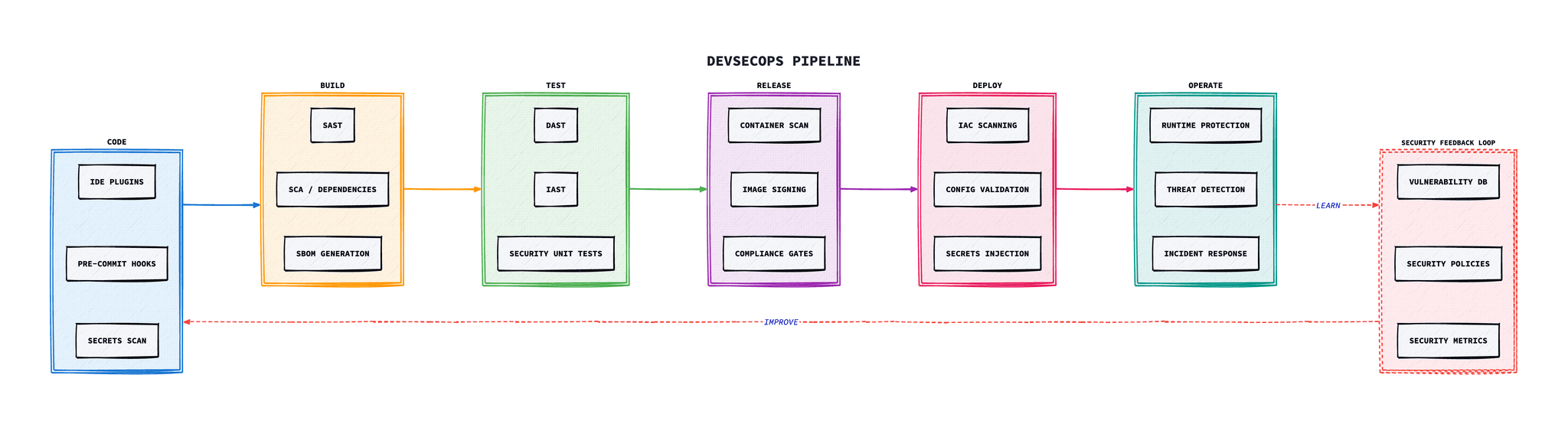
DevSecOps is the practice of integrating security practices and tools directly into the DevOps process, ensuring that security is a shared responsibility from the very first line of code. It's not about slowing down development; it's about building security in from the start so that teams can move faster with confidence.
“The ideal goal is to detect security issues (by design or application vulnerability) as fast as possible.”
— OWASP DevSecOps Guideline
The cost of fixing security vulnerabilities increases dramatically the later they are discovered. IBM and Ponemon Institute research shows a vulnerability found in production costs around 30 times more to remediate than one caught during the design phase. DevSecOps addresses this by shifting security left, automating security testing, and fostering a culture where everyone is responsible for security.
OWASP DevSecOps Guideline
The OWASP DevSecOps Guideline provides a detailed framework for implementing security in DevOps pipelines. It helps organisations of all sizes draw a perspective of a secure DevOps pipeline and then improve it based on customised requirements.
Core Implementation Steps
The OWASP guideline recommends implementing the following steps in a DevSecOps pipeline:
1. Secrets Scanning
Scan git repositories for potential credentials leakage before code is committed.
2. SAST
Static Application Security Testing to analyse source code for vulnerabilities.
3. SCA
Software Composition Analysis to identify vulnerable dependencies.
4. IAST
Interactive testing during QA to find runtime vulnerabilities.
5. DAST
Dynamic testing of running applications to simulate attacks.
6. IaC Scanning
Scan Terraform, Helm charts for misconfigurations.
7. Infrastructure Scanning
Continuous scanning of deployed infrastructure for vulnerabilities.
8. Compliance Check
Verify compliance with security standards and regulations.
Shift-Left Security Philosophy
“Shift left” refers to the practice of moving security testing earlier in the software development lifecycle. Rather than treating security as a final checkpoint, shift-left integrates security considerations from the earliest stages of development.
The Cost of Late Detection
Relative cost of fixing security vulnerabilities at different stages
Shift-Left Practices
- Security requirements in user stories: Include security acceptance criteria alongside functional requirements.
- Threat modelling during design: Identify potential threats before writing code.
- IDE security plugins: Catch vulnerabilities as developers write code.
- Pre-commit hooks: Prevent secrets and vulnerable code from being committed.
- Security-focused code reviews: Train developers to spot security issues during peer review.
Security Testing Methodologies
A complete DevSecOps pipeline incorporates multiple types of security testing, each serving a specific purpose and applied at different stages:
SAST (Static Application Security Testing)
Analyses source code, bytecode, or binary code for security vulnerabilities without executing the application. Best applied early in the development lifecycle.
Popular Tools
Thorough code quality and security analysis platform
Lightweight, fast static analysis with custom rule support
Enterprise-grade SAST with extensive language support
GitHub's semantic code analysis engine
AI-powered real-time SAST in IDE and CI/CD
DAST (Dynamic Application Security Testing)
Tests running applications from the outside to find vulnerabilities that are only visible during runtime. Simulates attacks against the application.
Popular Tools
Open-source web application security scanner
Industry-standard web vulnerability scanner
Fast vulnerability scanner with templated probes
Web server scanner for dangerous files and outdated software
Network mapping and attack surface discovery
SCA (Software Composition Analysis)
Identifies open-source components in codebases and detects known vulnerabilities, licence compliance issues, and outdated dependencies.
Popular Tools
Complete dependency and container vulnerability scanning
GitHub-native automated dependency updates
Open-source SCA tool with CVE detection
Enterprise SCA with licence compliance
All-in-one security scanner for containers and IaC
IAST (Interactive Application Security Testing)
Combines SAST and DAST approaches by analysing applications from within during runtime, providing real-time vulnerability detection with low false positives.
Popular Tools
Agent-based runtime security monitoring
Unified application security for runtime
Synopsys IAST for continuous security testing
Enterprise IAST with pipeline integration
IaC Security Scanning
Analyses Infrastructure as Code templates (Terraform, CloudFormation, Kubernetes manifests) for security misconfigurations before deployment.
Popular Tools
Policy-as-code for cloud infrastructure scanning
Security scanner for Terraform code
Open-source IaC scanner supporting multiple formats
Detect compliance and security violations in IaC
IaC security with fix recommendations
Container Security
Scans container images for vulnerabilities, misconfigurations, and compliance issues. Includes runtime protection and image signing.
Popular Tools
Complete container and artefact scanner
Fast vulnerability scanner for container images
Full lifecycle container security platform
Cloud-native security across the lifecycle
Runtime security and forensics for containers
CI/CD Pipeline Integration
Effective DevSecOps requires security controls at every stage of the CI/CD pipeline. Here's how to structure security activities across the deployment lifecycle:
| Stage | Security Activities | Tools |
|---|---|---|
| Code |
| git-secretsTalismanBetterleakspre-commit |
| Build |
| SonarQubeSnykSyftCycloneDX |
| Test |
| OWASP ZAPContrastJest securityAFL |
| Release |
| TrivyCosignOPAGitHub Actions |
| Deploy |
| CheckovconftestVaultArgo CD |
| Operate |
| FalcoSysdigPrometheusPagerDuty |
Example GitHub Actions Workflow
name: DevSecOps Pipeline

on:
  push:
    branches: [main, develop]
  pull_request:
    branches: [main]

jobs:
  security-scan:
    runs-on: ubuntu-latest
    steps:
      - uses: actions/checkout@v4

      # Secrets scanning
      - name: Betterleaks Scan
        uses: betterleaks/betterleaks-action@v1

      # SAST - SonarQube
      - name: SonarQube Scan
        uses: sonarsource/sonarqube-scan-action@master

      # SCA - Dependency scanning
      - name: Snyk Dependency Scan
        uses: snyk/actions/node@master
        with:
          args: --severity-threshold=high

      # Container scanning
      - name: Trivy Container Scan
        uses: aquasecurity/trivy-action@master
        with:
          image-ref: 'myapp:latest'
          severity: 'CRITICAL,HIGH'

      # IaC scanning
      - name: Checkov IaC Scan
        uses: bridgecrewio/checkov-action@master
        with:
          directory: ./terraform
Addressing OWASP Top 10
The OWASP Top 10 represents the most critical security risks to web applications. DevSecOps practices should specifically address each of these vulnerabilities:
Broken Access Control
Prevention: Implement proper authorisation checks, deny by default, enforce record-level access control
Cryptographic Failures
Prevention: Use strong encryption, proper key management, encrypt data in transit and at rest
Injection
Prevention: Use parameterised queries, input validation, and ORM frameworks
Insecure Design
Prevention: Threat modelling, secure design patterns, security requirements in user stories
Security Misconfiguration
Prevention: Automated hardening, minimal installations, regular security reviews
Vulnerable Components
Prevention: SCA scanning, dependency updates, component inventory (SBOM)
Authentication Failures
Prevention: MFA, secure session management, credential rotation
Software and Data Integrity
Prevention: Digital signatures, secure CI/CD pipelines, integrity verification
Security Logging Failures
Prevention: Thorough logging, monitoring, and alerting
Server-Side Request Forgery
Prevention: Input validation, network segmentation, deny by default firewall rules
Software Bill of Materials (SBOM)
A Software Bill of Materials is a formal, machine-readable inventory of software components and dependencies. SBOMs have become essential for supply chain security, particularly following high-profile incidents like the Log4Shell vulnerability.
Why SBOMs Matter
- • Rapidly identify affected systems when vulnerabilities are disclosed
- • Meet regulatory compliance requirements (US Executive Order 14028)
- • Understand your software supply chain dependencies
- • Enable automated vulnerability monitoring
SBOM Formats
- • SPDX: Linux Foundation standard, ISO/IEC 5962:2021
- • CycloneDX: OWASP lightweight SBOM standard
- • SWID: ISO/IEC 19770-2 software identification tags
Generating SBOMs
# Using Syft to generate SBOM# Using Trivy# Using Trivy# Using Trivy# Using Trivy# Using Trivy# For container images# For container images# For container images images
syft myimage:latest -o spdx-json > sbom.json
Building a Security Champions Programme
Security champions are developers who take on additional responsibility for promoting security within their teams. They serve as a bridge between security teams and development teams, helping to scale security expertise across the organisation.
Security Champion Responsibilities
Measuring DevSecOps Success
Effective DevSecOps programmes require measurable outcomes. Track these key metrics to assess your security posture and drive continuous improvement:
Mean Time to Remediation
Average time from vulnerability discovery to deployed fix. Target: critical < 24 hours.
Vulnerability Escape Rate
Percentage of vulnerabilities found in production vs. earlier stages.
Security Debt Ratio
Number of unresolved security issues relative to code size and age.
Pipeline Security Gate Pass Rate
Percentage of builds passing security gates on first attempt.
Troubleshooting
Common issues and solutions when implementing DevSecOps practices.
Security Scans Blocking Pipelines
Symptom: Builds failing due to security scan findings, slowing delivery.
Common causes:
- All vulnerabilities treated as blocking
- No baseline established for existing issues
- False positives not managed
- Scan timeouts on large codebases
Solution:
# Configure severity thresholds in CI# Create baseline file for existing issues# Create baseline file for existing issues# Create baseline file for existing issues# Create baseline file for existing issues# Create baseline file for existing issues# Fail only on new vulnerabilities# Fail only on new vulnerabilities# Fail only on new vulnerabilitiesbilities
trivy image --baseline baseline.json my-app:${'$'}{{ github.sha }}
Secret Scanning False Positives
Symptom: Secret scanner flagging test credentials, example code, or non-sensitive data.
Common causes:
- Generic patterns matching non-secrets
- Test fixtures containing example credentials
- Base64-encoded config mistaken for secrets
Solution:
# .betterleaksignore - exclude known false positives# Use inline comments to mark false positives# Use inline comments to mark false positives# Configure custom rules in .betterleaks.toml# betterleaks:allow# Configure custom rules in .betterleaks.tomlml
[allowlist]
  description = "Test credentials"
  paths = [
    '''tests/.*''',
    '''__fixtures__/.*'''
  ]
SAST Tools Producing Too Many Findings
Symptom: Thousands of findings making triage impossible.
Common causes:
- Scanning third-party/vendored code
- Including generated code in scans
- No risk-based prioritisation
- Legacy code included in new scan implementation
Solution:
# semgrep.yml - exclude directories and focus on high-impact# Start with high-confidence rules only# Start with high-confidence rules only# Start with high-confidence rules only# Implement incremental scanning for PRs# Implement incremental scanning for PRsremental scanning for PRs
semgrep --baseline-ref main --config auto
Container Image Vulnerabilities in Base Images
Symptom: Vulnerabilities in base image layers you don't control.
Common causes:
- Using outdated base images
- Base image maintainer slow to patch
- Using full OS images instead of minimal
Solution:
# Use distroless or minimal base images# Or use chainguard images with minimal CVEs# Automate base image updates with Renovate# Automate base image updates with Renovate# renovate.json# renovate.json# renovate.jsonvate.json
{
  "extends": ["config:base"],
  "docker": {
    "pinDigests": true
  },
  "schedule": ["before 6am on Monday"]
}
Developers Bypassing Security Controls
Symptom: Security tools disabled, findings ignored, or workarounds implemented.
Common causes:
- Security seen as blocker rather than enabler
- No clear remediation guidance provided
- Tools too noisy with low-value findings
- No security champions in development teams
Solution:
# Provide actionable fix suggestions# Most modern tools include remediation guidance# Create guardrails, not gates# Use warn mode before enforce mode# After 30 days, enable enforcement# After 30 days, enable enforcement# After 30 days, enable enforcement# Gamify security with metrics dashboards# Gamify security with metrics dashboards# Gamify security with metrics dashboards# Track "days since last critical vulnerability" last critical vulnerability"Conclusion
DevSecOps is not merely about adding security tools to your pipeline—it's about fundamentally changing how organisations think about and implement security. By shifting security left, automating testing, and fostering a culture of shared responsibility, teams can deliver secure software at the speed modern business demands.
The OWASP DevSecOps Guideline provides an excellent framework for implementation, covering everything from secrets scanning to compliance checks. Combined with the right tools for SAST, DAST, SCA, IAST, and IaC scanning, organisations can build effective security into their delivery pipelines.
Success requires more than technology—it requires cultural change, executive support, and continuous learning. Start small, measure progress, and iterate. The goal is not perfection from day one, but continuous improvement towards a more secure software delivery process.
Troubleshooting Common DevSecOps Issues
Issue: Too Many False Positives
Security scanners generate excessive false positives, causing alert fatigue and ignored findings.
Solution:
# Create a .semgrepignore file for false positives# Ignore test files for certain rules# Suppress specific rules in code# nosemgrep: javascript.lang.security.audit.prototype-pollution# Configure Snyk to ignore specific vulnerabilities# .snyk file# .snyk file# Trivy - ignore specific CVEs# Trivy - ignore specific CVEs# Trivy - ignore specific CVEs# Trivy - ignore specific CVEs# Trivy - ignore specific CVEs# Trivy - ignore specific CVEs# .trivyignore# .trivyignoregnore
CVE-2023-12345  # Mitigated by network policy
CVE-2023-67890  # Not exploitable in our context
Issue: Pipeline Too Slow
Security scanning adds significant time to CI/CD pipelines, slowing down deployments.
Solution:
# Run security scans in parallel# Use incremental scanning for PRs# Use incremental scanning for PRs# Use incremental scanning for PRs# Use incremental scanning for PRs# Use incremental scanning for PRs# Use incremental scanning for PRs# Use incremental scanning for PRs# Use incremental scanning for PRs# Use incremental scanning for PRs# Use incremental scanning for PRs# Use incremental scanning for PRs# Use incremental scanning for PRs# Use incremental scanning for PRs# Cache scan results# Cache scan results# Cache scan results# Cache scan results# Cache scan results# Cache scan results# Cache scan results# Cache scan results# Cache scan results# Cache scan results# Cache scan results# Cache scan resultsan results
- name: Cache Snyk
  uses: actions/cache@v4
  with:
    path: ~/.snyk
    key: snyk-${{ hashFiles('**/package-lock.json') }}
Issue: Secrets Leaked to Git History
Secrets were accidentally committed and remain in git history even after deletion.
Solution:
# 1. IMMEDIATELY rotate the exposed secret!# 2. Use git-filter-repo to remove from history# expressions.txt format:# expressions.txt format:# expressions.txt format:# expressions.txt format:# expressions.txt format:# expressions.txt format:# regex:sk-[a-zA-Z0-9]{48}==>REMOVED_API_KEY# literal:my-password==>REMOVED_PASSWORD# 3. Force push (coordinate with team!)# 4. Set up pre-commit hooks to prevent future leaks# .pre-commit-config.yaml# .pre-commit-config.yamlommit-config.yaml
repos:
  - repo: https://github.com/betterleaks/betterleaks
    rev: v1.0.0
    hooks:
      - id: betterleaks
  - repo: https://github.com/Yelp/detect-secrets
    rev: v1.4.0
    hooks:
      - id: detect-secrets
        args: ['--baseline', '.secrets.baseline']
DevSecOps Maturity Checklist
Assess your DevSecOps maturity level with this checklist:
Level 1: Foundation
Level 2: Integrated
Level 3: Advanced
Level 4: Optimised
Frequently Asked Questions
DevSecOps is the practice of integrating security practices and tools directly into the DevOps process, ensuring that security is a shared responsibility from the very first line of code. It embeds security throughout the entire software development lifecycle rather than treating it as a final gate before release.
While DevOps focuses on collaboration between development and operations teams to deliver software faster, DevSecOps adds security as a core component of this collaboration. In DevSecOps, security is not a separate phase but is integrated into every stage of the CI/CD pipeline, from code commit to production deployment.
Shift-left security refers to the practice of moving security testing earlier in the software development lifecycle. Rather than treating security as a final checkpoint, shift-left integrates security considerations from the earliest stages of development. This approach significantly reduces the cost of fixing vulnerabilities, as IBM and Ponemon Institute research shows issues found in production cost around 30 times more to remediate than those caught during the design phase.
DevSecOps pipelines typically include SAST tools (SonarQube, Semgrep, CodeQL), DAST tools (OWASP ZAP, Burp Suite), SCA tools (Snyk, Dependabot, Trivy), IAST tools (Contrast Security), IaC scanners (Checkov, tfsec), container security tools (Trivy, Grype), and secrets scanners (Betterleaks, git-secrets). Betterleaks is the successor to Gitleaks, built by the same author with BPE tokenisation for 98.6% recall on real secrets.
Start by implementing secrets scanning and dependency scanning (SCA) in your CI/CD pipeline, as these provide quick wins with minimal disruption. Then gradually add SAST, container scanning, and IaC security scanning. Establish a security champions programme to embed security knowledge in development teams, and focus on building a culture where security is everyone's responsibility.
DevSecOps reduces security vulnerabilities in production, lowers the cost of remediation by catching issues early, speeds up delivery by eliminating security bottlenecks, improves compliance with security standards and regulations, and fosters a culture of shared security responsibility across development, operations, and security teams.
References & Further Reading
- OWASP DevSecOps Guideline- Detailed framework for secure DevOps pipelines
- OWASP Top 10- Most critical web application security risks
- Snyk DevSecOps Learning Centre- Practical guides and tutorials for DevSecOps
- CISA Software Bill of Materials (SBOM)- SBOM guidance and requirements
- Semgrep Documentation- Lightweight SAST tool with custom rules
- Trivy Security Scanner- All-in-one security scanner for containers, IaC, and more
- OWASP ZAP Documentation- Open-source DAST tool for web applications
- Betterleaks- Secret detection for git repos (successor to Gitleaks, 98.6% recall via BPE tokenisation)