
What is OpenTelemetry?
OpenTelemetry (OTel) is an open-source observability framework that provides a single set of APIs, libraries, agents, and instrumentation to capture distributed traces, metrics, and logs from your applications. It's a CNCF incubating project formed from the merger of OpenTracing and OpenCensus.
The key value proposition of OpenTelemetry is vendor neutrality. Instrument once, and send your telemetry data to any backend: Jaeger, Prometheus, Grafana, Datadog, New Relic, AWS X-Ray, Azure Monitor, or any other OTLP-compatible system.
“OpenTelemetry is the second most active CNCF project after Kubernetes, with contributions from all major cloud providers and observability vendors.”
— CNCF Annual Report 2024
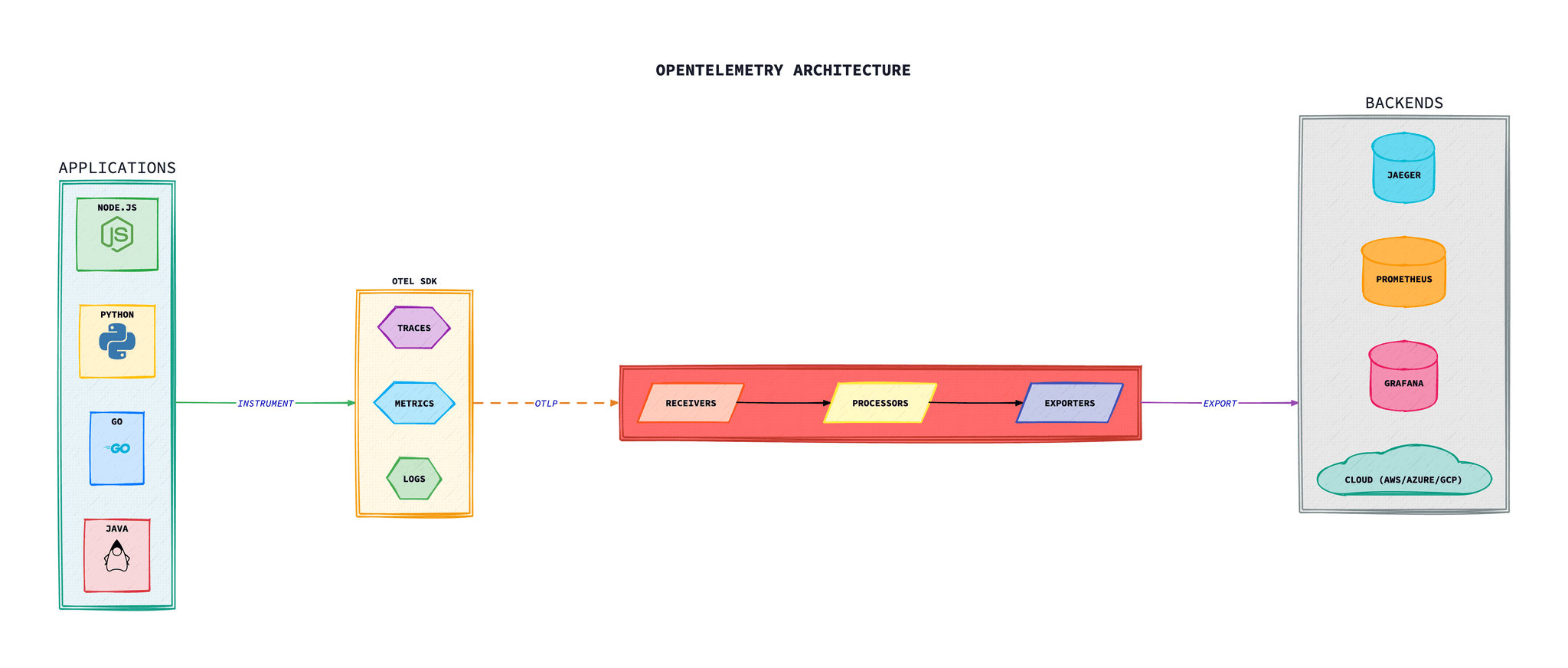
Core Components
OpenTelemetry consists of several key components that work together to provide end-to-end observability.
SDK
Language-specific libraries for instrumenting applications and generating telemetry data.
API
Vendor-neutral interfaces for instrumentation that remain stable across versions.
Collector
Vendor-agnostic proxy that receives, processes, and exports telemetry data.
Instrumentation Libraries
Pre-built instrumentation for popular frameworks and libraries.
The Three Signals
OpenTelemetry captures three types of telemetry data, often called “signals”.
| Signal | Description | Use Case |
|---|---|---|
| Traces | Distributed traces that follow a request across services | Request flow analysis, latency debugging, dependency mapping |
| Metrics | Numerical measurements aggregated over time | Performance monitoring, alerting, capacity planning |
| Logs | Timestamped text records with structured data | Debugging, audit trails, event recording |
Baggage: The Fourth Signal
While traces, metrics, and logs are the primary telemetry signals, OpenTelemetry also supports Baggage—a mechanism for propagating arbitrary key-value pairs across service boundaries alongside trace context.
Unlike trace context (which is for correlation), Baggage carries business data that you want available throughout a request's journey—like user IDs, tenant IDs, or feature flags.
Baggage Use Cases
Multi-tenancy
Propagate tenant ID to all downstream services for filtering and cost allocation.
Feature Flags
Pass feature flag values to ensure consistent behaviour across service calls.
Request Priority
Mark requests as high/low priority for downstream rate limiting decisions.
Debug Headers
Pass debug flags to enable verbose logging in specific request paths.
Using Baggage in Node.js
import { propagation, context, baggage } from '@opentelemetry/api';

// Setting baggage at the entry point
app.use((req, res, next) => {
  const bag = baggage.setItem(
    baggage.createBaggage(),
    'tenant.id',
    { value: req.headers['x-tenant-id'] || 'default' }
  );

  const ctxWithBaggage = baggage.setBaggage(context.active(), bag);

  context.with(ctxWithBaggage, () => {
    next();
  });
});

// Reading baggage in a downstream service
function processRequest() {
  const bag = baggage.getBaggage(context.active());
  const tenantId = bag?.getEntry('tenant.id')?.value;

  console.log('Processing for tenant:', tenantId);

  // Add to span attributes for correlation
  const span = trace.getActiveSpan();
  span?.setAttribute('tenant.id', tenantId);
}
Using Baggage in Python
from opentelemetry import baggage, context
from opentelemetry.baggage import set_baggage, get_baggage

# Setting baggage
ctx = set_baggage("user.id", "user-12345")
ctx = set_baggage("feature.premium", "true", context=ctx)

# Attach to current context
token = context.attach(ctx)

try:
    # All operations here will have access to baggage
    process_request()
finally:
    context.detach(token)

# Reading baggage
def process_request():
    user_id = get_baggage("user.id")
    is_premium = get_baggage("feature.premium") == "true"

    print(f"Processing for user {user_id}, premium: {is_premium}")
Security Warning
Baggage is transmitted in HTTP headers and can be seen by all services in the request path. Never put sensitive data like passwords, tokens, or PII in baggage. Consider using encryption if you must pass semi-sensitive identifiers.
Instrumenting Applications
There are two approaches to instrumenting your applications with OpenTelemetry:
Auto-Instrumentation
Automatic instrumentation of popular frameworks and libraries with minimal code changes.
- + No code changes required
- + Quick to implement
- - Less customisation
Manual Instrumentation
Custom spans, metrics, and logs added directly to your application code.
- + Full control over telemetry
- + Custom business metrics
- - More development effort
Node.js Setup
Setting up OpenTelemetry in a Node.js application with auto-instrumentation.
Installation
# Install OpenTelemetry packages
npm install @opentelemetry/sdk-node \
  @opentelemetry/auto-instrumentations-node \
  @opentelemetry/exporter-trace-otlp-http \
  @opentelemetry/exporter-metrics-otlp-http \
  @opentelemetry/sdk-metrics
Instrumentation Setup
// tracing.ts - Load this before your application
import { NodeSDK } from '@opentelemetry/sdk-node';
import { getNodeAutoInstrumentations } from '@opentelemetry/auto-instrumentations-node';
import { OTLPTraceExporter } from '@opentelemetry/exporter-trace-otlp-http';
import { OTLPMetricExporter } from '@opentelemetry/exporter-metrics-otlp-http';
import { PeriodicExportingMetricReader } from '@opentelemetry/sdk-metrics';
import { Resource } from '@opentelemetry/resources';
import { SemanticResourceAttributes } from '@opentelemetry/semantic-conventions';

const sdk = new NodeSDK({
  resource: new Resource({
    [SemanticResourceAttributes.SERVICE_NAME]: 'my-api-service',
    [SemanticResourceAttributes.SERVICE_VERSION]: '1.0.0',
    [SemanticResourceAttributes.DEPLOYMENT_ENVIRONMENT]: process.env.NODE_ENV,
  }),
  traceExporter: new OTLPTraceExporter({
    url: process.env.OTEL_EXPORTER_OTLP_ENDPOINT + '/v1/traces',
  }),
  metricReader: new PeriodicExportingMetricReader({
    exporter: new OTLPMetricExporter({
      url: process.env.OTEL_EXPORTER_OTLP_ENDPOINT + '/v1/metrics',
    }),
    exportIntervalMillis: 60000,
  }),
  instrumentations: [
    getNodeAutoInstrumentations({
      '@opentelemetry/instrumentation-http': {
        ignoreIncomingPaths: ['/health', '/ready'],
      },
      '@opentelemetry/instrumentation-express': {},
      '@opentelemetry/instrumentation-pg': {},
      '@opentelemetry/instrumentation-redis': {},
    }),
  ],
});

sdk.start();

// Graceful shutdown
process.on('SIGTERM', () => {
  sdk.shutdown()
    .then(() => console.log('Tracing terminated'))
    .catch((error) => console.error('Error shutting down tracing', error))
    .finally(() => process.exit(0));
});
Custom Spans
// Adding custom spans to your application
import { trace, SpanStatusCode } from '@opentelemetry/api';

const tracer = trace.getTracer('my-service');

async function processOrder(orderId: string) {
  return tracer.startActiveSpan('process-order', async (span) => {
    try {
      span.setAttribute('order.id', orderId);

      // Validate order
      await tracer.startActiveSpan('validate-order', async (validateSpan) => {
        const isValid = await validateOrder(orderId);
        validateSpan.setAttribute('order.valid', isValid);
        validateSpan.end();
      });

      // Process payment
      await tracer.startActiveSpan('process-payment', async (paymentSpan) => {
        const paymentResult = await chargePayment(orderId);
        paymentSpan.setAttribute('payment.status', paymentResult.status);
        paymentSpan.setAttribute('payment.amount', paymentResult.amount);
        paymentSpan.end();
      });

      span.setStatus({ code: SpanStatusCode.OK });
    } catch (error) {
      span.setStatus({
        code: SpanStatusCode.ERROR,
        message: error.message
      });
      span.recordException(error);
      throw error;
    } finally {
      span.end();
    }
  });
}
Python Setup
Configuring OpenTelemetry for Python applications with Django or Flask.
Installation
# Install OpenTelemetry packages
pip install opentelemetry-distro \
  opentelemetry-exporter-otlp \
  opentelemetry-instrumentation-flask \
  opentelemetry-instrumentation-django \
  opentelemetry-instrumentation-requests \
  opentelemetry-instrumentation-sqlalchemy

# Auto-generate instrumentation
opentelemetry-bootstrap -a install
Flask Example
# app.py
from flask import Flask
from opentelemetry import trace
from opentelemetry.sdk.trace import TracerProvider
from opentelemetry.sdk.trace.export import BatchSpanProcessor
from opentelemetry.exporter.otlp.proto.grpc.trace_exporter import OTLPSpanExporter
from opentelemetry.sdk.resources import Resource, SERVICE_NAME
from opentelemetry.instrumentation.flask import FlaskInstrumentor
from opentelemetry.instrumentation.requests import RequestsInstrumentor

# Configure the tracer
resource = Resource(attributes={
    SERVICE_NAME: "my-flask-api",
    "service.version": "1.0.0",
    "deployment.environment": "production"
})

provider = TracerProvider(resource=resource)
processor = BatchSpanProcessor(
    OTLPSpanExporter(endpoint="http://otel-collector:4317")
)
provider.add_span_processor(processor)
trace.set_tracer_provider(provider)

# Create Flask app
app = Flask(__name__)

# Instrument Flask and outgoing requests
FlaskInstrumentor().instrument_app(app)
RequestsInstrumentor().instrument()

tracer = trace.get_tracer(__name__)

@app.route('/api/orders/<order_id>')
def get_order(order_id):
    with tracer.start_as_current_span("fetch-order") as span:
        span.set_attribute("order.id", order_id)
        order = fetch_order_from_db(order_id)
        return order
Environment Variables
# Run with auto-instrumentation
OTEL_SERVICE_NAME=my-flask-api \
OTEL_EXPORTER_OTLP_ENDPOINT=http://otel-collector:4317 \
OTEL_TRACES_EXPORTER=otlp \
OTEL_METRICS_EXPORTER=otlp \
OTEL_LOGS_EXPORTER=otlp \
opentelemetry-instrument python app.py
Go Setup
Go is one of the most mature OpenTelemetry implementations. Here's how to instrument a Go service.
Installation
# Install OpenTelemetry packages
go get go.opentelemetry.io/otel \
  go.opentelemetry.io/otel/sdk \
  go.opentelemetry.io/otel/exporters/otlp/otlptrace/otlptracehttp \
  go.opentelemetry.io/otel/exporters/otlp/otlpmetric/otlpmetrichttp \
  go.opentelemetry.io/contrib/instrumentation/net/http/otelhttp
Initialisation
// otel.go - OpenTelemetry setup
package main

import (
    "context"
    "time"

    "go.opentelemetry.io/otel"
    "go.opentelemetry.io/otel/attribute"
    "go.opentelemetry.io/otel/exporters/otlp/otlptrace/otlptracehttp"
    "go.opentelemetry.io/otel/propagation"
    "go.opentelemetry.io/otel/sdk/resource"
    sdktrace "go.opentelemetry.io/otel/sdk/trace"
    semconv "go.opentelemetry.io/otel/semconv/v1.21.0"
)

func initTracer(ctx context.Context) (*sdktrace.TracerProvider, error) {
    // Create OTLP exporter
    exporter, err := otlptracehttp.New(ctx,
        otlptracehttp.WithEndpoint("localhost:4318"),
        otlptracehttp.WithInsecure(),
    )
    if err != nil {
        return nil, err
    }

    // Define resource attributes
    res, err := resource.New(ctx,
        resource.WithAttributes(
            semconv.ServiceName("my-go-service"),
            semconv.ServiceVersion("1.0.0"),
            attribute.String("environment", "production"),
        ),
    )
    if err != nil {
        return nil, err
    }

    // Create TracerProvider
    tp := sdktrace.NewTracerProvider(
        sdktrace.WithBatcher(exporter,
            sdktrace.WithBatchTimeout(5*time.Second),
        ),
        sdktrace.WithResource(res),
        sdktrace.WithSampler(sdktrace.AlwaysSample()),
    )

    // Set global TracerProvider and propagator
    otel.SetTracerProvider(tp)
    otel.SetTextMapPropagator(propagation.NewCompositeTextMapPropagator(
        propagation.TraceContext{},
        propagation.Baggage{},
    ))

    return tp, nil
}
HTTP Server Instrumentation
// main.go
package main

import (
    "context"
    "log"
    "net/http"

    "go.opentelemetry.io/contrib/instrumentation/net/http/otelhttp"
    "go.opentelemetry.io/otel"
)

var tracer = otel.Tracer("my-go-service")

func main() {
    ctx := context.Background()

    // Initialise OpenTelemetry
    tp, err := initTracer(ctx)
    if err != nil {
        log.Fatal(err)
    }
    defer tp.Shutdown(ctx)

    // Wrap handlers with OpenTelemetry middleware
    handler := http.NewServeMux()
    handler.HandleFunc("/api/orders", handleOrders)

    // otelhttp automatically creates spans for each request
    wrappedHandler := otelhttp.NewHandler(handler, "http-server")

    log.Println("Starting server on :8080")
    log.Fatal(http.ListenAndServe(":8080", wrappedHandler))
}

func handleOrders(w http.ResponseWriter, r *http.Request) {
    ctx := r.Context()

    // Create a child span for business logic
    ctx, span := tracer.Start(ctx, "process-order")
    defer span.End()

    span.SetAttributes(
        attribute.String("order.type", "standard"),
        attribute.Int("order.items", 5),
    )

    // Call downstream service with context propagation
    fetchOrderDetails(ctx)

    w.Write([]byte("Order processed"))
}

func fetchOrderDetails(ctx context.Context) {
    ctx, span := tracer.Start(ctx, "fetch-order-details")
    defer span.End()

    // HTTP client with automatic context propagation
    client := http.Client{
        Transport: otelhttp.NewTransport(http.DefaultTransport),
    }

    req, _ := http.NewRequestWithContext(ctx, "GET",
        "http://inventory-service/api/stock", nil)
    client.Do(req)
}
Custom Metrics
Beyond auto-instrumented metrics, you can create custom business metrics to track domain-specific indicators.
Metric Types
| Instrument | Description | Example Use Case |
|---|---|---|
| Counter | Monotonically increasing value | Request count, orders processed |
| UpDownCounter | Value that can increase or decrease | Active connections, queue size |
| Histogram | Distribution of values | Request latency, payload sizes |
| Gauge | Point-in-time measurement | CPU usage, memory, temperature |
Node.js Custom Metrics
import { metrics } from '@opentelemetry/api';

const meter = metrics.getMeter('my-service-metrics', '1.0.0');

// Counter - track total orders
const orderCounter = meter.createCounter('orders.total', {
  description: 'Total number of orders processed',
  unit: '1',
});

// Histogram - track order processing time
const orderDuration = meter.createHistogram('orders.duration', {
  description: 'Time to process an order',
  unit: 'ms',
});

// UpDownCounter - track active orders
const activeOrders = meter.createUpDownCounter('orders.active', {
  description: 'Number of orders currently being processed',
});

// Gauge - track inventory levels (using observable)
const inventoryGauge = meter.createObservableGauge('inventory.level', {
  description: 'Current inventory level',
});
inventoryGauge.addCallback((result) => {
  result.observe(getInventoryLevel(), { warehouse: 'main' });
});

// Using the metrics
async function processOrder(order: Order) {
  activeOrders.add(1, { type: order.type });
  const startTime = Date.now();

  try {
    await doProcessOrder(order);

    orderCounter.add(1, {
      status: 'success',
      type: order.type,
      region: order.region
    });
  } catch (error) {
    orderCounter.add(1, { status: 'error', type: order.type });
    throw error;
  } finally {
    activeOrders.add(-1, { type: order.type });
    orderDuration.record(Date.now() - startTime, { type: order.type });
  }
}
Python Custom Metrics
from opentelemetry import metrics

meter = metrics.get_meter("my-service-metrics", "1.0.0")

# Create instruments
request_counter = meter.create_counter(
    "http.requests.total",
    description="Total HTTP requests",
    unit="1"
)

request_duration = meter.create_histogram(
    "http.request.duration",
    description="HTTP request duration",
    unit="ms"
)

active_requests = meter.create_up_down_counter(
    "http.requests.active",
    description="Active HTTP requests"
)

# Observable gauge for system metrics
def get_cpu_usage(options):
    yield metrics.Observation(psutil.cpu_percent(), {"core": "all"})

meter.create_observable_gauge(
    "system.cpu.usage",
    callbacks=[get_cpu_usage],
    description="CPU usage percentage"
)

# Using metrics in request handler
@app.route('/api/data')
def handle_request():
    active_requests.add(1, {"endpoint": "/api/data"})
    start = time.time()

    try:
        result = process_data()
        request_counter.add(1, {"status": "200", "method": "GET"})
        return result
    except Exception as e:
        request_counter.add(1, {"status": "500", "method": "GET"})
        raise
    finally:
        active_requests.add(-1, {"endpoint": "/api/data"})
        duration_ms = (time.time() - start) * 1000
        request_duration.record(duration_ms, {"endpoint": "/api/data"})
The OpenTelemetry Collector
The Collector is a vendor-agnostic agent that receives, processes, and exports telemetry data. It acts as a central hub in your observability architecture.
Receivers
Ingest data from various sources (OTLP, Jaeger, Prometheus, etc.)
Processors
Transform, filter, batch, and enrich telemetry data
Exporters
Send data to backends (Jaeger, Prometheus, cloud providers, etc.)
Extensions
Health checks, pprof, zpages for operational support
Collector Configuration
A production-ready Collector configuration with multiple exporters.
# otel-collector-config.yaml
receivers:
  otlp:
    protocols:
      grpc:
        endpoint: 0.0.0.0:4317
      http:
        endpoint: 0.0.0.0:4318

  # Scrape Prometheus metrics
  prometheus:
    config:
      scrape_configs:
        - job_name: 'kubernetes-pods'
          kubernetes_sd_configs:
            - role: pod
          relabel_configs:
            - source_labels: [__meta_kubernetes_pod_annotation_prometheus_io_scrape]
              action: keep
              regex: true

processors:
  batch:
    timeout: 10s
    send_batch_size: 1024

  memory_limiter:
    check_interval: 1s
    limit_mib: 1000
    spike_limit_mib: 200

  resource:
    attributes:
      - key: environment
        value: production
        action: upsert
      - key: cluster
        value: main
        action: upsert

  # Filter out health check spans
  filter:
    spans:
      exclude:
        match_type: regexp
        span_names:
          - "health.*"
          - "ready.*"

  # Tail-based sampling for traces
  tail_sampling:
    decision_wait: 10s
    policies:
      - name: errors-policy
        type: status_code
        status_code: {status_codes: [ERROR]}
      - name: slow-traces-policy
        type: latency
        latency: {threshold_ms: 1000}
      - name: probabilistic-policy
        type: probabilistic
        probabilistic: {sampling_percentage: 10}

exporters:
  # Export to Jaeger
  jaeger:
    endpoint: jaeger:14250
    tls:
      insecure: true

  # Export metrics to Prometheus
  prometheus:
    endpoint: 0.0.0.0:8889
    namespace: otel

  # Export to cloud providers
  otlphttp/datadog:
    endpoint: https://api.datadoghq.com
    headers:
      DD-API-KEY: ${DD_API_KEY}

  # Debug logging
  debug:
    verbosity: detailed

extensions:
  health_check:
    endpoint: 0.0.0.0:13133
  pprof:
    endpoint: 0.0.0.0:1777
  zpages:
    endpoint: 0.0.0.0:55679

service:
  extensions: [health_check, pprof, zpages]
  pipelines:
    traces:
      receivers: [otlp]
      processors: [memory_limiter, batch, resource, filter, tail_sampling]
      exporters: [jaeger, otlphttp/datadog]

    metrics:
      receivers: [otlp, prometheus]
      processors: [memory_limiter, batch, resource]
      exporters: [prometheus]

    logs:
      receivers: [otlp]
      processors: [memory_limiter, batch, resource]
      exporters: [debug]
Kubernetes Deployment
Deploy the OpenTelemetry Collector as a DaemonSet for node-level collection or as a Deployment for centralised processing.
# otel-collector-daemonset.yaml
apiVersion: apps/v1
kind: DaemonSet
metadata:
  name: otel-collector
  namespace: observability
spec:
  selector:
    matchLabels:
      app: otel-collector
  template:
    metadata:
      labels:
        app: otel-collector
    spec:
      serviceAccountName: otel-collector
      containers:
      - name: collector
        image: otel/opentelemetry-collector-contrib:0.92.0
        args:
          - --config=/conf/otel-collector-config.yaml
        ports:
        - containerPort: 4317  # OTLP gRPC
        - containerPort: 4318  # OTLP HTTP
        - containerPort: 8889  # Prometheus metrics
        - containerPort: 13133 # Health check
        resources:
          requests:
            cpu: 200m
            memory: 400Mi
          limits:
            cpu: 1000m
            memory: 1Gi
        volumeMounts:
        - name: config
          mountPath: /conf
        livenessProbe:
          httpGet:
            path: /
            port: 13133
        readinessProbe:
          httpGet:
            path: /
            port: 13133
      volumes:
      - name: config
        configMap:
          name: otel-collector-config
---
apiVersion: v1
kind: Service
metadata:
  name: otel-collector
  namespace: observability
spec:
  selector:
    app: otel-collector
  ports:
  - name: otlp-grpc
    port: 4317
    targetPort: 4317
  - name: otlp-http
    port: 4318
    targetPort: 4318
  - name: prometheus
    port: 8889
    targetPort: 8889
Context Propagation
Context propagation enables distributed tracing by passing trace context between services via HTTP headers.
# W3C Trace Context headers (standard)
traceparent: 00-0af7651916cd43dd8448eb211c80319c-b7ad6b7169203331-01
tracestate: rojo=00f067aa0ba902b7

# Format: version-trace_id-span_id-flags
# - version: 00 (always)
# - trace_id: 32 hex characters
# - span_id: 16 hex characters
# - flags: 01 = sampled, 00 = not sampled

# B3 Propagation (Zipkin-style)
X-B3-TraceId: 80f198ee56343ba864fe8b2a57d3eff7
X-B3-SpanId: e457b5a2e4d86bd1
X-B3-ParentSpanId: 05e3ac9a4f6e3b90
X-B3-Sampled: 1
Backend Integration
OpenTelemetry integrates with all major observability backends.
Open Source
- Jaeger (Traces)
- Prometheus (Metrics)
- Grafana Tempo (Traces)
- Grafana Loki (Logs)
- Zipkin (Traces)
Cloud Providers
- AWS X-Ray & CloudWatch
- Azure Monitor & App Insights
- Google Cloud Trace & Monitoring
Commercial
- Datadog
- New Relic
- Splunk
- Dynatrace
- Honeycomb
Self-Hosted
- Grafana Cloud
- Elastic APM
- SigNoz
- Uptrace
AWS Implementation
AWS provides the AWS Distro for OpenTelemetry (ADOT), a secure, production-ready distribution that integrates with AWS X-Ray, CloudWatch, and Amazon Managed Service for Prometheus.
ADOT Collector on EKS
# Install ADOT add-on on EKS
aws eks create-addon \
  --cluster-name my-cluster \
  --addon-name adot \
  --addon-version v0.92.1-eksbuild.1

# Or use Helm
helm repo add aws-otel https://aws-observability.github.io/aws-otel-helm-charts
helm install adot-collector aws-otel/adot-exporter-for-eks-on-ec2 \
  --namespace opentelemetry \
  --create-namespace
ADOT Collector Configuration for AWS
# adot-collector-config.yaml
receivers:
  otlp:
    protocols:
      grpc:
        endpoint: 0.0.0.0:4317
      http:
        endpoint: 0.0.0.0:4318

processors:
  batch:
    timeout: 10s
    send_batch_size: 1024
  resourcedetection:
    detectors: [eks, ec2, ecs]
    timeout: 5s
    override: false

exporters:
  # AWS X-Ray for traces
  awsxray:
    region: eu-west-1
    indexed_attributes: ["user.id", "order.id"]

  # CloudWatch for metrics
  awsemf:
    region: eu-west-1
    namespace: MyApplication
    log_group_name: '/aws/otel/metrics'
    dimension_rollup_option: "NoDimensionRollup"

  # Amazon Managed Prometheus
  prometheusremotewrite:
    endpoint: https://aps-workspaces.eu-west-1.amazonaws.com/workspaces/ws-xxx/api/v1/remote_write
    auth:
      authenticator: sigv4auth

extensions:
  sigv4auth:
    region: eu-west-1
    service: aps

service:
  extensions: [sigv4auth]
  pipelines:
    traces:
      receivers: [otlp]
      processors: [batch, resourcedetection]
      exporters: [awsxray]
    metrics:
      receivers: [otlp]
      processors: [batch, resourcedetection]
      exporters: [awsemf, prometheusremotewrite]
Lambda with ADOT Layer
# Terraform configuration for Lambda with ADOT
resource "aws_lambda_function" "instrumented" {
  function_name = "my-instrumented-function"
  runtime       = "nodejs18.x"
  handler       = "index.handler"

  # Add ADOT Lambda layer
  layers = [
    "arn:aws:lambda:eu-west-1:901920570463:layer:aws-otel-nodejs-amd64-ver-1-18-1:1"
  ]

  environment {
    variables = {
      AWS_LAMBDA_EXEC_WRAPPER = "/opt/otel-handler"
      OTEL_SERVICE_NAME       = "my-lambda-service"
      OTEL_PROPAGATORS        = "tracecontext,baggage,xray"
    }
  }

  tracing_config {
    mode = "Active"  # Enable X-Ray
  }
}
AWS X-Ray ID Format
AWS X-Ray uses a different trace ID format than W3C. ADOT automatically converts between formats. Use OTEL_PROPAGATORS=xray,tracecontext to support both propagation formats.
Azure Implementation
Azure Monitor natively supports OpenTelemetry through Azure Monitor OpenTelemetry Distroand Application Insights, providing smooth integration for traces, metrics, and logs.
Azure Monitor Distro for Node.js
# Install Azure Monitor OpenTelemetry
npm install @azure/monitor-opentelemetry

# tracing.ts
import { useAzureMonitor, AzureMonitorOpenTelemetryOptions } from "@azure/monitor-opentelemetry";

const options: AzureMonitorOpenTelemetryOptions = {
  azureMonitorExporterOptions: {
    connectionString: process.env.APPLICATIONINSIGHTS_CONNECTION_STRING,
  },
  instrumentationOptions: {
    http: { enabled: true },
    azureSdk: { enabled: true },
    mongoDb: { enabled: true },
    mySql: { enabled: true },
    postgreSql: { enabled: true },
    redis: { enabled: true },
  },
  samplingRatio: 1.0,  // 100% sampling for dev, reduce in prod
};

useAzureMonitor(options);
Azure Monitor Distro for Python
# Install Azure Monitor OpenTelemetry
pip install azure-monitor-opentelemetry

# app.py
from azure.monitor.opentelemetry import configure_azure_monitor

configure_azure_monitor(
    connection_string=os.environ["APPLICATIONINSIGHTS_CONNECTION_STRING"],
    # Enable specific instrumentations
    instrumentations=["django", "flask", "requests", "psycopg2"],
)

# For Django, add to settings.py
MIDDLEWARE = [
    "azure.monitor.opentelemetry.AzureMonitorOpenTelemetryMiddleware",
    # ... other middleware
]
Collector Export to Azure Monitor
# otel-collector-azure.yaml
receivers:
  otlp:
    protocols:
      grpc:
        endpoint: 0.0.0.0:4317
      http:
        endpoint: 0.0.0.0:4318

processors:
  batch:
    timeout: 10s
  resourcedetection:
    detectors: [azure]
    azure:
      resource_attributes:
        cloud.platform: azure_vm
        cloud.region: uksouth

exporters:
  azuremonitor:
    connection_string: ${APPLICATIONINSIGHTS_CONNECTION_STRING}
    # Customise what gets sent
    instrumentation_key: ${APPINSIGHTS_INSTRUMENTATIONKEY}
    maxbatchsize: 100
    maxbatchinterval: 10s

service:
  pipelines:
    traces:
      receivers: [otlp]
      processors: [batch, resourcedetection]
      exporters: [azuremonitor]
    metrics:
      receivers: [otlp]
      processors: [batch, resourcedetection]
      exporters: [azuremonitor]
    logs:
      receivers: [otlp]
      processors: [batch]
      exporters: [azuremonitor]
AKS with OpenTelemetry
# Enable Azure Monitor for AKS
az aks enable-addons \
  --resource-group myResourceGroup \
  --name myAKSCluster \
  --addons monitoring \
  --workspace-resource-id /subscriptions/.../workspaces/myWorkspace

# Deploy OpenTelemetry Operator for auto-instrumentation
helm repo add open-telemetry https://open-telemetry.github.io/opentelemetry-helm-charts
helm install opentelemetry-operator open-telemetry/opentelemetry-operator \
  --namespace opentelemetry-operator-system \
  --create-namespace

# Create Instrumentation CR for auto-instrumentation
apiVersion: opentelemetry.io/v1alpha1
kind: Instrumentation
metadata:
  name: azure-instrumentation
spec:
  exporter:
    endpoint: http://otel-collector:4317
  propagators:
    - tracecontext
    - baggage
  sampler:
    type: parentbased_traceidratio
    argument: "0.25"
  nodejs:
    env:
      - name: APPLICATIONINSIGHTS_CONNECTION_STRING
        valueFrom:
          secretKeyRef:
            name: azure-monitor
            key: connection-string
Azure Monitor Live Metrics
Azure Monitor's Live Metrics Stream works with OpenTelemetry, providing real-time performance data. Enable it by setting enableLiveMetrics: true in your configuration.
GCP Implementation
Google Cloud provides native OpenTelemetry support through Cloud Trace, Cloud Monitoring, and Cloud Logging. GCP was an early contributor to OpenTelemetry and offers excellent integration.
Node.js with GCP Exporters
# Install GCP OpenTelemetry packages
npm install @google-cloud/opentelemetry-cloud-trace-exporter \
  @google-cloud/opentelemetry-cloud-monitoring-exporter \
  @opentelemetry/sdk-node

// tracing.ts
import { NodeSDK } from '@opentelemetry/sdk-node';
import { TraceExporter } from '@google-cloud/opentelemetry-cloud-trace-exporter';
import { MetricExporter } from '@google-cloud/opentelemetry-cloud-monitoring-exporter';
import { PeriodicExportingMetricReader } from '@opentelemetry/sdk-metrics';
import { getNodeAutoInstrumentations } from '@opentelemetry/auto-instrumentations-node';

const sdk = new NodeSDK({
  traceExporter: new TraceExporter({
    projectId: process.env.GOOGLE_CLOUD_PROJECT,
  }),
  metricReader: new PeriodicExportingMetricReader({
    exporter: new MetricExporter({
      projectId: process.env.GOOGLE_CLOUD_PROJECT,
    }),
    exportIntervalMillis: 60000,
  }),
  instrumentations: [getNodeAutoInstrumentations()],
});

sdk.start();
Python with GCP Exporters
# Install GCP OpenTelemetry packages
pip install opentelemetry-exporter-gcp-trace \
  opentelemetry-exporter-gcp-monitoring \
  opentelemetry-resourcedetector-gcp

# app.py
from opentelemetry import trace, metrics
from opentelemetry.sdk.trace import TracerProvider
from opentelemetry.sdk.trace.export import BatchSpanProcessor
from opentelemetry.exporter.cloud_trace import CloudTraceSpanExporter
from opentelemetry.sdk.metrics import MeterProvider
from opentelemetry.sdk.metrics.export import PeriodicExportingMetricReader
from opentelemetry.exporter.cloud_monitoring import CloudMonitoringMetricsExporter
from opentelemetry.resourcedetector.gcp_resource_detector import GoogleCloudResourceDetector

# Setup tracing
resource = GoogleCloudResourceDetector().detect()
trace.set_tracer_provider(TracerProvider(resource=resource))
trace.get_tracer_provider().add_span_processor(
    BatchSpanProcessor(CloudTraceSpanExporter())
)

# Setup metrics
metrics.set_meter_provider(MeterProvider(
    resource=resource,
    metric_readers=[
        PeriodicExportingMetricReader(
            CloudMonitoringMetricsExporter(),
            export_interval_millis=60000
        )
    ]
))
Collector on GKE
# otel-collector-gcp.yaml
receivers:
  otlp:
    protocols:
      grpc:
        endpoint: 0.0.0.0:4317
      http:
        endpoint: 0.0.0.0:4318

processors:
  batch:
    timeout: 10s
  resourcedetection:
    detectors: [gcp]
    timeout: 5s
  # Add GCP-specific resource attributes
  resource:
    attributes:
      - key: gcp.project_id
        value: ${GCP_PROJECT_ID}
        action: upsert

exporters:
  googlecloud:
    project: ${GCP_PROJECT_ID}
    # Trace configuration
    trace:
      attribute_mappings:
        - key: service.name
          replacement: g.co/gae/app/module
    # Metric configuration
    metric:
      prefix: custom.googleapis.com/opentelemetry

  # Alternative: Use Cloud Logging for logs
  googlecloudlogging:
    project: ${GCP_PROJECT_ID}
    log_name: opentelemetry-logs

service:
  pipelines:
    traces:
      receivers: [otlp]
      processors: [batch, resourcedetection, resource]
      exporters: [googlecloud]
    metrics:
      receivers: [otlp]
      processors: [batch, resourcedetection, resource]
      exporters: [googlecloud]
    logs:
      receivers: [otlp]
      processors: [batch]
      exporters: [googlecloudlogging]
Cloud Run with OpenTelemetry
# Dockerfile for Cloud Run with OTel
FROM node:20-slim

WORKDIR /app
COPY package*.json ./
RUN npm ci --only=production

COPY . .

# Cloud Run automatically provides GOOGLE_CLOUD_PROJECT
ENV OTEL_SERVICE_NAME=my-cloud-run-service
ENV OTEL_TRACES_EXPORTER=google_cloud_trace
ENV OTEL_METRICS_EXPORTER=google_cloud_monitoring

# Use OpenTelemetry auto-instrumentation
CMD ["node", "--require", "./tracing.js", "server.js"]

---
# Deploy to Cloud Run
gcloud run deploy my-service \
  --source . \
  --region europe-west1 \
  --set-env-vars "GOOGLE_CLOUD_PROJECT=my-project" \
  --allow-unauthenticated
GCP Resource Detection
The GCP resource detector automatically populates attributes like cloud.provider,cloud.platform, cloud.region, and GKE-specific attributes like k8s.cluster.name when running on GCP infrastructure.
Cloud Provider Comparison
Quick comparison of OpenTelemetry support across major cloud providers.
| Feature | AWS | Azure | GCP |
|---|---|---|---|
| Distribution | AWS Distro (ADOT) | Azure Monitor Distro | Native exporters |
| Traces Backend | X-Ray | Application Insights | Cloud Trace |
| Metrics Backend | CloudWatch / AMP | Azure Monitor | Cloud Monitoring |
| Logs Backend | CloudWatch Logs | Log Analytics | Cloud Logging |
| Lambda/Functions | ADOT Lambda Layer | App Insights Agent | Cloud Functions SDK |
| Kubernetes | EKS Add-on | AKS Monitoring | GKE + Cloud Ops |
| Auto-instrumentation | Java, Python, Node.js | Java, Python, Node.js, .NET | Java, Python, Node.js, Go |
Best Practices
Use Semantic Conventions
Follow OpenTelemetry semantic conventions for attribute names to ensure consistency and enable automatic correlation across tools.
Implement Sampling
Use head-based or tail-based sampling to control costs while retaining important traces (errors, slow requests).
Add Business Context
Include business-relevant attributes like user ID, tenant ID, and order ID to enable business-level observability.
Use the Collector
Deploy the Collector rather than exporting directly from applications. This provides flexibility, batching, and reduces application complexity.
Troubleshooting
Common issues and solutions when implementing OpenTelemetry.
No traces appearing in backend
Symptoms: Application runs but no traces in Jaeger/backend
Common causes:
- Collector not running or unreachable
- Wrong OTLP endpoint (check port 4317 for gRPC, 4318 for HTTP)
- Traces being sampled out (check sampling configuration)
- SDK not initialised before application code runs
Debug steps:
# Check if Collector is receiving data
curl -v http://localhost:13133/  # Health check endpoint

# Enable debug logging in SDK
OTEL_LOG_LEVEL=debug node app.js

# Test OTLP endpoint directly
curl -X POST http://localhost:4318/v1/traces \
  -H "Content-Type: application/json" \
  -d '{}'
High memory usage in Collector
Symptoms: Collector OOM crashes, memory keeps growing
Common causes:
- Missing memory_limiter processor
- Batch size too large
- Backend slower than ingestion rate
- Too many unique label combinations (cardinality explosion)
Solution: Add memory limiter as first processor:
processors:
  memory_limiter:
    check_interval: 1s
    limit_mib: 1000      # Hard limit
    spike_limit_mib: 200 # Spike allowance
  batch:
    timeout: 10s
    send_batch_size: 512  # Reduce from default 8192

service:
  pipelines:
    traces:
      processors: [memory_limiter, batch]  # memory_limiter FIRST
Context not propagating between services
Symptoms: Each service shows separate traces, no connected spans
Common causes:
- HTTP client not instrumented
- Custom HTTP client bypassing instrumentation
- Mismatched propagation formats (W3C vs B3)
- Proxy stripping trace headers
Verify headers are present:
# Check incoming headers in your service
console.log(req.headers['traceparent']);
// Should see: 00-<trace_id>-<span_id>-01

# Set propagators explicitly
OTEL_PROPAGATORS=tracecontext,baggage node app.js
Metrics showing wrong values or missing
Symptoms: Counters reset unexpectedly, histograms have wrong buckets
Common causes:
- Application restarts resetting counters (use cumulative temporality)
- Multiple SDK instances creating duplicate metrics
- Wrong aggregation temporality for backend
Solution: Configure temporality for your backend:
# For Prometheus (expects cumulative)
OTEL_EXPORTER_OTLP_METRICS_TEMPORALITY_PREFERENCE=cumulative

# For Datadog/statsd-style (expects delta)
OTEL_EXPORTER_OTLP_METRICS_TEMPORALITY_PREFERENCE=delta
Collector export failures
Symptoms: “export failed” errors in Collector logs
Common causes:
- Backend authentication issues
- Network/firewall blocking connections
- TLS certificate problems
- Rate limiting by backend
Enable detailed logging:
service:
  telemetry:
    logs:
      level: debug
    metrics:
      address: 0.0.0.0:8888  # Collector's own metrics

# Check Collector metrics
curl http://localhost:8888/metrics | grep otelcol_exporter
Conclusion
OpenTelemetry has become the de facto standard for application observability. Its vendor-neutral approach means you can instrument once and send data anywhere, avoiding lock-in while gaining the flexibility to evolve your observability stack.
Start with auto-instrumentation for quick wins, then add custom instrumentation where you need deeper insights. Deploy the Collector as your central telemetry hub, and integrate with your preferred backends for visualisation and alerting.