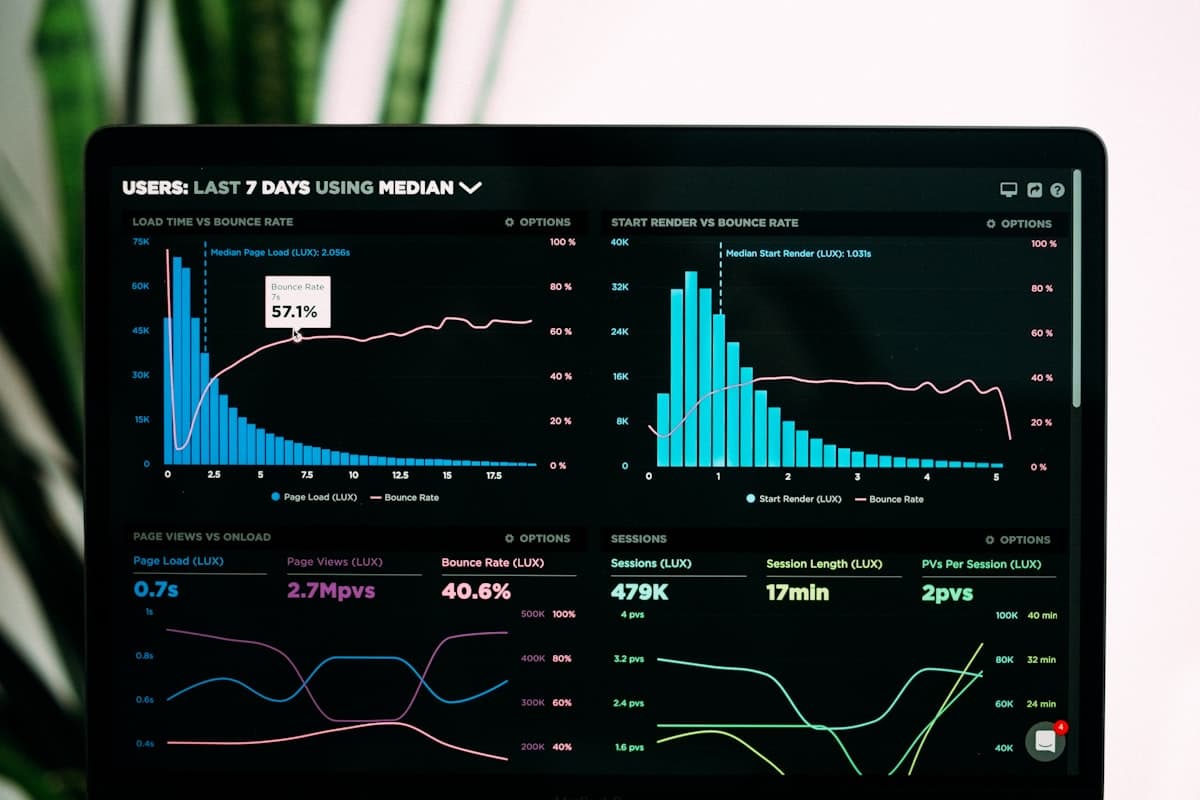
What is Observability?
Observability is the ability to understand the internal state of a system by examining its external outputs. Unlike traditional monitoring, which tells you when something is wrong, observability helps you understandwhysomething is wrong, even for problems you didn't anticipate.
The term originates from control theory, where a system is "observable" if you can determine its complete internal state from its outputs. In software engineering, this translates to being able to ask arbitrary questions about your system's behaviour without deploying new code.
Monitoring vs Observability
Monitoring tells you that something is broken. Observability helps you figure out why. Monitoring is about known unknowns; observability handles unknown unknowns.
The Three Pillars Explained
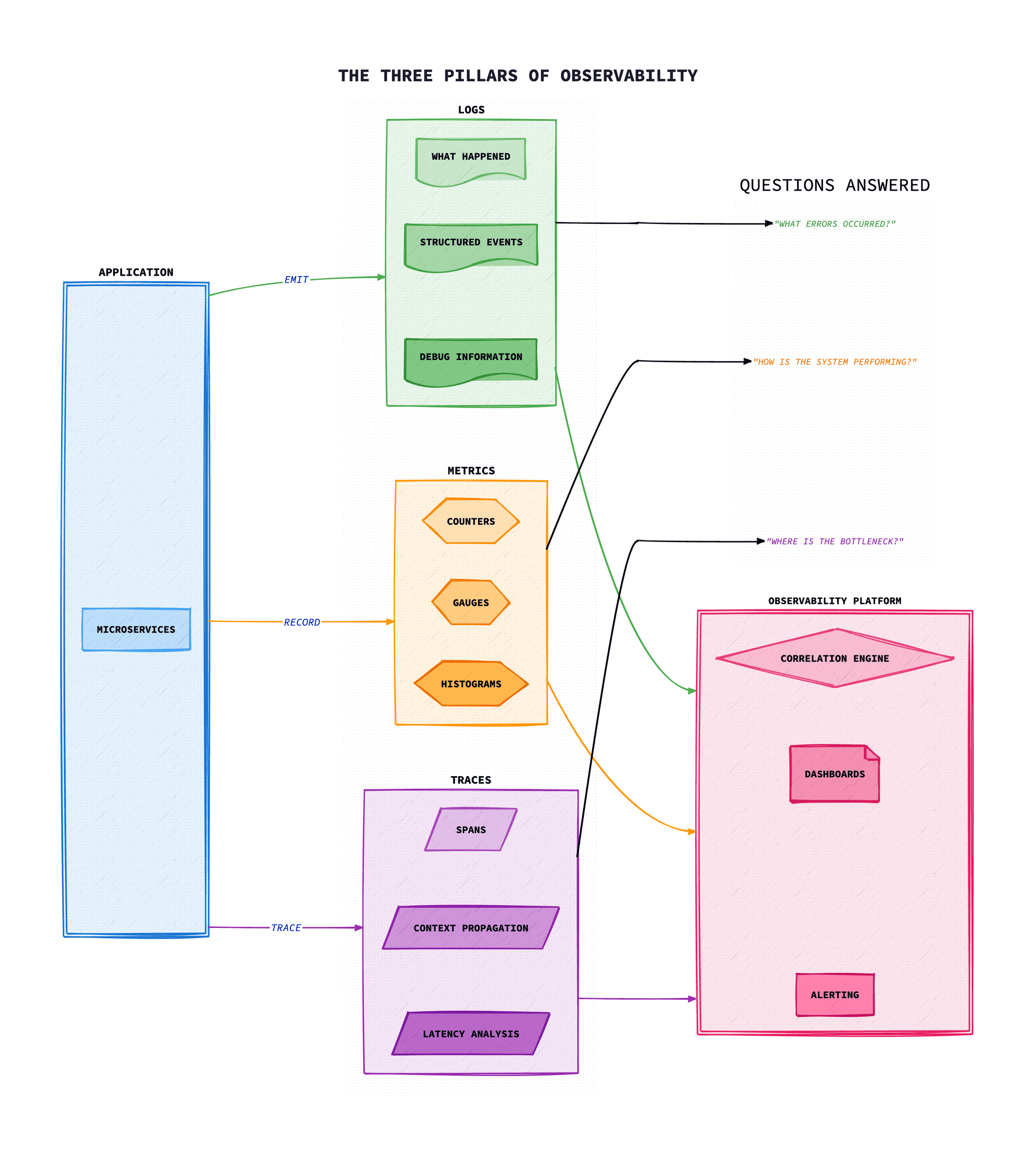
The three pillars of observability: logs, metrics, and traces, provide complementary views of your system's behaviour. Each serves a different purpose and excels at answering different types of questions.
Logs
Discrete events with context. Great for debugging specific issues and understanding what happened at a particular moment.
Metrics
Numeric measurements over time. Efficient for dashboards, alerting, and understanding trends and patterns.
Traces
Request paths through distributed systems. Essential for understanding latency and dependencies between services.
Pillar 1: Logs
Logs are timestamped records of discrete events. They provide rich context about what happened and when, making them invaluable for debugging.
Structured Logging
Modern logging should be structured (JSON) rather than unstructured text. Structured logs are machine-parseable, enabling rich queries and correlation.
// Bad: Unstructured log// Good: Structured log// Good: Structured log// Good: Structured loguctured log
logger.info("purchase_completed", {
  user_id: "123",
  item_id: "456",
  amount: 99.99,
  currency: "USD",
  trace_id: "abc123def456",
  span_id: "789xyz",
  timestamp: "2025-01-14T10:30:00Z"
});
Log Levels
- DEBUG: Detailed diagnostic information for developers
- INFO: General operational information
- WARN: Potential issues that don't prevent operation
- ERROR: Errors that need attention but aren't critical
- FATAL: Critical errors causing system shutdown
Logging Stack Example
# Fluent Bit configuration for Kubernetes# fluent-bit.conff
[SERVICE]
    Flush        1
    Log_Level    info
    Parsers_File parsers.conf

[INPUT]
    Name             tail
    Path             /var/log/containers/*.log
    Parser           docker
    Tag              kube.*
    Refresh_Interval 5
    Mem_Buf_Limit    5MB

[FILTER]
    Name                kubernetes
    Match               kube.*
    Kube_URL            https://kubernetes.default.svc:443
    Kube_CA_File        /var/run/secrets/kubernetes.io/serviceaccount/ca.crt
    Kube_Token_File     /var/run/secrets/kubernetes.io/serviceaccount/token
    Merge_Log           On
    K8S-Logging.Parser  On
    K8S-Logging.Exclude On

[OUTPUT]
    Name            loki
    Match           *
    Host            loki.monitoring.svc.cluster.local
    Port            3100
    Labels          job=fluent-bit
    Auto_Kubernetes_Labels on
Pillar 2: Metrics
Metrics are numeric measurements collected at regular intervals. They're highly efficient to store and query, making them ideal for dashboards, alerting, and trend analysis.
Metric Types
- Counter: Monotonically increasing value (e.g., total requests)
- Gauge: Value that can go up or down (e.g., memory usage)
- Histogram: Distribution of values in buckets (e.g., request latency)
- Summary: Similar to histogram but calculates quantiles client-side
The RED Method
For request-driven services, focus on these three metrics:
- Rate: Requests per second
- Errors: Number of failed requests
- Duration: Time taken to process requests
The USE Method
For resources (CPU, memory, disk, network), measure:
- Utilisation: Percentage of resource in use
- Saturation: Amount of work queued
- Errors: Error events
Prometheus Example
# Application metrics with Prometheus client// Request counter// Request counter// Request counter// Request counter// Request counter// Request counter// Request duration histogram// Request duration histogram// Request duration histogram// Request duration histogram// Request duration histogram// Request duration histogram// Request duration histogram// Middleware to record metrics// Middleware to record metrics// Middleware to record metrics// Middleware to record metrics// Middleware to record metrics// Middleware to record metrics// Middleware to record metrics// Middleware to record metrics// Middleware to record metricsd metrics
app.use((req, res, next) => {
  const start = Date.now();

  res.on('finish', () => {
    const duration = (Date.now() - start) / 1000;

    httpRequestsTotal.inc({
      method: req.method,
      path: req.route?.path || req.path,
      status: res.statusCode,
    });

    httpRequestDuration.observe(
      { method: req.method, path: req.route?.path || req.path },
      duration
    );
  });

  next();
});
PromQL Examples
# Request rate per second (last 5 minutes)# Error rate percentage# Error rate percentage# 95th percentile latency# 95th percentile latency# 95th percentile latency# 95th percentile latency# 95th percentile latency# Requests by service# Requests by service# Requests by service# Requests by service# Requests by serviceRequests by service
sum by (service) (rate(http_requests_total[5m]))
Pillar 3: Traces
Distributed traces track requests as they flow through multiple services. Each trace consists of spans representing individual operations, forming a tree structure that shows the request's journey.
Key Concepts
- Trace: End-to-end journey of a request through the system
- Span: A single operation within a trace (e.g., database query)
- Trace Context: Propagated headers (trace_id, span_id, parent_id)
- Baggage: User-defined key-value pairs propagated with the trace
W3C Trace Context
The W3C Trace Context standard defines how trace context is propagated across services using HTTP headers:
# traceparent header format# tracestate for vendor-specific data# tracestate for vendor-specific data# tracestate for vendor-specific data# tracestate for vendor-specific data data
tracestate: vendor1=value1,vendor2=value2
When Traces Are Essential
- Debugging latency issues across services
- Understanding service dependencies
- Identifying bottlenecks in request processing
- Root cause analysis for distributed failures
OpenTelemetry: Unified Observability
OpenTelemetry (OTel) is the CNCF project that provides a single set of APIs, libraries, agents, and collector services to capture distributed traces, metrics, and logs. It's vendor-neutral and has become the standard for instrumentation.
OpenTelemetry Architecture
┌─────────────┐    ┌─────────────────────────────────────────┐
│ Application │───▶│         OTel SDK + Auto-instrumentation │
└─────────────┘    └───────────────────┬─────────────────────┘
                                       │
                   ┌───────────────────▼─────────────────────┐
                   │          OTel Collector                  │
                   │  ┌─────────┐ ┌──────────┐ ┌──────────┐  │
                   │  │Receivers│ │Processors│ │Exporters │  │
                   │  └─────────┘ └──────────┘ └──────────┘  │
                   └───────────────────┬─────────────────────┘
                                       │
          ┌────────────────────────────┼────────────────────────────┐
          ▼                            ▼                            ▼
   ┌──────────┐                 ┌──────────┐                 ┌──────────┐
   │  Jaeger  │                 │Prometheus│                 │   Loki   │
   │ (Traces) │                 │(Metrics) │                 │  (Logs)  │
   └──────────┘                 └──────────┘                 └──────────┘
Node.js Instrumentation
// tracing.ts - Initialize before importing other modules
import { NodeSDK } from '@opentelemetry/sdk-node';
import { getNodeAutoInstrumentations } from '@opentelemetry/auto-instrumentations-node';
import { OTLPTraceExporter } from '@opentelemetry/exporter-trace-otlp-http';
import { OTLPMetricExporter } from '@opentelemetry/exporter-metrics-otlp-http';
import { PeriodicExportingMetricReader } from '@opentelemetry/sdk-metrics';
import { Resource } from '@opentelemetry/resources';
import { SemanticResourceAttributes } from '@opentelemetry/semantic-conventions';

const sdk = new NodeSDK({
  resource: new Resource({
    [SemanticResourceAttributes.SERVICE_NAME]: 'my-api',
    [SemanticResourceAttributes.SERVICE_VERSION]: '1.0.0',
    [SemanticResourceAttributes.DEPLOYMENT_ENVIRONMENT]: 'production',
  }),
  traceExporter: new OTLPTraceExporter({
    url: 'http://otel-collector:4318/v1/traces',
  }),
  metricReader: new PeriodicExportingMetricReader({
    exporter: new OTLPMetricExporter({
      url: 'http://otel-collector:4318/v1/metrics',
    }),
    exportIntervalMillis: 60000,
  }),
  instrumentations: [
    getNodeAutoInstrumentations({
      '@opentelemetry/instrumentation-http': {
        ignoreIncomingPaths: ['/health', '/ready'],
      },
      '@opentelemetry/instrumentation-fs': { enabled: false },
    }),
  ],
});

sdk.start();
OTel Collector Configuration
# otel-collector-config.yaml
receivers:
  otlp:
    protocols:
      grpc:
        endpoint: 0.0.0.0:4317
      http:
        endpoint: 0.0.0.0:4318

processors:
  batch:
    timeout: 10s
    send_batch_size: 1000

  memory_limiter:
    check_interval: 1s
    limit_mib: 1000
    spike_limit_mib: 200

  resource:
    attributes:
      - key: environment
        value: production
        action: upsert

exporters:
  prometheus:
    endpoint: "0.0.0.0:8889"

  jaeger:
    endpoint: jaeger:14250
    tls:
      insecure: true

  loki:
    endpoint: http://loki:3100/loki/api/v1/push

service:
  pipelines:
    traces:
      receivers: [otlp]
      processors: [memory_limiter, batch]
      exporters: [jaeger]
    metrics:
      receivers: [otlp]
      processors: [memory_limiter, batch]
      exporters: [prometheus]
    logs:
      receivers: [otlp]
      processors: [memory_limiter, batch]
      exporters: [loki]
SLIs, SLOs, and Error Budgets
Service Level Objectives (SLOs) provide a framework for making data-driven decisions about reliability. They bridge the gap between business requirements and engineering metrics.
Definitions
- SLI (Service Level Indicator): A quantitative measure of service behaviour (e.g., request latency, error rate)
- SLO (Service Level Objective): A target value for an SLI (e.g., 99.9% of requests complete in under 200ms)
- SLA (Service Level Agreement): A contract with customers that includes consequences for failing to meet SLOs
- Error Budget: The acceptable amount of unreliability (100% – SLO target)
Common SLIs
| Type | SLI | Example SLO |
|---|---|---|
| Availability | % of successful requests | 99.9% success rate |
| Latency | p99 response time | p99 < 200ms |
| Throughput | Requests per second | > 1000 RPS capacity |
| Freshness | Data age | Data < 1 minute old |
Error Budget Calculation
# For 99.9% availability SLO over 30 days:# In terms of downtime:# In terms of downtime:# Prometheus query for remaining error budget# Prometheus query for remaining error budget# Prometheus query for remaining error budgetPrometheus query for remaining error budget
1 - (
  sum(rate(http_requests_total{status=~"5.."}[30d]))
  / sum(rate(http_requests_total[30d]))
) / 0.001  # 0.1% error budget
Error Budget Policy
When the error budget is exhausted, freeze feature releases and focus on reliability improvements. This creates a natural balance between velocity and stability.
Best Practices
1. Correlate Across Pillars
Use trace IDs to link logs, metrics, and traces. This enables jumping from a spike in latency metrics to the specific traces and logs that explain it.
2. Instrument at the Right Level
- Use auto-instrumentation for common frameworks and libraries
- Add custom spans for business-critical operations
- Include relevant context in span attributes
3. Control Cardinality
High-cardinality labels (user IDs, request IDs) can explode metric storage. Use traces for high-cardinality data and keep metrics labels bounded.
4. Sample Intelligently
# Tail-based sampling in OTel Collector
processors:
  tail_sampling:
    decision_wait: 10s
    policies:
      # Always sample errors
      - name: errors
        type: status_code
        status_code:
          status_codes: [ERROR]
      # Sample slow requests
      - name: slow-requests
        type: latency
        latency:
          threshold_ms: 1000
      # Sample 10% of everything else
      - name: probabilistic
        type: probabilistic
        probabilistic:
          sampling_percentage: 10
5. Build Actionable Dashboards
- Summary dashboard: SLO status, error budgets, key metrics
- Service dashboard: RED metrics per service
- Debug dashboard: Detailed metrics for troubleshooting
Troubleshooting
Common issues and solutions when implementing observability.
High Cardinality Causing Storage and Query Issues
Symptom: Metrics storage exploding, queries timing out, or costs increasing rapidly.
Common causes:
- Using user IDs, request IDs, or timestamps as metric labels
- Unbounded label values (e.g., URLs with query parameters)
- Too many unique label combinations
Solution:
# Identify high-cardinality metrics in Prometheus
# Find metrics with most label combinations
topk(10, count by (__name__)({__name__=~".+"}))

# Replace high-cardinality labels with bounded values
# BAD: user_id, request_id, full URL
# GOOD: user_tier (free/paid), endpoint_path, status_code

# Use histograms instead of recording every value
http_request_duration_seconds_bucket{le="0.1"}
http_request_duration_seconds_bucket{le="0.5"}
http_request_duration_seconds_bucket{le="1.0"}
Traces Not Correlating Across Services
Symptom: Distributed traces show gaps or don't connect services properly.
Common causes:
- Context propagation headers not forwarded
- Different tracing systems without interoperability
- Async message queues breaking context chain
- Sampling dropping related spans
Solution:
# Ensure W3C Trace Context headers are propagated:
# traceparent, tracestate, baggage

# For async operations, inject trace context into messages
const span = trace.getActiveSpan();
const context = {};
propagation.inject(context, context);
message.headers = context;

# On consumer side, extract context
const extractedContext = propagation.extract(context, message.headers);
const span = tracer.startSpan('process', {}, extractedContext);
Log Ingestion Falling Behind
Symptom: Logs appearing with significant delay or being dropped.
Common causes:
- Log shipper buffer full
- Network bandwidth constraints
- Backend ingestion rate limits
- Parsing errors causing retries
Solution:
# For Fluent Bit - increase buffer and enable disk persistence
[SERVICE]
    Flush         5
    storage.path  /var/log/flb-storage/
    storage.sync  normal
    storage.backlog.mem_limit 50M

[OUTPUT]
    Name          forward
    storage.total_limit_size 1G
    Retry_Limit   5

# Add sampling for verbose logs
[FILTER]
    Name          throttle
    Match         app.*
    Rate          1000
    Window        5
Metrics Showing Gaps or Missing Data Points
Symptom: Dashboards show gaps in metrics, alerts misfiring due to missing data.
Common causes:
- Prometheus scrape timeout or target unreachable
- Pod restarts resetting counters
- Time series becoming stale
- Recording rules not evaluating
Solution:
# Check target health in Prometheus
up{job="my-service"} == 0

# Use rate() for counters to handle resets
rate(http_requests_total[5m])

# Check scrape duration vs timeout
scrape_duration_seconds{job="my-service"}

# Increase scrape interval for slow targets
scrape_configs:
  - job_name: 'slow-service'
    scrape_interval: 30s
    scrape_timeout: 25s
Observability Overhead Impacting Application Performance
Symptom: Application latency or resource usage increased after adding instrumentation.
Common causes:
- Too much synchronous telemetry export
- Tracing every operation without sampling
- Excessive log volume at debug level
- Blocking on telemetry batching
Solution:
# Use async/batch exporters
const exporter = new OTLPTraceExporter({
  url: 'http://collector:4318/v1/traces',
});
const processor = new BatchSpanProcessor(exporter, {
  maxQueueSize: 2048,
  scheduledDelayMillis: 5000,
});

# Implement sampling to reduce volume
const sampler = new ParentBasedSampler({
  root: new TraceIdRatioBasedSampler(0.1), // 10% sampling
});

# Use log levels appropriately
logger.setLevel(process.env.NODE_ENV === 'production' ? 'info' : 'debug');
Conclusion
True observability requires more than just collecting data; it requires the ability to ask and answer arbitrary questions about your system's behaviour. The three pillars of logs, metrics, and traces provide complementary perspectives that, when correlated, give you complete visibility.
OpenTelemetry has emerged as the standard for instrumentation, providing vendor-neutral APIs and automatic instrumentation for popular frameworks. Combined with SLOs and error budgets, you can make data-driven decisions about reliability that balance engineering velocity with system stability.
Start by instrumenting your most critical services with OpenTelemetry, define SLOs based on customer experience, and build dashboards that answer the questions you actually need to ask. Observability is a journey, not a destination; continuously refine your instrumentation as you learn what questions matter most.
Frequently Asked Questions
The three pillars of observability are logs, metrics, and traces. Logs are timestamped records of discrete events providing rich context for debugging. Metrics are numeric measurements collected at regular intervals, ideal for dashboards and alerting. Traces track requests as they flow through distributed systems, showing the journey through multiple services.
Monitoring tells you that something is broken, while observability helps you figure out why. Monitoring focuses on known unknowns: predefined metrics and alerts for anticipated issues. Observability handles unknown unknowns, enabling you to ask arbitrary questions about your system's behaviour without deploying new code.
SLI (Service Level Indicator) is a quantitative measure of service behaviour, such as request latency or error rate. SLO (Service Level Objective) is a target value for an SLI, for example '99.9% of requests complete in under 200ms'. SLOs provide a framework for making data-driven decisions about reliability and are often backed by error budgets.
Popular observability tools include OpenTelemetry for vendor-neutral instrumentation, Prometheus for metrics collection and alerting, Grafana for visualisation and dashboards, Jaeger for distributed tracing, and Loki for log aggregation. The best choice depends on your infrastructure, with many organisations using a combination of these tools.
The three pillars complement each other: metrics alert you to problems and show trends, traces help you understand the request flow and identify bottlenecks, and logs provide detailed context for debugging specific issues. Using trace IDs to correlate across all three pillars enables you to jump from a metric spike to the relevant traces and logs.
Distributed tracing tracks requests as they flow through multiple services in a distributed system. Each trace consists of spans representing individual operations, forming a tree structure that shows the request's complete journey. It's essential for debugging latency issues, understanding service dependencies, and performing root cause analysis in microservices architectures.
References & Further Reading
- OpenTelemetry Documentation- Vendor-neutral observability framework
- Prometheus Documentation- Open-source monitoring and alerting
- Grafana Documentation- Visualization and dashboarding platform
- Jaeger Documentation- Open-source distributed tracing
- Grafana Loki- Log aggregation inspired by Prometheus
- Google SRE Workbook: Implementing SLOs- Best practices for SLIs and SLOs