
Introduction to Platform Engineering
Platform Engineering has emerged as a critical discipline in modern software development, addressing the growing complexity of cloud-native architectures and the cognitive load faced by development teams. According to Gartner, by 2026, 80% of software engineering organisations will establish platform teams as internal providers of reusable services, components, and tools.
The discipline arose from the recognition that whilst DevOps transformed how organisations think about software delivery, it also created new challenges. Teams were expected to manage an ever-expanding toolkit of technologies, from containerisation and orchestration to observability and security; all whilst delivering business value through application development.
Platform Engineering addresses this by creating dedicated teams that build and maintain internal platforms, abstracting away infrastructure complexity and providing developers with self-service capabilities that accelerate delivery whilst maintaining governance and security.
What is an Internal Developer Platform?
An Internal Developer Platform (IDP) is a layer built on top of existing technologies and tooling that enables developer self-service. It provides a curated set of tools, workflows, and services that abstract away infrastructure complexity whilst maintaining the flexibility developers need.
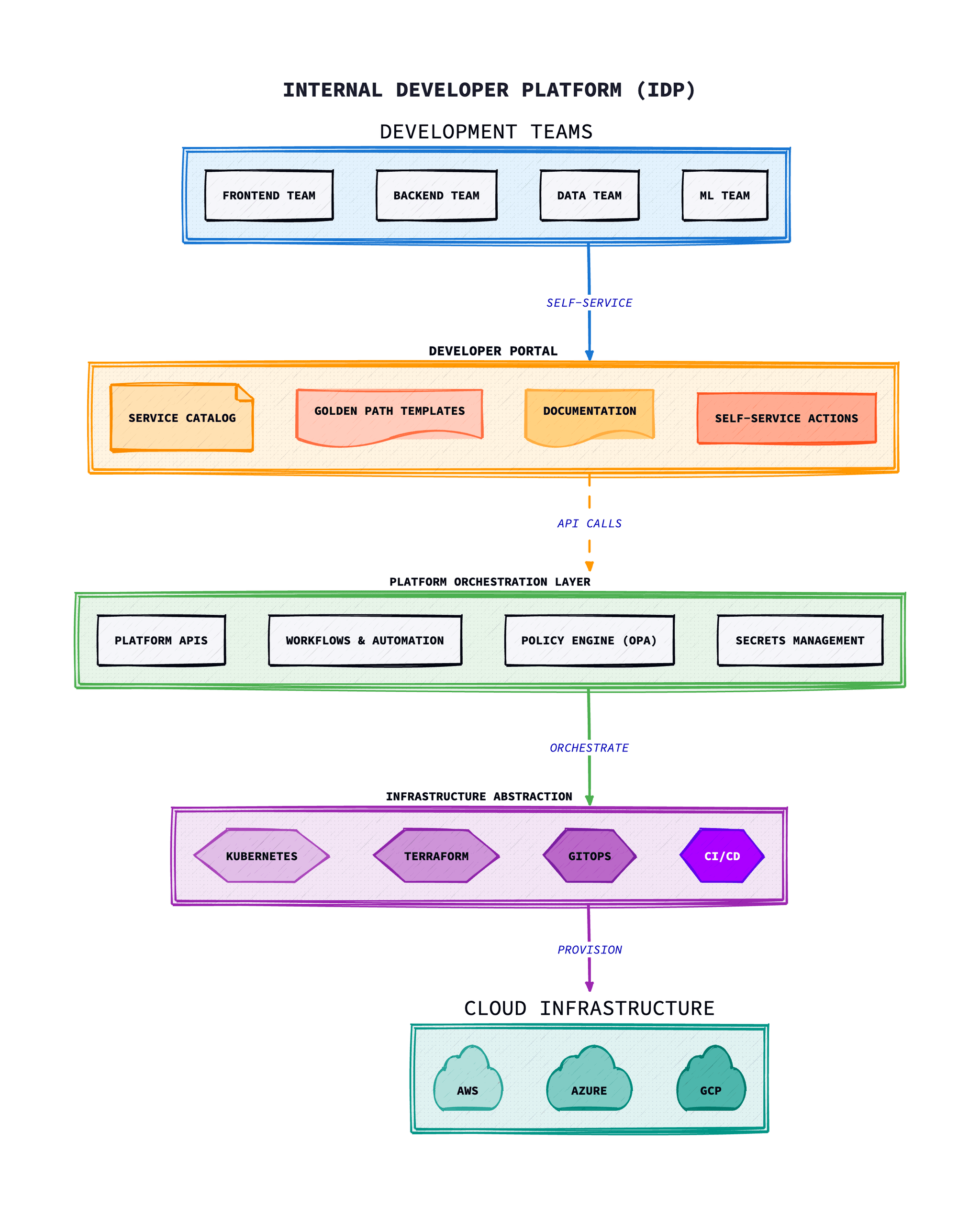
Key Components of an IDP
- Service Catalogue: A centralised registry of all services, their owners, documentation, and dependencies
- Self-Service Infrastructure: Automated provisioning of environments, databases, and cloud resources
- CI/CD Pipelines: Standardised build and deployment workflows with built-in security and compliance
- Observability Stack: Integrated logging, metrics, and tracing for all services
- Developer Portal: A unified interface for accessing all platform capabilities
- Documentation: Detailed guides, tutorials, and API references
Golden Paths and Developer Experience
Golden Paths are opinionated, well-supported routes through the platform that enable developers to accomplish common tasks efficiently. They represent the recommended way to build and deploy services, incorporating organisational best practices for security, scalability, and maintainability.
Characteristics of Effective Golden Paths
- Opinionated but not restrictive: Provide sensible defaults whilst allowing customisation when needed
- Well-documented: Clear guidance on when and how to use each path
- Automated: Minimal manual steps required to follow the path
- Secure by default: Built-in security controls and compliance checks
- Observable: Integrated monitoring and alerting from day one
Developer Experience (DevEx)
Developer Experience encompasses all interactions a developer has with the tools, processes, and systems they use daily. Platform Engineering places DevEx at the centre, recognising that developer productivity directly impacts business outcomes.
Key DevEx metrics include:
- Time to first deployment for new developers (onboarding time)
- Time to provision a new service or environment
- Frequency of context switching between tools
- Developer satisfaction scores (through surveys)
- Support ticket volume and resolution time
Building Your Platform
Building an effective IDP requires a product mindset: treating internal developers as customers and the platform as a product. This means conducting user research, iterating based on feedback, and continuously improving the platform experience.
Starting Points
- Assess current state: Understand existing tools, workflows, and pain points through developer interviews and surveys
- Identify high-impact opportunities: Focus on areas where standardisation will provide the most value
- Start small: Begin with a thin slice of functionality and expand based on feedback
- Build incrementally: Deliver value early and often rather than attempting a big-bang transformation
- Measure and iterate: Establish metrics and continuously improve based on data
Team Structure
Platform teams typically include a mix of skills including infrastructure engineering, software development, DevOps expertise, and product management. The team should be empowered to make decisions and own the platform end-to-end.
Tools and Technologies
Developer Portals
- Backstage:Spotify's open-source developer portal that has become the de facto standard for building IDPs. It provides software templates, a service catalogue, and a plugin ecosystem.
- Port: A commercial IDP solution with no-code/low-code configuration
- Cortex: Focuses on service ownership and scorecards for engineering standards
Infrastructure Automation
- Terraform/OpenTofu: Infrastructure as Code for multi-cloud provisioning
- Crossplane: Kubernetes-native infrastructure provisioning
- Pulumi: Infrastructure as Code using general-purpose programming languages
Deployment and GitOps
- ArgoCD: Declarative GitOps continuous delivery for Kubernetes
- Flux: GitOps toolkit for Kubernetes
- GitHub Actions/GitLab CI: CI/CD pipelines integrated with source control
Setting Up Backstage
Backstage is the foundation of most modern Internal Developer Platforms. Here's how to get started with a production-ready setup.
Creating a Backstage App
# Create a new Backstage app
npx @backstage/create-app@latest

# Navigate to the app directory
cd my-backstage-app

# Start the development server
yarn dev
Backstage app-config.yaml
Configure your Backstage instance for production:
# app-config.yaml
app:
  title: Internal Developer Platform
  baseUrl: http://localhost:3000

organization:
  name: Your Company

backend:
  baseUrl: http://localhost:7007
  listen:
    port: 7007
  csp:
    connect-src: ["'self'", 'http:', 'https:']
  cors:
    origin: http://localhost:3000
    methods: [GET, HEAD, PATCH, POST, PUT, DELETE]
    credentials: true
  database:
    client: pg
    connection:
      host: ${POSTGRES_HOST}
      port: ${POSTGRES_PORT}
      user: ${POSTGRES_USER}
      password: ${POSTGRES_PASSWORD}

integrations:
  github:
    - host: github.com
      token: ${GITHUB_TOKEN}

catalog:
  import:
    entityFilename: catalog-info.yaml
    pullRequestBranchName: backstage-integration
  rules:
    - allow: [Component, System, API, Resource, Location, Domain, Group, User]
  locations:
    # Local catalog entities
    - type: file
      target: ../../catalog-info.yaml
    # GitHub organization discovery
    - type: github-discovery
      target: https://github.com/your-org

auth:
  environment: development
  providers:
    github:
      development:
        clientId: ${AUTH_GITHUB_CLIENT_ID}
        clientSecret: ${AUTH_GITHUB_CLIENT_SECRET}
Software Template Example
Create golden path templates for your developers:
apiVersion: scaffolder.backstage.io/v1beta3
kind: Template
metadata:
  name: microservice-template
  title: Microservice Template
  description: Create a new microservice with CI/CD, monitoring, and K8s deployment
  tags:
    - recommended
    - microservice
spec:
  owner: platform-team
  type: service

  parameters:
    - title: Service Details
      required:
        - name
        - description
        - owner
      properties:
        name:
          title: Service Name
          type: string
          description: Unique name for the service
          pattern: '^[a-z0-9-]+$'
        description:
          title: Description
          type: string
        owner:
          title: Owner
          type: string
          description: Team that owns this service
          ui:field: OwnerPicker
          ui:options:
            catalogFilter:
              kind: Group

    - title: Technical Configuration
      required:
        - language
        - database
      properties:
        language:
          title: Programming Language
          type: string
          enum:
            - nodejs
            - python
            - go
            - java
          enumNames:
            - Node.js (TypeScript)
            - Python
            - Go
            - Java (Spring Boot)
        database:
          title: Database
          type: string
          enum:
            - postgres
            - mysql
            - mongodb
            - none
          enumNames:
            - PostgreSQL
            - MySQL
            - MongoDB
            - No Database
        enableMonitoring:
          title: Enable Monitoring
          type: boolean
          default: true

  steps:
    - id: fetch-base
      name: Fetch Base Template
      action: fetch:template
      input:
        url: ./skeleton
        values:
          name: ${{ parameters.name }}
          description: ${{ parameters.description }}
          owner: ${{ parameters.owner }}
          language: ${{ parameters.language }}
          database: ${{ parameters.database }}

    - id: publish
      name: Publish to GitHub
      action: publish:github
      input:
        allowedHosts: ['github.com']
        repoUrl: github.com?owner=your-org&repo=${{ parameters.name }}
        description: ${{ parameters.description }}
        defaultBranch: main

    - id: register
      name: Register in Catalog
      action: catalog:register
      input:
        repoContentsUrl: ${{ steps.publish.output.repoContentsUrl }}
        catalogInfoPath: '/catalog-info.yaml'

    - id: create-argocd-app
      name: Create ArgoCD Application
      action: argocd:create-resources
      input:
        appName: ${{ parameters.name }}
        projectName: default
        repoUrl: ${{ steps.publish.output.remoteUrl }}
        path: kubernetes

  output:
    links:
      - title: Repository
        url: ${{ steps.publish.output.remoteUrl }}
      - title: Open in Catalog
        icon: catalog
        entityRef: ${{ steps.register.output.entityRef }}
Service Catalog Entity
Define services in your catalog with catalog-info.yaml:
apiVersion: backstage.io/v1alpha1
kind: Component
metadata:
  name: payment-service
  description: Handles payment processing and transactions
  annotations:
    github.com/project-slug: your-org/payment-service
    backstage.io/techdocs-ref: dir:.
    argocd/app-name: payment-service
    prometheus.io/scrape: 'true'
    grafana/dashboard-selector: payment-service
  tags:
    - python
    - payments
    - critical
  links:
    - url: https://grafana.internal/d/payment-service
      title: Grafana Dashboard
      icon: dashboard
    - url: https://runbooks.internal/payment-service
      title: Runbook
      icon: docs
spec:
  type: service
  lifecycle: production
  owner: payments-team
  system: payments-platform
  dependsOn:
    - resource:payments-database
    - component:notification-service
  providesApis:
    - payments-api
---
apiVersion: backstage.io/v1alpha1
kind: API
metadata:
  name: payments-api
  description: RESTful API for payment processing
spec:
  type: openapi
  lifecycle: production
  owner: payments-team
  definition:
    $text: ./openapi.yaml
Infrastructure with Crossplane
Crossplane enables Kubernetes-native infrastructure provisioning, allowing developers to request resources through familiar Kubernetes manifests.
Installing Crossplane
# Install Crossplane with Helm
helm repo add crossplane-stable https://charts.crossplane.io/stable
helm repo update

helm install crossplane crossplane-stable/crossplane \
  --namespace crossplane-system \
  --create-namespace \
  --wait

# Verify installation
kubectl get pods -n crossplane-system
AWS Provider Configuration
apiVersion: pkg.crossplane.io/v1
kind: Provider
metadata:
  name: provider-aws
spec:
  package: xpkg.upbound.io/upbound/provider-aws:v0.47.0
---
apiVersion: aws.upbound.io/v1beta1
kind: ProviderConfig
metadata:
  name: default
spec:
  credentials:
    source: InjectedIdentity  # Uses IRSA on EKS
Composite Resource Definition (XRD)
Define reusable infrastructure abstractions:
apiVersion: apiextensions.crossplane.io/v1
kind: CompositeResourceDefinition
metadata:
  name: xdatabases.platform.example.com
spec:
  group: platform.example.com
  names:
    kind: XDatabase
    plural: xdatabases
  claimNames:
    kind: Database
    plural: databases
  versions:
    - name: v1alpha1
      served: true
      referenceable: true
      schema:
        openAPIV3Schema:
          type: object
          properties:
            spec:
              type: object
              properties:
                parameters:
                  type: object
                  properties:
                    size:
                      type: string
                      enum: [small, medium, large]
                      default: small
                    engine:
                      type: string
                      enum: [postgres, mysql]
                      default: postgres
                    version:
                      type: string
                      default: "15"
                  required:
                    - size
                    - engine
              required:
                - parameters
            status:
              type: object
              properties:
                connectionSecret:
                  type: string
                endpoint:
                  type: string
Composition
Define how composite resources map to cloud resources:
apiVersion: apiextensions.crossplane.io/v1
kind: Composition
metadata:
  name: aws-rds-postgres
  labels:
    provider: aws
    engine: postgres
spec:
  compositeTypeRef:
    apiVersion: platform.example.com/v1alpha1
    kind: XDatabase

  patchSets:
    - name: common-fields
      patches:
        - type: FromCompositeFieldPath
          fromFieldPath: spec.parameters.size
          toFieldPath: spec.forProvider.instanceClass
          transforms:
            - type: map
              map:
                small: db.t3.micro
                medium: db.t3.medium
                large: db.r5.large

  resources:
    - name: rds-instance
      base:
        apiVersion: rds.aws.upbound.io/v1beta1
        kind: Instance
        spec:
          forProvider:
            region: eu-west-1
            engine: postgres
            allocatedStorage: 20
            publiclyAccessible: false
            skipFinalSnapshot: true
            vpcSecurityGroupIdSelector:
              matchLabels:
                type: database
            dbSubnetGroupNameSelector:
              matchLabels:
                type: database
          writeConnectionSecretToRef:
            namespace: crossplane-system
      patches:
        - type: PatchSet
          patchSetName: common-fields
        - type: FromCompositeFieldPath
          fromFieldPath: spec.parameters.version
          toFieldPath: spec.forProvider.engineVersion
        - type: ToCompositeFieldPath
          fromFieldPath: status.atProvider.endpoint
          toFieldPath: status.endpoint
      connectionDetails:
        - name: host
          fromFieldPath: status.atProvider.endpoint
        - name: port
          fromFieldPath: status.atProvider.port
        - name: username
          fromFieldPath: spec.forProvider.username
        - name: password
          fromConnectionSecretKey: password
Developer Self-Service Claim
Developers can request databases with a simple manifest:
# Developers create this simple claim
apiVersion: platform.example.com/v1alpha1
kind: Database
metadata:
  name: my-service-db
  namespace: my-team
spec:
  parameters:
    size: medium
    engine: postgres
    version: "15"
  writeConnectionSecretToRef:
    name: my-service-db-credentials
Self-Service in Action
With this setup, developers get a database by simply applying a Kubernetes manifest. The platform handles all the complexity of networking, security groups, and RDS configuration behind the scenes.
Platform Team Structure
Successful platform engineering requires the right team composition and organisational structure.
Core Team Roles
Platform Product Manager
Owns the platform roadmap, gathers requirements from development teams, prioritises features, and measures adoption metrics.
Platform Engineers
Build and maintain platform capabilities, CI/CD pipelines, infrastructure automation, and self-service tooling.
Developer Advocates
Bridge between platform team and users. Create documentation, run workshops, gather feedback, and drive adoption.
Site Reliability Engineers
Ensure platform reliability, define SLOs/SLIs, implement observability, and handle incident response.
Team Sizing Guidelines
| Organisation Size | Dev Teams | Platform Team Size | Ratio |
|---|---|---|---|
| Small | 5-15 teams | 3-5 engineers | 1:3 to 1:5 |
| Medium | 15-50 teams | 8-15 engineers | 1:3 to 1:5 |
| Large | 50+ teams | 20+ engineers | 1:5 to 1:10 |
Best Practices
1. Treat the Platform as a Product
- Apply product management principles: user research, roadmap, adoption metrics
- Iterate continuously based on developer feedback
- Internal developers are your customers
2. Enable Self-Service
- Reduce dependencies on the platform team
- Developers should provision resources and deploy services without raising tickets
3. Maintain Flexibility
- Ensure developers can deviate from golden paths when necessary
- Overly restrictive platforms drive shadow IT and workarounds
4. Integrate Security from Day One
- Embed security controls directly into golden paths
- Automated scanning and secure defaults should be invisible to developers
5. Document Everything
- Include tutorials, reference guides, and troubleshooting guides
- Maintain architectural decision records (ADRs) for key platform choices
6. Build a Community
- Foster community through office hours, Slack channels, and internal conferences
- Engaged users provide feedback and become platform advocates
Measuring Success
Success metrics for platform engineering should align with both developer experience and business outcomes:
Developer Productivity Metrics
- Lead time for changes (DORA metric)
- Deployment frequency (DORA metric)
- Time to provision new services
- Developer onboarding time
- Self-service adoption rate
Platform Health Metrics
- Platform availability and reliability
- Support ticket volume and trends
- Golden path adoption rate
- Developer satisfaction (NPS/surveys)
- Security and compliance posture
Conclusion
Platform Engineering represents the next evolution in how organisations approach software delivery. By creating dedicated teams focused on building internal developer platforms, organisations can reduce cognitive load on development teams, improve productivity, and maintain governance at scale.
Success requires treating the platform as a product, focusing relentlessly on developer experience, and building a culture of continuous improvement. Start small, measure outcomes, and iterate based on feedback from your internal customers.
As the discipline matures, we're seeing increasing standardisation around tools like Backstage, growing investment in platform teams, and recognition that developer productivity is a competitive advantage. Organisations that embrace Platform Engineering will be better positioned to attract talent, ship faster, and innovate more effectively.
Troubleshooting Common Issues
Low Platform Adoption
Developers aren't using the platform capabilities you've built.
Solutions:
- •Conduct user research to understand why – survey developers directly
- •Ensure golden paths solve real problems developers face daily
- •Run workshops and office hours to increase awareness
- •Start with early adopters who can champion the platform
Backstage Performance Issues
Catalog is slow to load or search queries time out.
# Check database connections and indexes
SELECT * FROM pg_stat_activity WHERE datname = 'backstage';

# Consider enabling search collation indexes
CREATE INDEX IF NOT EXISTS search_idx
  ON final_entities USING gin(final_entity jsonb_path_ops);

# Implement entity caching
# app-config.yaml
catalog:
  processingInterval: { minutes: 5 }
  stitchingStrategy:
    mode: deferred
Crossplane Resources Stuck in "Creating"
Composite resources don't transition to Ready state.
# Check the composition events
kubectl describe xdatabase my-database

# View provider logs
kubectl logs -n crossplane-system \
  -l pkg.crossplane.io/provider=provider-aws

# Check managed resource status
kubectl get managed -o wide

# Common fixes:
# - Verify provider credentials (IRSA, service account)
# - Check IAM permissions for resource creation
# - Ensure VPC/subnet selectors match existing resources
Template Scaffolding Failures
Backstage software templates fail during repository creation.
# Check scaffolder logs
kubectl logs -n backstage deployment/backstage \
  | grep -i scaffolder

# Common issues:
# - GitHub token lacks 'repo' and 'workflow' scopes
# - Template syntax errors in fetch:template action
# - Missing skeleton files in template directory

# Test GitHub integration
curl -H "Authorization: token YOUR_TOKEN" \
  https://api.github.com/user/repos
Platform Maturity Checklist
Use this checklist to assess your platform engineering maturity:
Foundation (Level 1)
- Platform team established with clear ownership
- Basic service catalogue in place
- Standardised CI/CD pipelines
- Initial documentation created
Standardisation (Level 2)
- Golden paths defined for common workloads
- Self-service infrastructure provisioning
- Integrated observability stack
- Security policies embedded in pipelines
Optimisation (Level 3)
- Developer portal with full self-service
- Automated compliance and governance
- Platform metrics driving decisions
- Active developer community engagement
Innovation (Level 4)
- Platform enables rapid experimentation
- AI/ML capabilities integrated
- Developer productivity is a competitive advantage
- Platform team contributes to open source
Frequently Asked Questions
Platform Engineering is a discipline focused on building and maintaining internal developer platforms (IDPs) that enable developer self-service. Platform engineers create tooling, workflows, and services that abstract away infrastructure complexity, allowing development teams to focus on delivering business value whilst maintaining governance and security standards.
While DevOps focuses on cultural practices and collaboration between development and operations teams, Platform Engineering takes this further by creating dedicated teams that build self-service platforms. DevOps practitioners embed within product teams, whereas Platform Engineers build reusable infrastructure and tooling that serves multiple teams. Platform Engineering addresses the cognitive load challenges that emerged as DevOps tooling proliferated.
An Internal Developer Platform is a layer built on top of existing technologies that enables developer self-service. It typically includes a service catalogue, self-service infrastructure provisioning, standardised CI/CD pipelines, integrated observability, a developer portal, and thorough documentation. The goal is to reduce dependencies on platform teams whilst maintaining organisational standards.
Key benefits include reduced cognitive load for developers, faster time to production, improved developer experience and satisfaction, consistent security and compliance across all services, better visibility into system dependencies, reduced support overhead for infrastructure teams, and accelerated onboarding for new team members.
Platform Engineers typically need expertise in infrastructure as code (Terraform, Crossplane), Kubernetes and container orchestration, CI/CD systems, cloud platforms (AWS, Azure, GCP), programming languages for tooling development, observability and monitoring, and security best practices. Equally important are product thinking skills and the ability to gather requirements from internal developer customers.
Start by assessing your current state through developer interviews to understand pain points. Identify high-impact opportunities where standardisation provides the most value. Begin with a thin slice of functionality: perhaps a service catalogue using Backstage, and expand based on feedback. Apply product management principles: measure adoption, iterate based on data, and treat your developers as customers.
References & Further Reading
- Backstage Official Documentation- Detailed guide to building with Backstage
- Crossplane Documentation- Kubernetes-native infrastructure management
- Platform Engineering Community- Community resources and events
- Internal Developer Platform Reference- IDP patterns and architecture guides
- CNCF Platform Engineering Whitepaper- Industry guidance and best practices
- DORA Research Program- DevOps metrics and research
- Team Topologies- Organising teams for fast flow
- Gartner Platform Engineering Overview- Industry analyst perspective