
What is GitOps?
GitOps is an operational framework that applies DevOps best practices for infrastructure automation, using Git as the single source of truth for declarative infrastructure and applications. Coined by Weaveworks in 2017, GitOps has become the preferred approach for managing Kubernetes deployments.
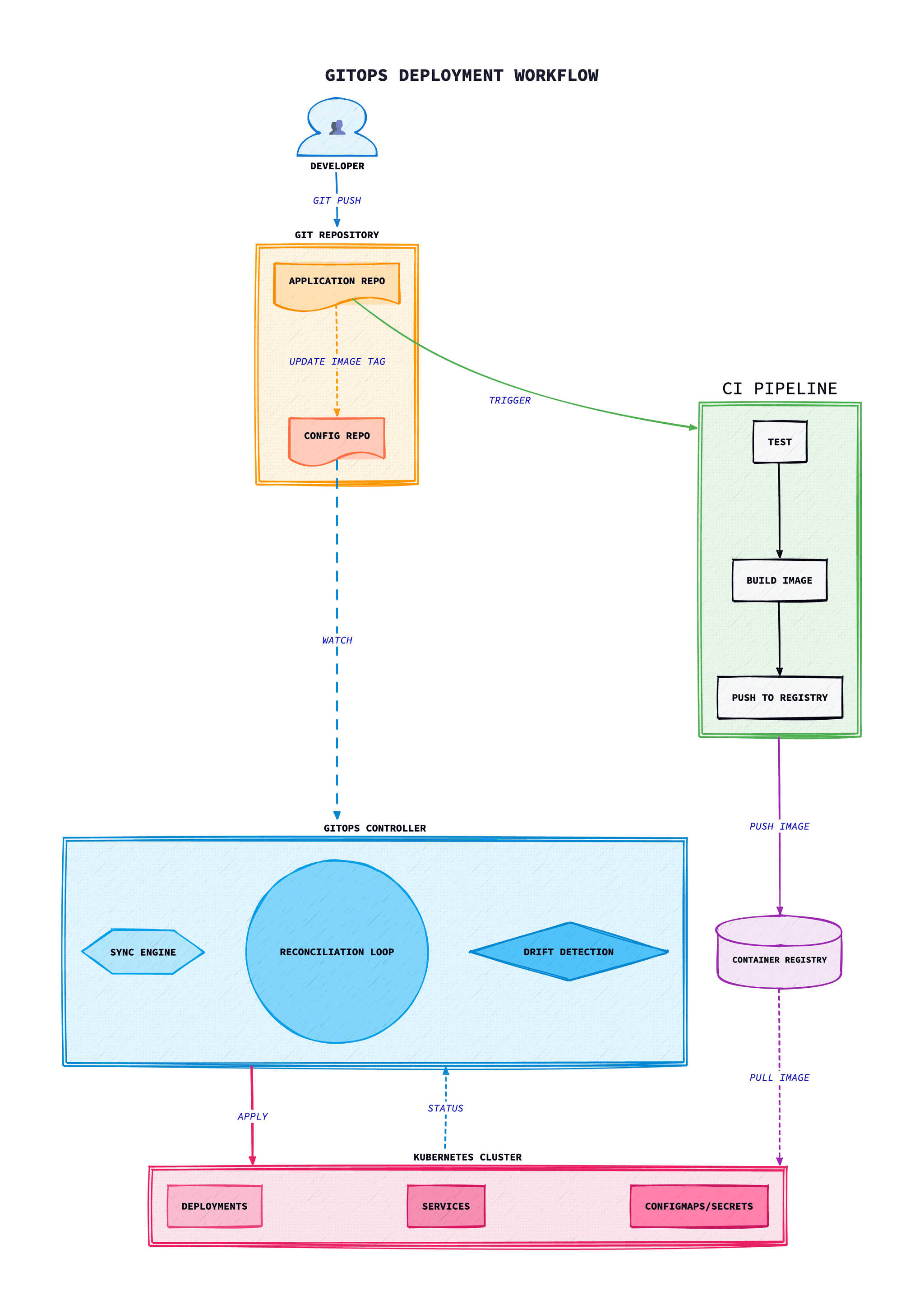
At its core, GitOps extends the principles that made Git successful for application code: version control, collaboration, code review, and auditability, to infrastructure and operational configurations.
Instead of manually applying changes or running imperative scripts, GitOps uses automated agents that continuously monitor Git repositories and apply changes to bring the actual state of the system in line with the desired state declared in Git.
Core GitOps Principles
1. Declarative Configuration
All system configuration must be declarative: describing the desired end state rather than the steps to achieve it. Kubernetes YAML manifests, Helm charts, and Kustomize overlays all fit this model.
2. Version Controlled
The desired state of the system is stored in Git, providing:
- Complete audit trail of all changes
- Ability to rollback to any previous state
- Peer review through pull requests
- Branch-based workflows for different environments
3. Automated Delivery
Changes approved and merged to Git are automatically applied to the system. This eliminates manual kubectl commands and ensures consistency.
4. Continuous Reconciliation
Software agents continuously compare actual state with desired state and take corrective action. This self-healing capability automatically reverts unauthorised changes and recovers from failures.
GitOps Tools: ArgoCD vs Flux
ArgoCD
ArgoCD is a declarative, GitOps continuous delivery tool for Kubernetes. Key features include:
- Rich web UI for visualising application state
- Multi-cluster management capabilities
- SSO integration and RBAC
- Webhook and CLI-driven sync
- Support for Helm, Kustomize, Jsonnet, and plain YAML
- Application health assessment
Flux
Flux is a set of continuous delivery solutions for Kubernetes, part of the CNCF. Key features include:
- Modular toolkit approach
- Native Kubernetes CRDs
- Image automation and scanning
- Multi-tenancy support
- Notification system for alerts
- Progressive delivery with Flagger
Choosing Between Them
Choose ArgoCD if you need a rich UI, multi-cluster management from a single pane, and prefer a more opinionated solution. Choose Flux if you prefer a modular approach, need advanced image automation, or want deeper Kubernetes-native integration.
Implementing GitOps
Repository Structure
A well-organised repository structure is essential. Common patterns include:
- Monorepo: All applications and environments in a single repository
- Polyrepo: Separate repositories for application code and configuration
- Hybrid: Application code in separate repos, shared configuration in a central repo
Environment Management
Use directory structures or branches to manage multiple environments:
- Directory-based: /environments/dev, /environments/staging, /environments/prod
- Kustomize overlays: Base configurations with environment-specific patches
- Helm values: Environment-specific values files
Deployment Strategies
- Automatic sync: Changes are automatically applied when merged
- Manual sync: Changes require explicit approval before deployment
- Progressive delivery: Canary, blue-green, or A/B deployments
Best Practices
1. Separate Application and Config Repos
Keep application source code separate from deployment configuration. This provides clear separation of concerns and allows different teams to manage code and configuration independently.
2. Use Semantic Versioning for Images
Tag container images with semantic versions rather than using 'latest'. This enables meaningful rollbacks and provides clarity about what's deployed.
3. Implement Proper RBAC
Restrict who can merge to protected branches. Use CODEOWNERS files and branch protection rules to ensure appropriate review of changes.
4. Test Before Merging
Implement pre-merge validation including manifest linting, policy checks, and schema validation. Tools like kubeval, conftest, and OPA help catch errors before deployment.
5. Monitor Drift
Alert on configuration drift between Git and actual cluster state. Investigate and address drift promptly to maintain system integrity.
6. Document Everything
Include README files explaining repository structure, deployment procedures, and troubleshooting guides. Document why decisions were made, not just what.
Security Considerations
Secrets Management
Never store plain-text secrets in Git. Use solutions like:
- Sealed Secrets: Encrypted secrets stored in Git
- External Secrets Operator: Syncs secrets from external providers
- SOPS: Encrypts specific values within files
- HashiCorp Vault: Central secrets management with dynamic credentials
Repository Security
- Enable branch protection on main/production branches
- Require pull request reviews before merging
- Enable signed commits for verification
- Audit repository access regularly
- Use least-privilege access for GitOps agents
Network and Cluster Security
- Run GitOps agents with minimal RBAC permissions
- Use network policies to restrict agent communication
- Enable audit logging for all operations
- Regularly rotate credentials and tokens
Troubleshooting
Common issues and solutions when implementing GitOps with Kubernetes.
ArgoCD Application Out of Sync
Symptom: Application shows “OutOfSync” status but manifests appear identical.
Common causes:
- Server-side defaulting adding fields not in Git manifests
- Mutating webhooks modifying resources
- Differences in field ordering or formatting
- Drift in mutable fields like replicas from HPA
Solution:
# Check the diff to identify what's causing OutOfSync# Ignore specific fields that are managed externallye specific fields that are managed externally
apiVersion: argoproj.io/v1alpha1
kind: Application
spec:
  ignoreDifferences:
  - group: apps
    kind: Deployment
    jsonPointers:
    - /spec/replicas
  - group: "*"
    kind: "*"
    managedFieldsManagers:
    - kube-controller-manager
Flux Kustomization Failing to Reconcile
Error: “kustomize build failed: accumulating resources: accumulation err”
Common causes:
- Invalid Kustomization file syntax
- Missing or incorrect resource paths
- Git branch or path configuration errors
- Missing SOPS decryption keys for secrets
Solution:
# Check Kustomization status and events# Validate kustomize locally before committing# Validate kustomize locally before committing# Validate kustomize locally before committing# Check source controller for Git sync issues# Force reconciliation# Force reconciliation# Force reconciliation# Force reconciliation# Force reconciliationliation
flux reconcile kustomization my-app --with-source
Webhook Delivery Failures
Symptom: Changes pushed to Git but ArgoCD/Flux doesn't detect them immediately.
Common causes:
- Webhook endpoint not reachable from Git provider
- Incorrect webhook secret configuration
- Network policies blocking incoming webhooks
- TLS certificate issues
Solution:
# Check webhook deliveries in GitHub/GitLab UI for errors# For ArgoCD, verify webhook is configured# Ensure webhook secret matches# Ensure webhook secret matches# Check ArgoCD server logs for webhook processing# Check ArgoCD server logs for webhook processing# Fallback: reduce poll interval for faster detection# Fallback: reduce poll interval for faster detectioninterval for faster detection
apiVersion: argoproj.io/v1alpha1
kind: Application
spec:
  source:
    repoURL: https://github.com/org/repo
  syncPolicy:
    automated: {}
  project: default
Secrets Not Decrypting
Error: “failed to decrypt secrets: could not find key” or “MAC mismatch”
Common causes:
- SOPS age key not available to controller
- Sealed Secrets controller using wrong key
- Secret encrypted for different cluster
- Key rotation without re-encrypting secrets
Solution:
# For SOPS with Flux, verify age key is mounted# Re-encrypt with correct key# Re-encrypt with correct key# For Sealed Secrets, fetch the current public key# For Sealed Secrets, fetch the current public key# For Sealed Secrets, fetch the current public key# For Sealed Secrets, fetch the current public key# Verify controller can decrypt# Verify controller can decrypt# Verify controller can decrypt# Verify controller can decryptfy controller can decrypt
kubectl logs -n kube-system deploy/sealed-secrets-controller
Sync Waves and Hooks Not Executing in Order
Symptom: Resources deploying out of expected order causing dependency failures.
Common causes:
- Missing or incorrect sync wave annotations
- Hooks not marked with correct phase
- Resources in same wave have dependencies on each other
Solution:
# Use sync waves to control ordering (lower numbers first)# Use hooks for jobs that must complete before sync# Use hooks for jobs that must complete before sync# Use hooks for jobs that must complete before sync# Use hooks for jobs that must complete before sync# Use hooks for jobs that must complete before sync# Use hooks for jobs that must complete before sync sync
metadata:
  annotations:
    argocd.argoproj.io/hook: PreSync
    argocd.argoproj.io/hook-delete-policy: HookSucceeded
Conclusion
GitOps changes how we manage Kubernetes deployments in a concrete way. By treating Git as the single source of truth and using automated reconciliation, organisations achieve greater reliability, improved auditability, and faster recovery from failures.
Whether you choose ArgoCD, Flux, or another GitOps tool, the principles remain the same: declarative configuration, version-controlled state, automated delivery, and continuous reconciliation.
Start small: perhaps with a single application in a non-production environment, and expand as you gain confidence. The investment in GitOps pays dividends through reduced operational overhead, improved security posture, and enhanced developer experience.
ArgoCD Setup and Configuration
Installation with Helm
# Add ArgoCD Helm repository# Create namespace# Create namespace# Create namespace# Create namespace# Create namespace# Install ArgoCD with HA configuration# Get initial admin password# Get initial admin password# Get initial admin password# Get initial admin password# Get initial admin password# Get initial admin password# Get initial admin password# Get initial admin password# Get initial admin password# Get initial admin password# Get initial admin passwordt initial admin password
kubectl -n argocd get secret argocd-initial-admin-secret \
  -o jsonpath="{.data.password}" | base64 -d
ArgoCD Application Manifest
apiVersion: argoproj.io/v1alpha1
kind: Application
metadata:
  name: my-app
  namespace: argocd
  finalizers:
    - resources-finalizer.argocd.argoproj.io
spec:
  project: default
  source:
    repoURL: https://github.com/org/gitops-repo.git
    targetRevision: main
    path: apps/my-app/overlays/production
  destination:
    server: https://kubernetes.default.svc
    namespace: production
  syncPolicy:
    automated:
      prune: true
      selfHeal: true
      allowEmpty: false
    syncOptions:
      - CreateNamespace=true
      - PrunePropagationPolicy=foreground
      - PruneLast=true
    retry:
      limit: 5
      backoff:
        duration: 5s
        factor: 2
        maxDuration: 3m
ApplicationSet for Multi-Environment Deployment
apiVersion: argoproj.io/v1alpha1
kind: ApplicationSet
metadata:
  name: my-app-environments
  namespace: argocd
spec:
  generators:
    - list:
        elements:
          - cluster: dev
            url: https://dev-cluster.example.com
            namespace: dev
          - cluster: staging
            url: https://staging-cluster.example.com
            namespace: staging
          - cluster: production
            url: https://prod-cluster.example.com
            namespace: production
  template:
    metadata:
      name: 'my-app-{{cluster}}'
    spec:
      project: default
      source:
        repoURL: https://github.com/org/gitops-repo.git
        targetRevision: main
        path: 'apps/my-app/overlays/{{cluster}}'
      destination:
        server: '{{url}}'
        namespace: '{{namespace}}'
      syncPolicy:
        automated:
          prune: true
          selfHeal: true
Flux Setup and Configuration
Bootstrap Flux
# Install Flux CLI# Check prerequisites# Check prerequisites# Bootstrap Flux with GitHub# Bootstrap Flux with GitHub# Verify installation# Verify installation# Verify installation# Verify installation# Verify installation# Verify installation# Verify installation installation
flux check
Flux GitRepository Source
apiVersion: source.toolkit.fluxcd.io/v1
kind: GitRepository
metadata:
  name: my-app
  namespace: flux-system
spec:
  interval: 1m
  url: https://github.com/org/my-app.git
  ref:
    branch: main
  secretRef:
    name: github-credentials
---
apiVersion: kustomize.toolkit.fluxcd.io/v1
kind: Kustomization
metadata:
  name: my-app
  namespace: flux-system
spec:
  interval: 10m
  targetNamespace: production
  sourceRef:
    kind: GitRepository
    name: my-app
  path: ./deploy/overlays/production
  prune: true
  healthChecks:
    - apiVersion: apps/v1
      kind: Deployment
      name: my-app
      namespace: production
  timeout: 2m
Flux Image Automation
# Image repository to scan# Policy for selecting image tags# Policy for selecting image tags# Policy for selecting image tags# Policy for selecting image tags# Policy for selecting image tags# Policy for selecting image tags# Policy for selecting image tags# Automation to update Git# Automation to update Git# Automation to update Git# Automation to update Git# Automation to update Git# Automation to update Git# Automation to update Git# Automation to update Git# Automation to update Git update Git
apiVersion: image.toolkit.fluxcd.io/v1beta2
kind: ImageUpdateAutomation
metadata:
  name: my-app
  namespace: flux-system
spec:
  interval: 30m
  sourceRef:
    kind: GitRepository
    name: fleet-infra
  git:
    checkout:
      ref:
        branch: main
    commit:
      author:
        email: flux@example.com
        name: Flux
      messageTemplate: 'Update {{.AutomationObject.Name}} to {{.NewTag}}'
    push:
      branch: main
  update:
    path: ./clusters/production
    strategy: Setters
Recommended Repository Structure
Monorepo Structure with Kustomize
gitops-repo/
├── apps/
│   ├── my-app/
│   │   ├── base/
│   │   │   ├── kustomization.yaml
│   │   │   ├── deployment.yaml
│   │   │   ├── service.yaml
│   │   │   └── configmap.yaml
│   │   └── overlays/
│   │       ├── dev/
│   │       │   ├── kustomization.yaml
│   │       │   └── patches/
│   │       │       └── replicas.yaml
│   │       ├── staging/
│   │       │   ├── kustomization.yaml
│   │       │   └── patches/
│   │       └── production/
│   │           ├── kustomization.yaml
│   │           └── patches/
│   │               ├── replicas.yaml
│   │               └── resources.yaml
│   └── another-app/
│       └── ...
├── infrastructure/
│   ├── controllers/
│   │   ├── ingress-nginx/
│   │   ├── cert-manager/
│   │   └── external-secrets/
│   └── configs/
│       ├── cluster-issuer.yaml
│       └── external-secrets-store.yaml
├── clusters/
│   ├── dev/
│   │   ├── apps.yaml
│   │   └── infrastructure.yaml
│   ├── staging/
│   └── production/
└── README.md
Kustomization Example
# apps/my-app/base/kustomization.yaml# apps/my-app/overlays/production/kustomization.yaml# apps/my-app/overlays/production/kustomization.yaml# apps/my-app/overlays/production/kustomization.yaml# apps/my-app/overlays/production/kustomization.yaml# apps/my-app/overlays/production/kustomization.yamlkustomization.yaml
apiVersion: kustomize.config.k8s.io/v1beta1
kind: Kustomization
namespace: production
resources:
  - ../../base
patches:
  - path: patches/replicas.yaml
  - path: patches/resources.yaml
configMapGenerator:
  - name: my-app-config
    behavior: merge
    literals:
      - LOG_LEVEL=warn
      - ENVIRONMENT=production
images:
  - name: my-app
    newName: ghcr.io/org/my-app
    newTag: v1.2.3
Secrets Management in GitOps
Sealed Secrets
# Install Sealed Secrets controller# Create a sealed secret# Create a sealed secret# Create a sealed secret# Create a sealed secret# Create a sealed secret# Create a sealed secret# Create a sealed secret# The sealed secret can be safely committed to Git# The sealed secret can be safely committed to Git# The sealed secret can be safely committed to Git# The sealed secret can be safely committed to Git# The sealed secret can be safely committed to Git# The sealed secret can be safely committed to Gitted to Git
cat sealed-secret.yaml
External Secrets Operator
# Install External Secrets Operator# Configure ClusterSecretStore for AWS Secrets Manager# Configure ClusterSecretStore for AWS Secrets Manager# Configure ClusterSecretStore for AWS Secrets Manager# Configure ClusterSecretStore for AWS Secrets Manager# ExternalSecret that syncs from AWS# ExternalSecret that syncs from AWS# ExternalSecret that syncs from AWS# ExternalSecret that syncs from AWS# ExternalSecret that syncs from AWS# ExternalSecret that syncs from AWS# ExternalSecret that syncs from AWS# ExternalSecret that syncs from AWS# ExternalSecret that syncs from AWS# ExternalSecret that syncs from AWSlSecret that syncs from AWS
apiVersion: external-secrets.io/v1beta1
kind: ExternalSecret
metadata:
  name: my-app-secrets
  namespace: production
spec:
  refreshInterval: 1h
  secretStoreRef:
    kind: ClusterSecretStore
    name: aws-secrets-manager
  target:
    name: my-app-secrets
    creationPolicy: Owner
  data:
    - secretKey: database-password
      remoteRef:
        key: production/my-app
        property: database-password
    - secretKey: api-key
      remoteRef:
        key: production/my-app
        property: api-key
SOPS with Age Encryption
# Install SOPS# Generate age key# Generate age key# Create .sops.yaml configuration# Encrypt a secret# Encrypt a secret# Encrypt a secret# Encrypt a secret# Encrypt a secret# Encrypt a secret# Encrypt a secret# Encrypt a secret# Encrypt a secret# Encrypt a secret# Encrypt a secret# Encrypt a secret# Decrypt (for ArgoCD or Flux)# Decrypt (for ArgoCD or Flux)# Decrypt (for ArgoCD or Flux)# Configure decryption key in clusterter
kubectl create secret generic sops-age \
  --namespace=argocd \
  --from-file=age.key
Troubleshooting GitOps
Issue: Application stuck in "OutOfSync" state
Symptoms: ArgoCD shows OutOfSync but manual sync fails
# Check application status details
argocd app get my-app --show-diff

# Force refresh from Git
argocd app get my-app --hard-refresh

# Check for resource hooks blocking sync
kubectl get jobs -n argocd -l argocd.argoproj.io/hook

# View sync operation details
argocd app sync my-app --dry-run
Solution: Check for resource conflicts, finalizers preventing deletion, or webhook timeouts. Verify RBAC permissions for the ArgoCD application controller.
Issue: Flux Kustomization failing to reconcile
Symptoms:Kustomization shows "False" Ready condition
# Check Kustomization status
flux get kustomizations

# View detailed events
kubectl describe kustomization my-app -n flux-system

# Check source controller logs
kubectl logs -n flux-system deploy/source-controller

# Force reconciliation
flux reconcile kustomization my-app --with-source
Solution: Verify GitRepository is synced, check for Kustomize build errors, ensure target namespace exists or CreateNamespace is enabled.
Issue: Git authentication failures
Symptoms:"authentication required" or "permission denied"
# For ArgoCD - check repository credentials
argocd repo list
argocd repo add https://github.com/org/repo.git \
  --username git \
  --password <PAT>

# For Flux - verify secret
kubectl get secret github-credentials -n flux-system -o yaml
flux create secret git github-credentials \
  --url=https://github.com/org/repo \
  --username=git \
  --password=<PAT>
Solution: Regenerate GitHub/GitLab personal access token, verify token has correct scopes (repo access), check for expired credentials.
Issue: Drift detection showing false positives
Symptoms: Resources always show as modified
# Ignore specific fields in ArgoCD
apiVersion: argoproj.io/v1alpha1
kind: Application
spec:
  ignoreDifferences:
    - group: apps
      kind: Deployment
      jsonPointers:
        - /spec/replicas  # Ignore HPA-managed replicas
    - group: ""
      kind: Service
      jqPathExpressions:
        - .spec.clusterIP  # Ignore auto-assigned ClusterIP
Solution: Configure ignoreDifferences for fields managed by controllers (HPA replicas, mutating webhooks). Use server-side apply for better field ownership tracking.