
Introduction: The 2025 Threat Landscape
Cloud-native architectures have become the standard for modern application development, but they also introduce new security challenges. The distributed nature of microservices, the ephemeral lifecycle of containers, and the complexity of Kubernetes create a vast attack surface that requires a fundamentally different security approach.
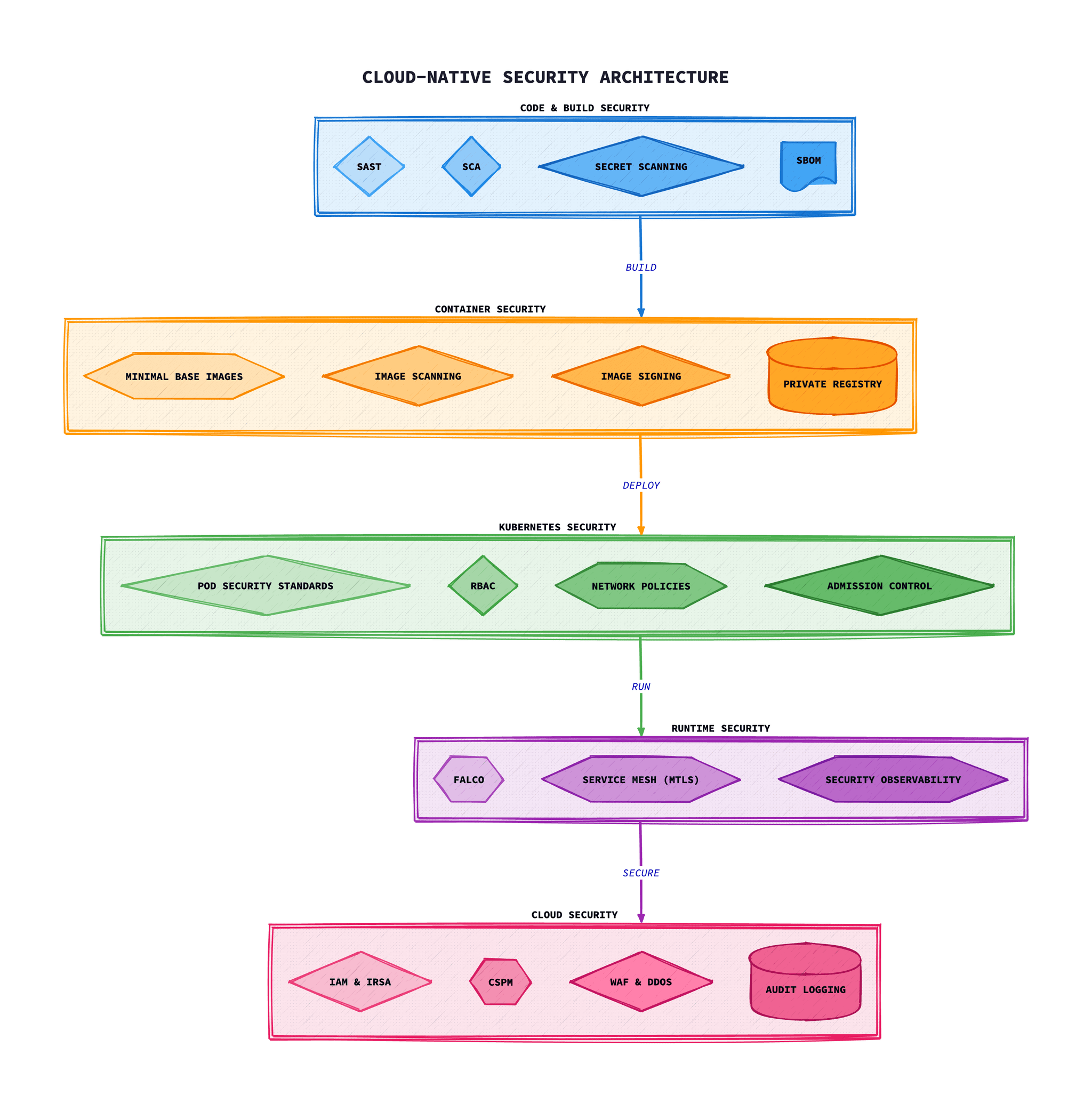
In 2025, organisations face an evolving threat landscape characterised by sophisticated supply chain attacks, ransomware targeting cloud infrastructure, and increasingly automated exploitation of misconfigurations. The NCSC and CISA have both highlighted cloud security as a critical priority, emphasising the need for defence in depth strategies.
Worth noting:Sysdig's 2024 Cloud-Native Security Report found that most container images in production contain at least one known vulnerability, and misconfigurations remain the leading cause of cloud security breaches.
Container Security Fundamentals
Secure Base Images
Start with minimal, trusted base images. Distroless images from Google, Alpine Linux, or purpose-built images significantly reduce the attack surface by removing unnecessary packages, shells, and utilities.
- Use distroless or minimal base images where possible
- Pin image versions using SHA256 digests, not tags
- Regularly rebuild images to incorporate security patches
- Maintain an approved list of base images
Image Scanning
Implement automated vulnerability scanning at multiple stages:
- Build time: Integrate scanners like Trivy, Grype, or Snyk into CI pipelines
- Registry: Enable continuous scanning of stored images
- Runtime: Monitor running containers for newly discovered vulnerabilities
Establish clear policies for vulnerability severity thresholds and remediation SLAs. Critical vulnerabilities should block deployment; high-severity issues should trigger alerts and require remediation within defined timeframes.
Container Runtime Security
- Run containers as non-root users
- Use read-only root filesystems where possible
- Drop all capabilities and add only those required
- Implement seccomp and AppArmor/SELinux profiles
- Disable privilege escalation
Kubernetes Security Hardening
Pod Security Standards
Kubernetes Pod Security Standards (PSS) define three policies: Privileged, Baseline, and Restricted. For production workloads, aim for the Restricted profile, which enforces strict security best practices.
Key restrictions in the Restricted profile include:
- Running as non-root
- Disallowing privilege escalation
- Requiring a read-only root filesystem
- Dropping all capabilities
- Restricting volume types
Network Policies
Implement network policies to enforce microsegmentation. Start with a default-deny policy and explicitly allow only required communication paths.
- Define ingress and egress rules for each namespace
- Limit pod-to-pod communication to necessary paths
- Restrict external access to the minimum required
- Consider service mesh for advanced traffic management
RBAC Best Practices
- Follow the principle of least privilege
- Avoid cluster-admin roles in production
- Use service accounts with minimal permissions
- Regularly audit RBAC configurations
- Implement just-in-time access for administrative tasks
API Server Security
- Enable audit logging for all API requests
- Use TLS for all communications
- Disable anonymous authentication
- Implement admission controllers for policy enforcement
- Regularly rotate certificates and credentials
Supply Chain Security
Supply chain attacks have become increasingly prevalent, with high-profile incidents demonstrating the potential impact. Securing your software supply chain requires a multi-layered approach.
Software Bill of Materials (SBOM)
Generate and maintain SBOMs for all container images and applications. SBOMs provide visibility into all components and dependencies, enabling rapid response to newly discovered vulnerabilities.
- Generate SBOMs in standard formats (SPDX, CycloneDX)
- Store SBOMs alongside images in your registry
- Automate SBOM generation in CI/CD pipelines
- Use SBOMs for vulnerability tracking and compliance
Image Signing
Sign container images to ensure integrity and provenance. Implement signature verification in your deployment pipeline to prevent deployment of tampered images.
- Use Sigstore/Cosign for keyless signing with OIDC identity
- Verify signatures before deployment using admission controllers
- Establish a chain of custody for all images
- Document and audit your signing process
Dependency Management
- Use lock files to pin dependency versions
- Enable Dependabot or Renovate for automated updates
- Scan dependencies for vulnerabilities before merging
- Review and approve dependency changes carefully
- Consider using a private package registry
Runtime Security and Threat Detection
Whilst shift-left security is essential, it must be complemented by runtime protection. Attackers may exploit zero-day vulnerabilities, misconfigurations, or compromised credentials that bypass preventive controls.
Runtime Threat Detection
- Falco: Open-source runtime security tool that detects anomalous behaviour
- Sysdig: Commercial platform with deep container visibility
- Aqua Security: Complete cloud-native security platform
Key behaviours to monitor include:
- Unexpected process execution
- File system modifications in unexpected locations
- Network connections to unusual destinations
- Privilege escalation attempts
- Access to sensitive files or credentials
Incident Response
Develop and practise incident response procedures specific to containerised environments:
- Establish procedures for isolating compromised containers
- Maintain forensic capabilities for container analysis
- Document rollback procedures for rapid recovery
- Conduct regular incident response drills
Secrets Management
Proper secrets management is fundamental to cloud-native security. Never store secrets in container images, environment variables visible in configuration, or source code.
Best Practices
- Use dedicated secrets management solutions (HashiCorp Vault, AWS Secrets Manager, Azure Key Vault)
- Implement automatic secret rotation
- Use short-lived credentials where possible
- Audit secret access and usage
- Encrypt secrets at rest and in transit
Workload Identity
Workload identity federation removes the need for long-lived credentials. Cloud providers offer mechanisms to bind Kubernetes service accounts to cloud IAM roles, enabling secure, credential-free authentication.
Policy as Code
Policy as Code enables consistent security enforcement across your entire infrastructure. Define security policies in code, version them alongside application code, and automate enforcement.
Tools
- OPA/Gatekeeper: General-purpose policy engine for Kubernetes
- Kyverno: Kubernetes-native policy management
- Checkov: Static analysis for infrastructure as code
- TFSec: Terraform security scanner
Example Policies
- Require all pods to run as non-root
- Enforce resource limits on all containers
- Require approved registries for all images
- Mandate network policies in all namespaces
- Enforce labelling standards for ownership and cost allocation
Kyverno Policy Example
Here's a practical Kyverno policy that enforces non-root containers:
apiVersion: kyverno.io/v1
kind: ClusterPolicy
metadata:
  name: require-run-as-nonroot
  annotations:
    policies.kyverno.io/title: Require runAsNonRoot
    policies.kyverno.io/category: Pod Security Standards (Restricted)
    policies.kyverno.io/severity: medium
spec:
  validationFailureAction: Enforce
  background: true
  rules:
    - name: run-as-non-root
      match:
        any:
        - resources:
            kinds:
              - Pod
      validate:
        message: >-
          Running as root is not allowed. Either the field
          spec.securityContext.runAsNonRoot must be set to true, or
          the fields spec.containers[*].securityContext.runAsNonRoot
          and spec.initContainers[*].securityContext.runAsNonRoot
          must be set to true.
        anyPattern:
        - spec:
            securityContext:
              runAsNonRoot: true
            containers:
            - securityContext:
                runAsNonRoot: true
            initContainers:
            - securityContext:
                runAsNonRoot: true
OPA Gatekeeper Constraint
For organisations using OPA Gatekeeper, here's an equivalent constraint:
apiVersion: constraints.gatekeeper.sh/v1beta1
kind: K8sRequiredProbes
metadata:
  name: must-have-probes
spec:
  match:
    kinds:
      - apiGroups: [""]
        kinds: ["Pod"]
    excludedNamespaces:
      - kube-system
      - gatekeeper-system
  parameters:
    probes:
      - readinessProbe
      - livenessProbe
    probeTypes:
      - httpGet
      - tcpSocket
      - exec
Implementation Guide: Securing a Production Cluster
This section provides a step-by-step guide to implementing cloud-native security in a production Kubernetes cluster.
Step 1: Secure Dockerfile Best Practices
# Use specific digest for reproducibility# Create non-root user# Create non-root user# Create non-root user# Create non-root user# Copy dependency files first for better layer caching# Copy dependency files first for better layer caching# Copy application code# Copy application code# Copy application code# Copy application code# Copy application code# Switch to non-root user# Switch to non-root user# Use HEALTHCHECK for container orchestration# Don't run as PID 1 - use dumb-init or tini# Don't run as PID 1 - use dumb-init or tini# Don't run as PID 1 - use dumb-init or tini# Don't run as PID 1 - use dumb-init or tini tini
ENTRYPOINT ["/usr/bin/dumb-init", "--"]
CMD ["node", "server.js"]
Step 2: Pod Security Configuration
apiVersion: v1
kind: Pod
metadata:
  name: secure-app
  labels:
    app: secure-app
spec:
  securityContext:
    runAsNonRoot: true
    runAsUser: 1001
    runAsGroup: 1001
    fsGroup: 1001
    seccompProfile:
      type: RuntimeDefault
  containers:
  - name: app
    image: myregistry.io/app:v1.2.3@sha256:abc123...
    securityContext:
      allowPrivilegeEscalation: false
      readOnlyRootFilesystem: true
      capabilities:
        drop:
          - ALL
    resources:
      limits:
        cpu: "500m"
        memory: "256Mi"
      requests:
        cpu: "100m"
        memory: "128Mi"
    volumeMounts:
    - name: tmp
      mountPath: /tmp
    - name: cache
      mountPath: /app/.cache
  volumes:
  - name: tmp
    emptyDir: {}
  - name: cache
    emptyDir: {}
  automountServiceAccountToken: false
Step 3: Network Policy Implementation
# Default deny all ingress and egress# Allow specific application traffic# Allow specific application traffic# Allow specific application traffic# Allow specific application traffic# Allow specific application traffic Allow specific application traffic
apiVersion: networking.k8s.io/v1
kind: NetworkPolicy
metadata:
  name: allow-app-traffic
  namespace: production
spec:
  podSelector:
    matchLabels:
      app: frontend
  policyTypes:
  - Ingress
  - Egress
  ingress:
  - from:
    - namespaceSelector:
        matchLabels:
          name: ingress-nginx
    ports:
    - protocol: TCP
      port: 8080
  egress:
  - to:
    - podSelector:
        matchLabels:
          app: backend
    ports:
    - protocol: TCP
      port: 3000
  - to:  # Allow DNS
    - namespaceSelector: {}
      podSelector:
        matchLabels:
          k8s-app: kube-dns
    ports:
    - protocol: UDP
      port: 53
Step 4: Image Signing with Cosign
# Generate a signing key pair# Sign an image (keyless with OIDC)# Sign with a key# Sign with a key# Sign with a key# Sign with a key# Sign with a key# Verify signature# Verify signature# Verify signature# Verify signature# Generate and attach SBOM# Generate and attach SBOM# Generate and attach SBOM# Verify SBOM attachment# Verify SBOM attachment# Verify SBOM attachment# Verify SBOM attachment# Verify SBOM attachment# Verify SBOM attachmentattachment
cosign verify-attestation myregistry.io/app:v1.2.3
Step 5: CI/CD Pipeline Security Integration
# .github/workflows/secure-build.yml
name: Secure Build Pipeline

on:
  push:
    branches: [main]
  pull_request:
    branches: [main]

jobs:
  security-scan:
    runs-on: ubuntu-latest
    permissions:
      contents: read
      security-events: write
      id-token: write  # For keyless signing

    steps:
    - uses: actions/checkout@v4

    - name: Run Trivy vulnerability scanner
      uses: aquasecurity/trivy-action@master
      with:
        scan-type: 'fs'
        scan-ref: '.'
        format: 'sarif'
        output: 'trivy-results.sarif'
        severity: 'CRITICAL,HIGH'

    - name: Upload Trivy scan results
      uses: github/codeql-action/upload-sarif@v2
      with:
        sarif_file: 'trivy-results.sarif'

    - name: Build image
      run: |
        docker build -t myregistry.io/app:${{ github.sha }} .

    - name: Scan container image
      uses: aquasecurity/trivy-action@master
      with:
        image-ref: 'myregistry.io/app:${{ github.sha }}'
        format: 'sarif'
        output: 'image-trivy.sarif'
        exit-code: '1'
        severity: 'CRITICAL'

    - name: Generate SBOM
      uses: anchore/sbom-action@v0
      with:
        image: myregistry.io/app:${{ github.sha }}
        format: spdx-json
        output-file: sbom.spdx.json

    - name: Install Cosign
      uses: sigstore/cosign-installer@main

    - name: Sign image (keyless)
      run: |
        cosign sign --yes myregistry.io/app:${{ github.sha }}

    - name: Attach SBOM to image
      run: |
        cosign attach sbom --sbom sbom.spdx.json \
          myregistry.io/app:${{ github.sha }}
Runtime Detection with Falco
Falco provides runtime threat detection for containers. Here's a complete setup with custom rules:
Falco Installation via Helm
# Add Falco Helm repository# Install Falco with custom values# Install Falco with custom values# Install Falco with custom valueswith custom values
helm install falco falcosecurity/falco \
  --namespace falco \
  --create-namespace \
  --set driver.kind=ebpf \
  --set collectors.kubernetes.enabled=true \
  --set falcosidekick.enabled=true \
  --set falcosidekick.config.slack.webhookurl="https://hooks.slack.com/..." \
  -f falco-values.yaml
Custom Falco Rules
# custom-rules.yaml
customRules:
  rules-custom.yaml: |-
    # Detect cryptocurrency mining
    - rule: Detect crypto miners using the Stratum protocol
      desc: Detect cryptocurrency mining activity
      condition: >
        spawned_process and
        (proc.cmdline contains "stratum+tcp://" or
         proc.cmdline contains "stratum+ssl://")
      output: >
        Crypto mining detected
        (user=%user.name command=%proc.cmdline container=%container.name)
      priority: CRITICAL
      tags: [cryptomining, mitre_execution]

    # Detect shell spawned in container
    - rule: Shell Spawned in Container
      desc: Detect shell execution in a container
      condition: >
        spawned_process and
        container and
        shell_procs and
        not shell_spawned_by_trusted_proc
      output: >
        Shell spawned in container
        (user=%user.name shell=%proc.name parent=%proc.pname
         container=%container.name image=%container.image.repository)
      priority: WARNING
      tags: [container, shell, mitre_execution]

    # Detect sensitive file access
    - rule: Read Sensitive Files
      desc: Detect reads of sensitive files
      condition: >
        open_read and
        sensitive_files and
        container
      output: >
        Sensitive file read in container
        (user=%user.name file=%fd.name container=%container.name)
      priority: WARNING
      tags: [filesystem, confidentiality]
Troubleshooting Common Security Issues
Issue: Pods failing to start due to security context
Symptoms: Pods stuck in CrashLoopBackOff with permission errors
Diagnosis:
# Check pod events
kubectl describe pod <pod-name>

# Check security context violations
kubectl get events --field-selector reason=FailedCreate

# Verify PSA labels on namespace
kubectl get ns <namespace> -o yaml | grep pod-securitySolution:Ensure your security context matches the namespace's Pod Security Standards. Add emptyDir volumes for writable paths if using readOnlyRootFilesystem.
Issue: Network policies blocking legitimate traffic
Symptoms: Services unable to communicate despite correct configuration
# Check network policies affecting a pod
kubectl get networkpolicy -A -o wide

# Test connectivity from within a pod
kubectl exec -it <pod> -- wget -qO- --timeout=2 http://service:port

# Check if CNI supports network policies
kubectl get pods -n kube-system | grep -E "(calico|cilium|weave)"
Solution: Verify your CNI supports NetworkPolicy. Ensure DNS egress is allowed (UDP port 53 to kube-dns). Use network policy visualisation tools like Cilium Hubble.
Issue: Image signature verification failing
Symptoms: Admission controller rejecting deployments
# Verify signature manually
cosign verify --key cosign.pub myregistry.io/app:tag

# Check if signature exists
cosign tree myregistry.io/app:tag

# Debug admission webhook
kubectl logs -n sigstore-system deploy/policy-controller
Solution: Ensure images are signed in CI/CD before push. Check that the public key or keyless configuration matches. Verify the admission controller has network access to Rekor transparency log.
Issue: Secrets appearing in container logs or environment
Symptoms: Sensitive data visible in kubectl logs or describe
# Audit secret access
kubectl get events --field-selector reason=SecretAccess

# Check if secrets are mounted as env vars (bad)
kubectl get pod <pod> -o jsonpath='{.spec.containers[*].env[*].valueFrom.secretKeyRef}'

# Verify secrets are mounted as files instead
kubectl get pod <pod> -o jsonpath='{.spec.containers[*].volumeMounts}'
Solution: Mount secrets as files rather than environment variables. Use external secrets operators to inject at runtime. Enable secret encryption at rest in etcd.
Production Security Checklist
Container Security
- Use minimal base images (distroless, Alpine, or Chainguard)
- Pin image versions with SHA256 digests
- Run containers as non-root user
- Enable read-only root filesystem
- Drop all capabilities and add only required ones
- Implement vulnerability scanning in CI/CD
Kubernetes Cluster Security
- Enable Pod Security Standards (Restricted profile)
- Implement default-deny network policies
- Configure RBAC with least privilege
- Enable API server audit logging
- Encrypt secrets at rest
- Disable automounting service account tokens
Supply Chain Security
- Generate SBOMs for all container images
- Sign container images with Sigstore/Cosign
- Verify signatures before deployment
- Use private/approved registries only
- Enable Dependabot/Renovate for dependency updates
Runtime Security
- Deploy runtime threat detection (Falco/Sysdig)
- Configure alerts for anomalous behaviour
- Document incident response procedures
- Practice regular incident response drills
Conclusion
Securing cloud-native applications in 2025 requires a thorough, defence-in-depth approach that addresses security at every layer: from base images and dependencies to runtime behaviour and incident response.
Key priorities for organisations include:
- Implementing supply chain security with SBOMs and image signing
- Extending Zero Trust principles to workload identities
- Complementing shift-left security with runtime threat detection
- Adopting Policy as Code for consistent enforcement at scale
- Continuously monitoring, auditing, and improving security posture
The threat landscape will continue to evolve, but organisations that build security into their cloud-native foundations will be better positioned to respond to emerging threats whilst maintaining the agility that makes cloud-native architectures valuable.