
Why Self-Host in 2026?
While proprietary models like GPT-5 and Claude 4.5 push the frontiers of reasoning, open-weight models (Llama 3, Mistral, Qwen) have become "good enough" for 90% of enterprise use cases, and often faster and cheaper.
Self-hosting allows you to:
- Own Your Data: Ensure sensitive PII or IP never leaves your VPC.
- Control Latency: Eliminate internet round-trips. Local inference can achieve <10ms TTFT (Time to First Token).
- Fix Costs: Stop paying per token. Pay for GPU hours, regardless of volume.
- Ensure Reliability: No more "Service Unavailable" errors during provider outages.
Hardware Sizing Guide
The most common question: "How much VRAM do I need?"
The rule of thumb for FP16 (16-bit) precision is: 2GB VRAM per 1 Billion Parameters. For 4-bit quantisation, it's roughly 0.7-0.8GB per 1 Billion Parameters (plus overhead for context).
| Model Size | FP16 VRAM | 4-bit (AWQ) VRAM | Recommended GPU |
|---|---|---|---|
| 7B / 8B | ~16 GB | ~6-8 GB | RTX 3060 / 4060 Ti / T4 |
| 13B / 14B | ~28 GB | ~10-12 GB | RTX 3090 / 4090 / L4 |
| 70B / 72B | ~140 GB | ~40-48 GB | 1x A6000 / 2x RTX 4090 |
| Mixtral 8x7B | ~96 GB | ~26-32 GB | 1x A100 40GB / 2x RTX 3090 |
The Inference Software Landscape
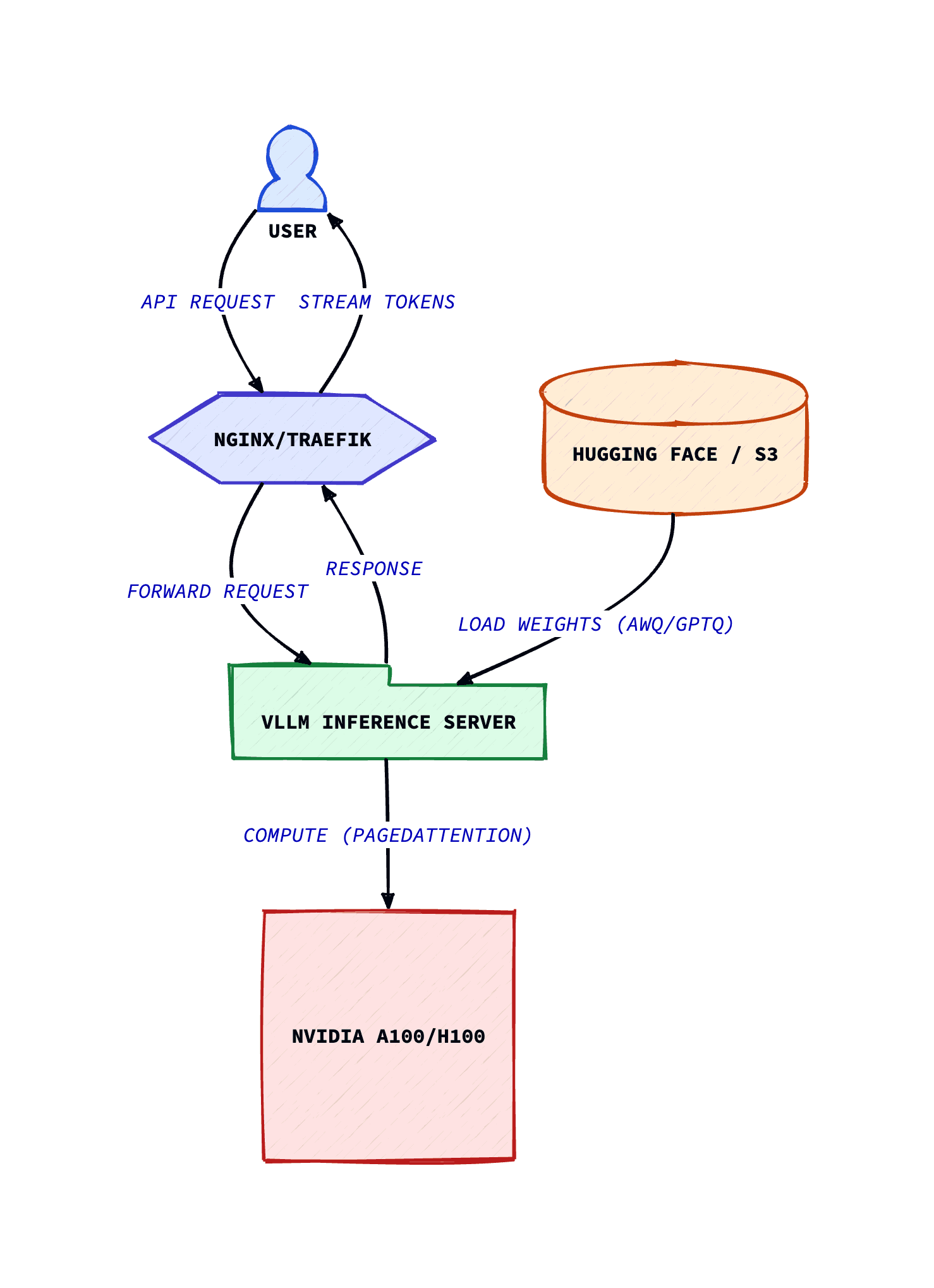
Choosing the right serving engine is as critical as the hardware.
vLLM (The Production Standard)
Open-source, high-throughput serving engine. Famous for inventing PagedAttention, which manages KV cache memory like an OS manages RAM, maximising batch sizes. Supports OpenAI-compatible API.
Ollama (The Developer Standard)
Focuses on simplicity. Wraps llama.cpp in a Go binary. Just ollama run llama3. Perfect for local dev, laptops, and simple deployments.
TGI (Text Generation Inference)
Built by Hugging Face. Highly optimised, rust-based. Features tensor parallelism, continuous batching, and native integration with Hugging Face Hub.
Production Inference with vLLM
For enterprise deployment, vLLM is the recommended choice in 2026 due to its throughput capabilities and broad model support.
# Run vLLM with Docker
docker run --runtime nvidia --gpus all \
    -v ~/.cache/huggingface:/root/.cache/huggingface \
    -p 8000:8000 \
    --ipc=host \
    vllm/vllm-openai:latest \
    --model meta-llama/Meta-Llama-3-8B-Instruct \
    --dtype auto \
    --api-key your-secret-key
This exposes an OpenAI-compatible API at http://localhost:8000/v1. You can drop this URL into any app built for OpenAI.
Local Development with Ollama
Ollama shines for local testing and running on Mac/Windows.
# Installation (Linux/Mac)
curl -fsSL https://ollama.com/install.sh | sh

# Run a model
ollama run llama3

# Serve API (runs on port 11434 by default)
ollama serve
Understanding Quantisation
Quantisation is the magic that fits large models onto smaller GPUs.
- GGUF: Format used by llama.cpp/Ollama. Designed for CPU+GPU split inference (Apple Silicon).
- AWQ (Activation-aware Weight Quantisation): Best for GPU inference. Preserves accuracy by protecting important weights.
- GPTQ: Older but widely supported GPU quantisation.
Recommendation: Use AWQ for vLLM/TGI production deployments. Use GGUF for local/Mac deployments.
Deployment Patterns
1. Single Node Docker
Simplest. Run a docker container on a VM with a GPU. Good for internal tools.
2. Kubernetes with KServe
Autoscaling production. KServe manages scale-to-zero and canary rollouts. Complex to set up but essential for high-traffic apps.
3. SkyPilot
Cloud abstraction. Run your inference task on any cloud (AWS, GCP, Azure, Lambda Labs) where GPUs are cheapest.
Practical: Docker Compose Setup
Here is a complete docker-compose.yml to run vLLM alongside OpenWebUI (a ChatGPT-like interface).
version: '3.8'

services:
  vllm:
    image: vllm/vllm-openai:latest
    runtime: nvidia
    deploy:
      resources:
        reservations:
          devices:
            - driver: nvidia
              count: 1
              capabilities: [gpu]
    volumes:
      - ~/.cache/huggingface:/root/.cache/huggingface
    ports:
      - "8000:8000"
    environment:
      - HUGGING_FACE_HUB_TOKEN=${HF_TOKEN}
    command: >
      --model meta-llama/Meta-Llama-3-8B-Instruct
      --dtype auto
      --gpu-memory-utilization 0.95
      --max-model-len 8192

  open-webui:
    image: ghcr.io/open-webui/open-webui:main
    ports:
      - "3000:8080"
    environment:
      - OPENAI_API_BASE_URL=http://vllm:8000/v1
      - OPENAI_API_KEY=sk-no-key-required
    depends_on:
      - vllm
Conclusion
Self-hosting LLMs in 2026 is no longer a research project; it's a viable engineering decision. With tools like vLLM and quantisation techniques like AWQ, you can run state-of-the-art models on affordable hardware with total privacy and control.
Start with Ollama for development. Move to vLLM for production. And always size your hardware for the quantised version of the model to save 50%+ on infrastructure costs.