
Introduction: The Kubernetes Security Challenge
Kubernetes has become the de facto standard for container orchestration, but its power and flexibility come with significant security responsibilities. The distributed nature of Kubernetes, combined with its declarative configuration model and extensive API surface, creates a complex attack surface that requires careful attention.
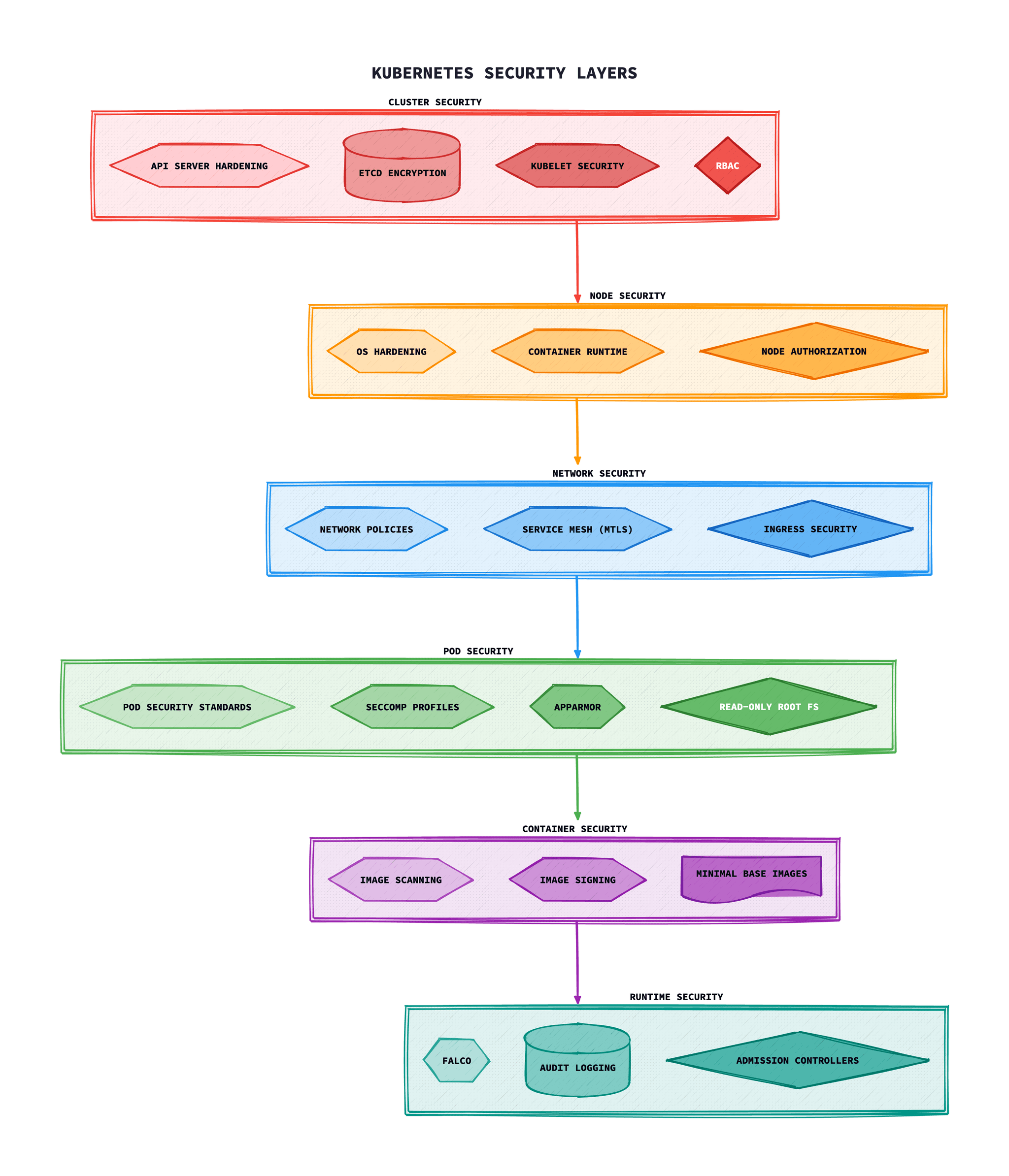
According to the 2024 Red Hat State of Kubernetes Security report, 67% of organisations have delayed or slowed application deployment due to security concerns, and 46% have experienced a security incident related to containers or Kubernetes in the past 12 months.
Security is a Shared Responsibility
Kubernetes security is not a one-time configuration but an ongoing process. Managed Kubernetes services (EKS, GKE, AKS) handle control plane security, but workload security remains your responsibility.
This guide provides a thorough approach to Kubernetes security hardening, covering everything from pod-level controls to cluster-wide policies and runtime threat detection.
The 4Cs of Cloud-Native Security
Cloud-native security follows a defence-in-depth model known as the 4Cs. Each layer builds upon the security of the layer beneath it, and weaknesses at any level can compromise the entire stack.
1. Cloud
The underlying cloud provider infrastructure. This includes IAM, network security groups, encryption at rest, and compliance certifications.
2. Cluster
The Kubernetes cluster itself. This includes API server security, etcd encryption, authentication/authorisation, and network policies.
3. Container
Container image security, vulnerability scanning, image signing, and using minimal base images like distroless.
4. Code
Application code security, dependency scanning, SAST/DAST testing, and secure coding practices.
Pod Security Standards
Pod Security Standards (PSS) replaced the deprecated PodSecurityPolicy (PSP) in Kubernetes 1.25. They define three security profiles that can be enforced at the namespace level.
The Three Profiles
- Privileged: Unrestricted policy, providing the widest possible level of permissions. Use only for system-level workloads.
- Baseline: Minimally restrictive policy that prevents known privilege escalations. Suitable for common containerised workloads.
- Restricted: Heavily restricted policy following security best practices. Required for security-sensitive workloads.
Enabling Pod Security Admission
Pod Security Admission is the built-in admission controller that enforces Pod Security Standards. Apply labels to namespaces to enable enforcement:
apiVersion: v1
kind: Namespace
metadata:
  name: production
  labels:
    # Enforce restricted profile - reject non-compliant pods
    pod-security.kubernetes.io/enforce: restricted
    pod-security.kubernetes.io/enforce-version: latest
    # Warn on baseline violations (allows pod but logs warning)
    pod-security.kubernetes.io/warn: baseline
    pod-security.kubernetes.io/warn-version: latest
    # Audit all violations for review
    pod-security.kubernetes.io/audit: restricted
    pod-security.kubernetes.io/audit-version: latest
Restricted Profile Requirements
Pods running under the restricted profile must adhere to these constraints:
apiVersion: v1
kind: Pod
metadata:
  name: secure-pod
spec:
  securityContext:
    runAsNonRoot: true
    seccompProfile:
      type: RuntimeDefault
  containers:
  - name: app
    image: myapp:v1.0
    securityContext:
      allowPrivilegeEscalation: false
      readOnlyRootFilesystem: true
      runAsNonRoot: true
      runAsUser: 1000
      capabilities:
        drop:
          - ALL
    resources:
      limits:
        memory: "128Mi"
        cpu: "500m"
      requests:
        memory: "64Mi"
        cpu: "250m"
Migration Tip
Start with audit mode to understand violations, then move to warn mode, and finally enable enforce mode once your workloads are compliant.
RBAC Best Practices
Role-Based Access Control (RBAC) is the foundation of Kubernetes authorisation. Following the principle of least privilege is essential for securing your cluster.
Key Principles
- Least Privilege: Grant only the minimum permissions required for a workload or user to function
- Namespace Isolation:Use Roles instead of ClusterRoles when permissions don't need to span namespaces
- Avoid Wildcards: Never use wildcards (*) for resources or verbs in production
- Regular Audits: Periodically review and prune unused roles and bindings
Example: Application Service Account
# Create a dedicated service account# Define minimal permissions# Define minimal permissions# Define minimal permissions# Define minimal permissions# Define minimal permissions# Define minimal permissions# Bind the role to the service account# Bind the role to the service account# Bind the role to the service account# Bind the role to the service account# Bind the role to the service account# Bind the role to the service account# Bind the role to the service account# Bind the role to the service account# Bind the role to the service account# Bind the role to the service accountervice account
apiVersion: rbac.authorization.k8s.io/v1
kind: RoleBinding
metadata:
  name: myapp-binding
  namespace: production
subjects:
- kind: ServiceAccount
  name: myapp-sa
  namespace: production
roleRef:
  kind: Role
  name: myapp-role
  apiGroup: rbac.authorization.k8s.io
Dangerous Permissions to Avoid
Certain RBAC permissions can lead to privilege escalation and should be carefully controlled:
create pods– Can be used to mount secrets or run privileged containerscreate/update roles or clusterroles– Can escalate own privilegesexec into pods– Provides shell access to running containerslist/get secrets– Access to sensitive credentialspatch/update pods– Can modify security contexts
Network Policies
By default, Kubernetes allows all pod-to-pod communication within a cluster. Network Policies enable you to control traffic flow at the IP address or port level, implementing microsegmentation.
CNI Requirement
Network Policies require a CNI plugin that supports them (Calico, Cilium, Weave Net). The default kubenet CNI does not enforce Network Policies.
Default Deny Policy
Start with a default deny policy for each namespace and then allow only required traffic:
# Default deny all ingress and egress
apiVersion: networking.k8s.io/v1
kind: NetworkPolicy
metadata:
  name: default-deny-all
  namespace: production
spec:
  podSelector: {}  # Applies to all pods
  policyTypes:
  - Ingress
  - Egress
Allow Specific Traffic
apiVersion: networking.k8s.io/v1
kind: NetworkPolicy
metadata:
  name: api-network-policy
  namespace: production
spec:
  podSelector:
    matchLabels:
      app: api
  policyTypes:
  - Ingress
  - Egress
  ingress:
  # Allow traffic from frontend pods
  - from:
    - podSelector:
        matchLabels:
          app: frontend
    ports:
    - protocol: TCP
      port: 8080
  # Allow traffic from ingress controller namespace
  - from:
    - namespaceSelector:
        matchLabels:
          name: ingress-nginx
    ports:
    - protocol: TCP
      port: 8080
  egress:
  # Allow DNS resolution
  - to:
    - namespaceSelector: {}
      podSelector:
        matchLabels:
          k8s-app: kube-dns
    ports:
    - protocol: UDP
      port: 53
  # Allow database access
  - to:
    - podSelector:
        matchLabels:
          app: postgres
    ports:
    - protocol: TCP
      port: 5432
Runtime Security with Falco
Falco is the de facto open-source runtime security tool for Kubernetes. It uses eBPF (or kernel modules) to monitor system calls and detect anomalous behaviour in real-time.
What Falco Detects
- Shell spawned inside containers
- Unexpected network connections
- Sensitive file access (e.g., /etc/shadow, /etc/passwd)
- Privilege escalation attempts
- Crypto mining processes
- Container escape attempts
Installing Falco with Helm
# Add the Falco Helm repository# Install Falco with eBPF driver (recommended)# Install Falco with eBPF driver (recommended)all Falco with eBPF driver (recommended)
helm install falco falcosecurity/falco \
  --namespace falco-system \
  --create-namespace \
  --set driver.kind=ebpf \
  --set falcosidekick.enabled=true \
  --set falcosidekick.webui.enabled=true
Custom Falco Rules
# custom-rules.yaml
- rule: Detect kubectl exec
  desc: Detect any kubectl exec commands
  condition: >
    spawned_process and
    container and
    proc.name = "kubectl" and
    proc.cmdline contains "exec"
  output: >
    kubectl exec detected
    (user=%user.name pod=%k8s.pod.name ns=%k8s.ns.name
    command=%proc.cmdline)
  priority: WARNING
  tags: [container, process]

- rule: Detect Cryptocurrency Mining
  desc: Detect crypto mining processes
  condition: >
    spawned_process and
    container and
    (proc.name in (xmrig, minerd, minergate, cryptonight) or
    proc.cmdline contains "stratum+tcp")
  output: >
    Cryptocurrency mining detected
    (user=%user.name container=%container.name
    command=%proc.cmdline)
  priority: CRITICAL
  tags: [container, cryptomining]
Policy Engines: Kyverno and OPA Gatekeeper
Policy engines provide declarative policy-as-code for Kubernetes, enabling you to enforce security standards, best practices, and organisational requirements at admission time.
Kyverno
Kyverno is a Kubernetes-native policy engine that uses familiar YAML syntax and doesn't require learning a new language.
# Require resource limits on all containers# Automatically add labels to pods# Automatically add labels to pods# Automatically add labels to pods# Automatically add labels to pods# Automatically add labels to pods# Automatically add labels to pods# Automatically add labels to pods# Automatically add labels to pods# Automatically add labels to pods# Automatically add labels to pods# Automatically add labels to pods# Automatically add labels to pods# Automatically add labels to pods# Automatically add labels to pods# Automatically add labels to podspods
apiVersion: kyverno.io/v1
kind: ClusterPolicy
metadata:
  name: add-security-labels
spec:
  rules:
  - name: add-labels
    match:
      any:
      - resources:
          kinds:
          - Pod
    mutate:
      patchStrategicMerge:
        metadata:
          labels:
            security-scan: enabled
            managed-by: kyverno
OPA Gatekeeper
OPA Gatekeeper uses Rego, a declarative policy language, offering more flexibility for complex policy logic.
# ConstraintTemplate defining the policy logic# Constraint applying the template# Constraint applying the template# Constraint applying the template# Constraint applying the template# Constraint applying the template# Constraint applying the template# Constraint applying the template# Constraint applying the template# Constraint applying the template# Constraint applying the template# Constraint applying the template# Constraint applying the template# Constraint applying the template# Constraint applying the template# Constraint applying the template# Constraint applying the template# Constraint applying the template# Constraint applying the template# Constraint applying the template# Constraint applying the template# Constraint applying the template# Constraint applying the template# Constraint applying the template# Constraint applying the templatee template
apiVersion: constraints.gatekeeper.sh/v1beta1
kind: K8sRequiredLabels
metadata:
  name: require-team-label
spec:
  match:
    kinds:
    - apiGroups: [""]
      kinds: ["Pod"]
  parameters:
    labels:
    - "team"
    - "environment"
Kyverno vs OPA Gatekeeper
| Feature | Kyverno | OPA Gatekeeper |
|---|---|---|
| Policy Language | YAML | Rego |
| Learning Curve | Lower | Higher |
| Mutation Support | Native | Experimental |
| Generation Support | Yes | No |
| Complex Logic | Limited | Excellent |
Secrets Management
Kubernetes Secrets are base64-encoded by default, not encrypted. For production environments, implement proper secrets management:
Enable Encryption at Rest
# /etc/kubernetes/encryption-config.yaml
apiVersion: apiserver.config.k8s.io/v1
kind: EncryptionConfiguration
resources:
  - resources:
      - secrets
    providers:
      - aescbc:
          keys:
            - name: key1
              secret: <base64-encoded-32-byte-key>
      - identity: {}  # Fallback to unencrypted
External Secrets Operator
Use External Secrets Operator to sync secrets from external providers (HashiCorp Vault, AWS Secrets Manager, Azure Key Vault):
apiVersion: external-secrets.io/v1beta1
kind: ExternalSecret
metadata:
  name: database-credentials
  namespace: production
spec:
  refreshInterval: 1h
  secretStoreRef:
    name: vault-backend
    kind: ClusterSecretStore
  target:
    name: db-secret
    creationPolicy: Owner
  data:
  - secretKey: username
    remoteRef:
      key: secret/data/production/database
      property: username
  - secretKey: password
    remoteRef:
      key: secret/data/production/database
      property: password
Security Hardening Checklist
Cluster Security
- Enable RBAC and disable anonymous authentication
- Encrypt etcd data at rest
- Enable audit logging
- Restrict API server access to known IP ranges
- Use a CNI that supports Network Policies
Workload Security
- Apply Pod Security Standards (restricted profile)
- Run containers as non-root
- Use read-only root filesystems
- Drop all capabilities and add only required ones
- Set resource limits on all containers
- Disable automounting of service account tokens
Network Security
- Implement default-deny Network Policies
- Segment namespaces with Network Policies
- Restrict egress to known endpoints
- Use mTLS for service-to-service communication
Troubleshooting
Common issues and solutions when implementing Kubernetes security controls.
RBAC Permission Denied Errors
Error: “Error from server (Forbidden): pods is forbidden: User 'system:serviceaccount:default:my-sa' cannot list resource 'pods'”
Common causes:
- Missing RoleBinding or ClusterRoleBinding
- Role bound to wrong namespace
- ServiceAccount not specified in Pod spec
- Typo in resource names or API groups
Solution:
# Check what permissions a ServiceAccount has# Verify RoleBinding exists and references correct subjects# Verify RoleBinding exists and references correct subjects# Create correct RoleBinding# Create correct RoleBinding# Create correct RoleBindingrrect RoleBinding
kubectl create rolebinding my-sa-pods \
  --clusterrole=view \
  --serviceaccount=default:my-sa \
  --namespace=default
Network Policy Not Blocking Traffic
Symptom: Network Policy is applied but traffic still flows that should be blocked.
Common causes:
- CNI plugin doesn't support Network Policies (e.g., Flannel without Calico)
- Pod labels don't match policy selector
- Policy is in wrong namespace
- Egress policy missing when only ingress defined (default allow egress)
Solution:
# Verify CNI supports NetworkPolicy# Check pod labels match policy selector# Check pod labels match policy selector# Test network connectivity with debug pod# Test network connectivity with debug pod# Apply default deny policy first, then allow specific traffic# Apply default deny policy first, then allow specific traffic# Apply default deny policy first, then allow specific trafficny policy first, then allow specific traffic
kubectl apply -f - <<EOF
apiVersion: networking.k8s.io/v1
kind: NetworkPolicy
metadata:
  name: default-deny-all
spec:
  podSelector: {}
  policyTypes:
  - Ingress
  - Egress
EOF
Pod Security Admission Blocking Deployments
Error: “Error from server (Forbidden): pods 'my-pod' is forbidden: violates PodSecurity 'restricted:latest'”
Common causes:
- Container running as root (runAsNonRoot not set)
- Missing securityContext configuration
- Privileged containers or host namespaces requested
- Capabilities not dropped
Solution:
# Add required securityContext for restricted policy# Use warn mode first to identify issues# Use warn mode first to identify issues# Use warn mode first to identify issues# Use warn mode first to identify issues# Use warn mode first to identify issues# Use warn mode first to identify issues# Use warn mode first to identify issues# Use warn mode first to identify issuesues
kubectl label namespace my-ns \
  pod-security.kubernetes.io/warn=restricted \
  pod-security.kubernetes.io/warn-version=latest
Falco Generating False Positives
Symptom: Falco alerts flooding logs with legitimate application behaviour.
Common causes:
- Default rules too strict for your workloads
- Application behaviour not whitelisted
- Container images with unusual but legitimate patterns
Solution:
# Create exception rules in custom_rules.yaml# Use Falco's exceptions framework# Use Falco's exceptions framework# Use Falco's exceptions framework# Use Falco's exceptions framework# Use Falco's exceptions framework# Use Falco's exceptions framework# Use Falco's exceptions framework# Use Falco's exceptions framework# Use Falco's exceptions frameworkxceptions framework
- list: trusted_images
  items: [my-registry/my-app, my-registry/admin-tools]

- macro: user_trusted_containers
  condition: container.image.repository in (trusted_images)
Secrets Not Syncing from External Secrets Manager
Error: “SecretStore 'vault-backend' is not ready” or “could not get secret data from provider”
Common causes:
- External Secrets Operator ServiceAccount lacks permissions
- IAM role or authentication not configured correctly
- Secret path or key name mismatch
- Network policy blocking access to secrets manager
Solution:
# Check ExternalSecret status# Verify SecretStore connectivity# Verify SecretStore connectivity# For AWS Secrets Manager, verify IAM# For AWS Secrets Manager, verify IAM# For AWS Secrets Manager, verify IAM# Check operator logs# Check operator logs# Check operator logs# Check operator logs# Check operator logs# Ensure IRSA or Workload Identity is configured# Ensure IRSA or Workload Identity is configuredIRSA or Workload Identity is configured
kubectl describe sa external-secrets -n external-secrets | grep Annotations
Conclusion
Kubernetes security requires a defence-in-depth approach, addressing security at every layer from the cloud infrastructure to the application code. By implementing Pod Security Standards, proper RBAC, Network Policies, and runtime security monitoring, you can significantly reduce your attack surface.
Remember that security is not a one-time task but an ongoing process. Regularly audit your configurations, keep your clusters updated, and stay informed about new vulnerabilities and best practices. Tools like Falco, Kyverno, and OPA Gatekeeper provide automation and visibility that make this ongoing work manageable.
Start with the fundamentals: enable RBAC, apply Pod Security Standards, and implement Network Policies, then progressively add runtime security and policy enforcement as your security maturity grows.