
What is Ansible?
Ansible is an open-source automation platform that simplifies IT orchestration, configuration management, application deployment, and task automation. Created by Michael DeHaan in 2012 and now maintained by Red Hat, Ansible has become one of the most popular automation tools in the DevOps ecosystem.
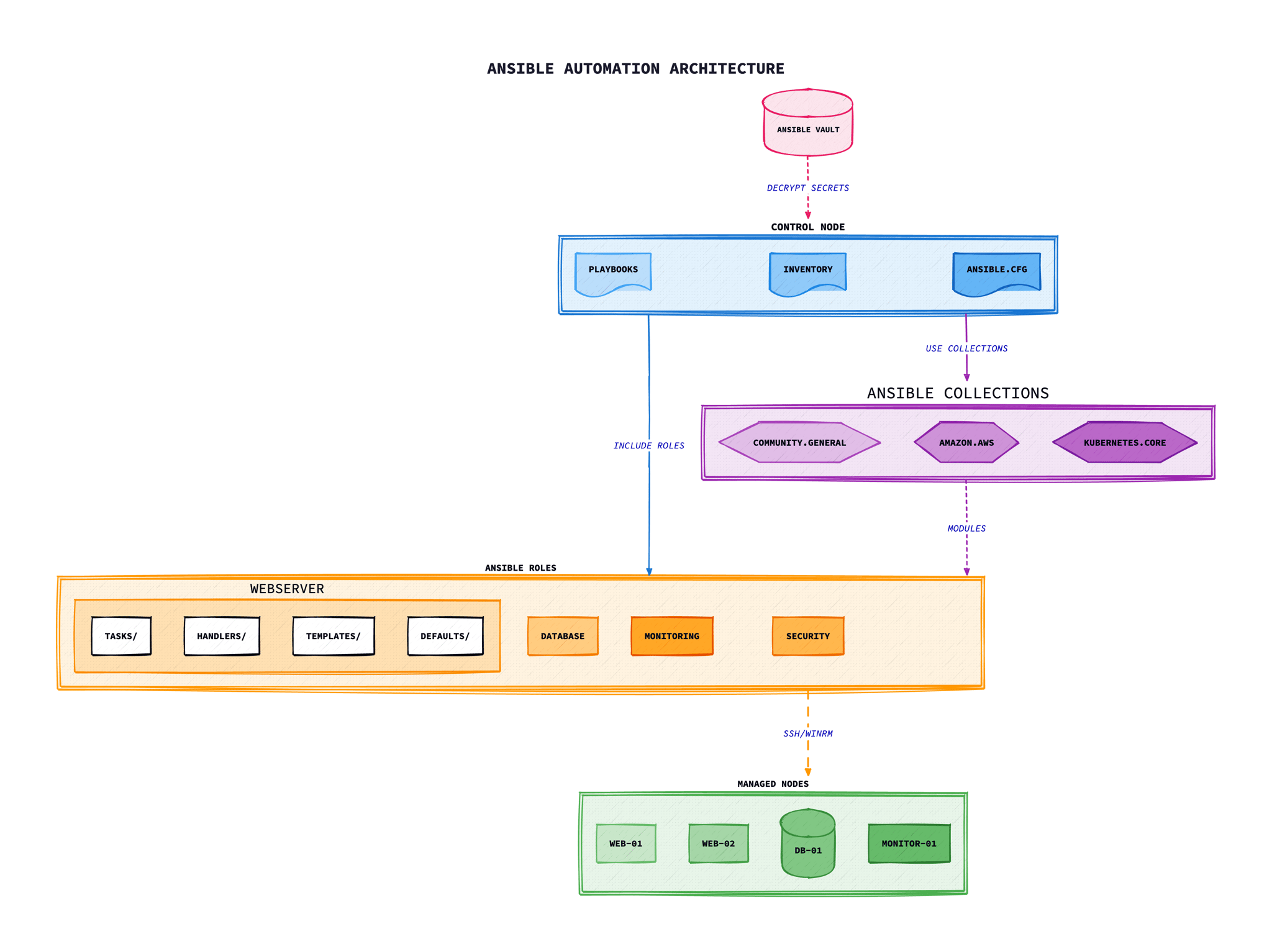
Agentless Architecture
Unlike tools such as Puppet or Chef that require agents installed on managed nodes, Ansible uses an agentless architecture. It connects to target systems via SSH (or WinRM for Windows) and executes tasks directly. This approach offers several advantages:
No Agent Installation
No software to install, update, or maintain on managed nodes. Only Python is required on target systems.
Push-Based Model
Changes are pushed from a control node when you run playbooks, giving you full control over timing.
SSH-Based Security
Uses existing SSH infrastructure and key-based authentication for secure connections.
Minimal Overhead
No daemon processes running on managed nodes consuming resources.
“Ansible is designed to be minimal in nature, consistent, secure, and highly reliable.”
— Ansible Documentation
Installing Ansible
Ansible can be installed on most Unix-like systems. The control node (where you run Ansible from) requires Python 3.9 or later. Managed nodes only need Python 2.7 or Python 3.5+.
Installation Methods
# Using pip (recommended)# On Ubuntu/Debian# On Ubuntu/Debian# On RHEL/CentOS/Fedora# On RHEL/CentOS/Fedora# On RHEL/CentOS/Fedora# On macOS with Homebrew# On macOS with Homebrew# Verify installation# Verify installationlation
ansible --version
Configuration File
Ansible looks for configuration in the following order:
ANSIBLE_CONFIGenvironment variableansible.cfgin current directory~/.ansible.cfgin home directory/etc/ansible/ansible.cfgsystem-wide
# ansible.cfg - Basic configuration
[defaults]
inventory = ./inventory
remote_user = ansible
host_key_checking = False
retry_files_enabled = False
stdout_callback = yaml

[privilege_escalation]
become = True
become_method = sudo
become_user = root
become_ask_pass = False
Inventory Management
The inventory defines the hosts and groups of hosts that Ansible manages. It can be a simple INI file, YAML, or dynamically generated from cloud providers and other sources.
INI Format Inventory
# inventory/hosts.ini# Ungrouped hosts# Web servers group# Database servers group# Database servers group# Database servers group# Database servers group# Group with variables# Group with variables# Group with variables# Group with variables# Parent group containing child groups# Parent group containing child groups# Host with connection variables# Host with connection variables# Host with connection variableses
[loadbalancers]
lb1.example.com ansible_user=admin ansible_ssh_private_key_file=~/.ssh/lb_key
YAML Format Inventory
# inventory/hosts.yml
all:
  children:
    webservers:
      hosts:
        web1.example.com:
        web2.example.com:
      vars:
        http_port: 80
        max_clients: 200
    dbservers:
      hosts:
        db1.example.com:
          ansible_port: 2222
        db2.example.com:
    production:
      children:
        webservers:
        dbservers:
Dynamic Inventory
For cloud environments, Ansible supports dynamic inventory plugins that query APIs:
# aws_ec2.yml - AWS dynamic inventory
plugin: amazon.aws.aws_ec2
regions:
  - eu-west-1
  - eu-west-2
keyed_groups:
  - key: tags.Environment
    prefix: env
  - key: instance_type
    prefix: type
filters:
  instance-state-name: running
compose:
  ansible_host: public_ip_address
Ad-hoc Commands
Ad-hoc commands are quick, one-line commands for simple tasks. They're useful for one-off operations, testing, and quick system checks without writing a full playbook.
# Ping all hosts to verify connectivity# Run a command on all web servers# Using shell module for pipes and redirects# Using shell module for pipes and redirects# Copy a file to all hosts# Copy a file to all hosts# Copy a file to all hosts# Copy a file to all hosts# Install a package on all database servers# Install a package on all database servers# Restart a service# Restart a service# Restart a service# Restart a service# Restart a service# Restart a service# Gather facts about hosts# Gather facts about hosts# Gather facts about hosts# Gather facts about hosts# Filter specific facts# Filter specific facts# Run with elevated privileges# Run with elevated privileges# Limit to specific hosts# Limit to specific hosts# Limit to specific hosts# Limit to specific hosts# Run with specific user# Run with specific user# Run with specific userth specific user
ansible all -m ping -u deploy
Playbooks and YAML Syntax
Playbooks are the foundation of Ansible automation. They are YAML files that define a set of plays, each targeting specific hosts with a series of tasks to execute.
Basic Playbook Structure
# site.yml - Main playbookbook
- name: Configure web servers
  hosts: webservers
  become: yes
  vars:
    http_port: 80
    document_root: /var/www/html

  tasks:
    - name: Install Nginx
      apt:
        name: nginx
        state: present
        update_cache: yes

    - name: Start Nginx service
      service:
        name: nginx
        state: started
        enabled: yes

    - name: Copy website content
      copy:
        src: files/index.html
        dest: "{{ document_root }}/index.html"
        owner: www-data
        group: www-data
        mode: '0644'

- name: Configure database servers
  hosts: dbservers
  become: yes

  tasks:
    - name: Install PostgreSQL
      apt:
        name:
          - postgresql
          - postgresql-contrib
        state: present
Running Playbooks
# Run a playbook# Run with specific inventory# Check mode (dry run)# Check mode (dry run)# Check mode (dry run)# Check mode (dry run)# Verbose output# Verbose output# Verbose output# Verbose output# Limit to specific hosts# Limit to specific hosts# Limit to specific hosts# More detail# Limit to specific hosts# Limit to specific hosts# Limit to specific hosts# Start at specific task# Start at specific task# Start at specific task# List all tasks# List all tasks# List all tasks# List all tasks# List all tasks# List all hosts# List all hosts# List all hostst all hosts
ansible-playbook site.yml --list-hosts
Tasks, Handlers, and Modules
Tasks
Tasks are the individual units of work in a playbook. Each task calls a module with specific arguments to perform an action on the target system.
tasks:
  # Simple task
  - name: Ensure Apache is installed
    apt:
      name: apache2
      state: present

  # Task with multiple arguments
  - name: Create application user
    user:
      name: appuser
      shell: /bin/bash
      groups: www-data
      append: yes
      create_home: yes

  # Task with register to capture output
  - name: Get server uptime
    command: uptime
    register: uptime_result

  - name: Display uptime
    debug:
      msg: "Uptime: {{ uptime_result.stdout }}"

  # Task with ignore_errors
  - name: Check if optional service exists
    command: systemctl status optional-service
    register: service_check
    ignore_errors: yes
Handlers
Handlers are special tasks that only run when notified by other tasks. They're commonly used to restart services after configuration changes.
---
- name: Configure Nginx
  hosts: webservers
  become: yes

  tasks:
    - name: Install Nginx
      apt:
        name: nginx
        state: present

    - name: Copy Nginx configuration
      template:
        src: templates/nginx.conf.j2
        dest: /etc/nginx/nginx.conf
      notify: Restart Nginx

    - name: Copy virtual host configuration
      template:
        src: templates/vhost.conf.j2
        dest: /etc/nginx/sites-available/mysite.conf
      notify:
        - Validate Nginx config
        - Restart Nginx

  handlers:
    - name: Validate Nginx config
      command: nginx -t

    - name: Restart Nginx
      service:
        name: nginx
        state: restarted
Common Modules
Package Management
aptManages apt packages on Debian/Ubuntu
yumManages yum packages on RHEL/CentOS
dnfManages dnf packages on Fedora/RHEL 8+
pipManages Python packages via pip
File Management
fileSets attributes of files and directories
copyCopies files to remote locations
templateRenders Jinja2 templates to files
lineinfileManages lines in text files
System
serviceManages services (start, stop, restart)
systemdControls systemd units
userManages user accounts
groupManages groups
Cloud & Infrastructure
aws_ec2Creates/terminates EC2 instances
azure_rm_virtualmachineManages Azure VMs
gcp_compute_instanceManages GCP instances
docker_containerManages Docker containers
Variables and Facts
Defining Variables
Variables in Ansible can be defined in multiple locations with different precedence levels. Understanding variable precedence is crucial for managing complex configurations.
# Variables in playbookbook
- name: Deploy application
  hosts: webservers
  vars:
    app_name: myapp
    app_port: 8080
    app_env: production

    # Complex variables
    database:
      host: db.example.com
      port: 5432
      name: myapp_db

    # List variable
    packages:
      - nginx
      - python3
      - git

  tasks:
    - name: Install packages
      apt:
        name: "{{ packages }}"
        state: present

    - name: Display database host
      debug:
        msg: "Database is at {{ database.host }}:{{ database.port }}"
Variable Files
# group_vars/webservers.yml# host_vars/web1.example.com.yml# host_vars/web1.example.com.yml# host_vars/web1.example.com.yml# Include variables in playbook# Include variables in playbook# Include variables in playbook playbook
- name: Configure servers
  hosts: webservers
  vars_files:
    - vars/common.yml
    - "vars/{{ ansible_os_family }}.yml"
Ansible Facts
Facts are system information automatically gathered from managed nodes when a playbook runs. They provide details about the OS, network, hardware, and more.
# Using facts in tasks# Conditional based on facts# Conditional based on facts# Conditional based on facts# Conditional based on facts# Conditional based on facts# Conditional based on facts# Conditional based on facts# Conditional based on facts# Conditional based on facts# Custom facts (place in /etc/ansible/facts.d/*.fact)# Custom facts (place in /etc/ansible/facts.d/*.fact)# Custom facts (place in /etc/ansible/facts.d/*.fact)# Custom facts (place in /etc/ansible/facts.d/*.fact)# Custom facts (place in /etc/ansible/facts.d/*.fact)# Custom facts (place in /etc/ansible/facts.d/*.fact)# /etc/ansible/facts.d/app.fact# Access custom facts# Access custom facts# Access custom facts facts
- debug:
    msg: "App version: {{ ansible_local.app.application.version }}"
Conditionals and Loops
Conditionals with when
tasks:
  # Simple condition
  - name: Install Apache on Debian
    apt:
      name: apache2
      state: present
    when: ansible_os_family == "Debian"

  # Multiple conditions (AND)
  - name: Restart service if config changed and in production
    service:
      name: myapp
      state: restarted
    when:
      - config_changed | bool
      - env == "production"

  # OR condition
  - name: Install on Debian or Ubuntu
    apt:
      name: nginx
      state: present
    when: ansible_distribution == "Debian" or ansible_distribution == "Ubuntu"

  # Condition based on registered variable
  - name: Check if file exists
    stat:
      path: /etc/myapp/config.yml
    register: config_file

  - name: Create config if missing
    template:
      src: config.yml.j2
      dest: /etc/myapp/config.yml
    when: not config_file.stat.exists

  # Condition with failed_when
  - name: Run command that might fail
    command: /opt/myapp/check.sh
    register: check_result
    failed_when: "'CRITICAL' in check_result.stdout"
Loops
tasks:
  # Simple loop
  - name: Install multiple packages
    apt:
      name: "{{ item }}"
      state: present
    loop:
      - nginx
      - python3
      - git
      - curl

  # Loop with dictionaries
  - name: Create multiple users
    user:
      name: "{{ item.name }}"
      groups: "{{ item.groups }}"
      shell: "{{ item.shell | default('/bin/bash') }}"
    loop:
      - { name: 'alice', groups: 'admin' }
      - { name: 'bob', groups: 'developers' }
      - { name: 'charlie', groups: 'developers,docker' }

  # Loop with index
  - name: Create numbered files
    file:
      path: "/tmp/file_{{ index }}.txt"
      state: touch
    loop:
      - one
      - two
      - three
    loop_control:
      index_var: index

  # Loop with dict2items
  - name: Set sysctl values
    sysctl:
      name: "{{ item.key }}"
      value: "{{ item.value }}"
      state: present
    loop: "{{ sysctl_settings | dict2items }}"
    vars:
      sysctl_settings:
        net.ipv4.ip_forward: 1
        vm.swappiness: 10

  # Nested loops with subelements
  - name: Add SSH keys for users
    authorized_key:
      user: "{{ item.0.name }}"
      key: "{{ item.1 }}"
    loop: "{{ users | subelements('ssh_keys') }}"
    vars:
      users:
        - name: alice
          ssh_keys:
            - "ssh-rsa AAAA... alice@laptop"
            - "ssh-rsa AAAA... alice@desktop"
Templates with Jinja2
Ansible uses Jinja2 templating to dynamically generate configuration files. Templates allow you to create flexible configurations that adapt to different hosts and environments.
Template Example
{# templates/nginx.conf.j2 #}
# Managed by Ansible - Do not edit manually
user {{ nginx_user | default('www-data') }};
worker_processes {{ ansible_processor_cores }};
pid /run/nginx.pid;

events {
    worker_connections {{ worker_connections | default(1024) }};
}

http {
    sendfile on;
    tcp_nopush on;
    tcp_nodelay on;
    keepalive_timeout 65;
    types_hash_max_size 2048;

    include /etc/nginx/mime.types;
    default_type application/octet-stream;

    # Logging
    access_log /var/log/nginx/access.log;
    error_log /var/log/nginx/error.log;

    # Virtual hosts
{% for vhost in virtual_hosts %}
    server {
        listen {{ vhost.port | default(80) }};
        server_name {{ vhost.server_name }};
        root {{ vhost.document_root }};

{% if vhost.ssl_enabled | default(false) %}
        listen 443 ssl;
        ssl_certificate {{ vhost.ssl_cert }};
        ssl_certificate_key {{ vhost.ssl_key }};
{% endif %}

{% for location in vhost.locations | default([]) %}
        location {{ location.path }} {
            {{ location.config }}
        }
{% endfor %}
    }
{% endfor %}
}
Common Jinja2 Features
{# Variables #}
{{ variable_name }}
{{ dict.key }}
{{ list[0] }}

{# Filters #}
{{ name | upper }}
{{ list | join(', ') }}
{{ value | default('fallback') }}
{{ path | basename }}
{{ content | b64encode }}
{{ timestamp | to_datetime }}

{# Conditionals #}
{% if environment == 'production' %}
DEBUG = False
{% elif environment == 'staging' %}
DEBUG = True
{% else %}
DEBUG = True
{% endif %}

{# Loops #}
{% for item in items %}
- {{ item.name }}: {{ item.value }}
{% endfor %}

{# Loop with conditions #}
{% for user in users if user.active %}
{{ user.name }}
{% endfor %}

{# Comments #}
{# This is a comment and won't appear in output #}

{# Set variables #}
{% set my_var = 'value' %}

{# Whitespace control #}
{%- if condition -%}
no extra whitespace
{%- endif -%}
Ansible Vault for Secrets
Ansible Vault provides encryption for sensitive data such as passwords, API keys, and certificates. This allows you to store secrets in version control safely.
Vault Commands
# Create a new encrypted file
ansible-vault create secrets.yml

# Encrypt an existing file
ansible-vault encrypt vars/production.yml

# Decrypt a file (permanently)
ansible-vault decrypt vars/production.yml

# View encrypted file contents
ansible-vault view secrets.yml

# Edit an encrypted file
ansible-vault edit secrets.yml

# Change encryption password
ansible-vault rekey secrets.yml

# Encrypt a string (inline)
ansible-vault encrypt_string 'mysecretpassword' --name 'db_password'

# Run playbook with vault password prompt
ansible-playbook site.yml --ask-vault-pass

# Run with password file
ansible-playbook site.yml --vault-password-file ~/.vault_pass
Using Encrypted Variables
# vars/secrets.yml (encrypted)
---
db_password: supersecretpassword
api_key: abc123xyz789
ssl_private_key: |
  -----BEGIN PRIVATE KEY-----
  MIIEvQIBADANBgkqhkiG9...
  -----END PRIVATE KEY-----

# Using inline encrypted strings in a file
# group_vars/production.yml
---
app_name: myapp
db_host: db.example.com
db_password: !vault |
  $ANSIBLE_VAULT;1.1;AES256
  61626364656667686970...

# Playbook using secrets
- name: Configure database
  hosts: dbservers
  vars_files:
    - vars/secrets.yml

  tasks:
    - name: Configure database user
      postgresql_user:
        name: appuser
        password: "{{ db_password }}"
        state: present
Security Best Practice
Store your vault password file outside of version control and protect it with appropriate file permissions (600). Consider using a password manager or secrets management service for team environments.
Best Practices
Following best practices ensures your Ansible automation is maintainable, secure, and reliable across environments.
Use Roles for Reusability
Organise playbooks into roles for better structure, reusability, and maintenance.
Idempotency Always
Ensure tasks produce the same result whether run once or multiple times.
Use Ansible Vault
Never store secrets in plain text. Always encrypt sensitive data with Vault.
Version Control Everything
Store playbooks, roles, and inventory in Git for tracking and collaboration.
Use Descriptive Names
Give tasks, plays, and variables meaningful names for readability.
Test Before Production
Use --check mode and molecule for testing before applying to production.
Recommended Directory Structure
ansible-project/
├── ansible.cfg
├── inventory/
│   ├── production/
│   │   ├── hosts.yml
│   │   ├── group_vars/
│   │   │   ├── all.yml
│   │   │   └── webservers.yml
│   │   └── host_vars/
│   │       └── web1.example.com.yml
│   └── staging/
│       └── hosts.yml
├── playbooks/
│   ├── site.yml
│   ├── webservers.yml
│   └── dbservers.yml
├── roles/
│   ├── common/
│   │   ├── tasks/
│   │   │   └── main.yml
│   │   ├── handlers/
│   │   │   └── main.yml
│   │   ├── templates/
│   │   ├── files/
│   │   ├── vars/
│   │   │   └── main.yml
│   │   └── defaults/
│   │       └── main.yml
│   ├── nginx/
│   └── postgresql/
├── vars/
│   └── secrets.yml  # encrypted
└── requirements.yml  # role dependencies
Using Roles
# roles/nginx/tasks/main.yml
---
- name: Install Nginx
  apt:
    name: nginx
    state: present
  notify: Restart Nginx

- name: Configure Nginx
  template:
    src: nginx.conf.j2
    dest: /etc/nginx/nginx.conf
  notify: Restart Nginx

- name: Enable Nginx service
  service:
    name: nginx
    enabled: yes
    state: started

# roles/nginx/handlers/main.yml
---
- name: Restart Nginx
  service:
    name: nginx
    state: restarted

# playbooks/webservers.yml - Using the role
---
- name: Configure web servers
  hosts: webservers
  become: yes
  roles:
    - common
    - nginx
    - { role: app, tags: ['app', 'deploy'] }
Troubleshooting
Common issues and solutions when working with Ansible.
SSH connection failures
Error: “Failed to connect to the host via ssh” or “Permission denied”
Common causes:
- SSH key not added to ssh-agent
- Wrong username in inventory
- Host key verification failure
- Firewall blocking SSH port
Solution:
# Test SSH connection directly
ssh -vvv user@hostname

# Add key to ssh-agent
eval $(ssh-agent)
ssh-add ~/.ssh/id_rsa

# Disable host key checking (dev only)
export ANSIBLE_HOST_KEY_CHECKING=False

# Or in ansible.cfg
[defaults]
host_key_checking = False

# Specify SSH options in inventory
[webservers]
web1 ansible_host=10.0.0.1 ansible_user=ubuntu ansible_ssh_private_key_file=~/.ssh/mykey
Module not found or Python issues
Error: “Module failure” or “/usr/bin/python: not found”
Common causes:
- Python not installed on target host
- Python path different than expected
- Missing Python dependencies for module
Solution:
# Specify Python interpreter
[webservers:vars]
ansible_python_interpreter=/usr/bin/python3

# Install Python using raw module (bootstrap)
- name: Install Python
  raw: apt-get update && apt-get install -y python3
  become: yes

# Use auto-discovery (Ansible 2.8+)
[defaults]
interpreter_python = auto_silent
Variable precedence confusion
Symptoms: Variables not having expected values, overrides not working
Common causes:
- Variable defined in multiple places
- Not understanding precedence order
- Using wrong variable scope
Variable precedence (lowest to highest):
# Precedence order (later overrides earlier):
# 1. role defaults
# 2. inventory vars
# 3. inventory group_vars
# 4. inventory host_vars
# 5. playbook group_vars
# 6. playbook host_vars
# 7. host facts
# 8. play vars
# 9. role vars
# 10. block vars
# 11. task vars
# 12. set_facts
# 13. extra vars (-e) <-- HIGHEST

# Debug variable value and source
- debug:
    var: my_variable
    verbosity: 0

# Run with increased verbosity
ansible-playbook site.yml -vvv
Idempotency issues - tasks always report changed
Symptoms: Tasks report “changed” on every run when nothing should change
Common causes:
- Using shell/command modules without creates/removes
- Template has dynamic content (timestamps)
- File permissions or ownership constantly changing
Solution:
# Bad - always reports changed
- name: Create directory
  command: mkdir -p /app/data

# Good - idempotent
- name: Create directory
  file:
    path: /app/data
    state: directory

# For shell commands, use creates/removes
- name: Run migration
  command: python manage.py migrate
  args:
    creates: /app/.migrated

# Use changed_when for custom logic
- name: Check status
  command: systemctl is-active nginx
  register: nginx_status
  changed_when: false
  failed_when: false
Vault password issues
Error: “Attempting to decrypt but no vault secrets found”
Common causes:
- Vault password not provided
- Wrong vault password
- Mixing vault IDs
Solution:
# Provide vault password
ansible-playbook site.yml --ask-vault-pass

# Use password file
ansible-playbook site.yml --vault-password-file ~/.vault_pass

# Configure in ansible.cfg
[defaults]
vault_password_file = ~/.vault_pass

# Re-encrypt with correct password
ansible-vault rekey secrets.yml

# View encrypted file content
ansible-vault view secrets.yml
Conclusion
Ansible offers an approachable way to automate infrastructure configuration and application deployment. Its agentless architecture, human-readable YAML syntax, and extensive module library make it a practical choice for teams of all sizes.
The key concepts covered in this guide—inventory management, playbooks, tasks and handlers, variables and facts, conditionals and loops, Jinja2 templates, and Ansible Vault—form the foundation for building reliable automation solutions.
As you progress, explore Ansible Galaxy for community roles, investigate Ansible Tower/AWX for enterprise features, and consider integrating Ansible with your CI/CD pipelines for continuous infrastructure deployment.