What Are Terraform Modules?
A Terraform module is a container for multiple resources that are used together. Modules are the primary way to package and reuse resource configurations in Terraform. Every Terraform configuration has at least one module, known as the root module, which consists of the resources defined in the .tf files in the main working directory.
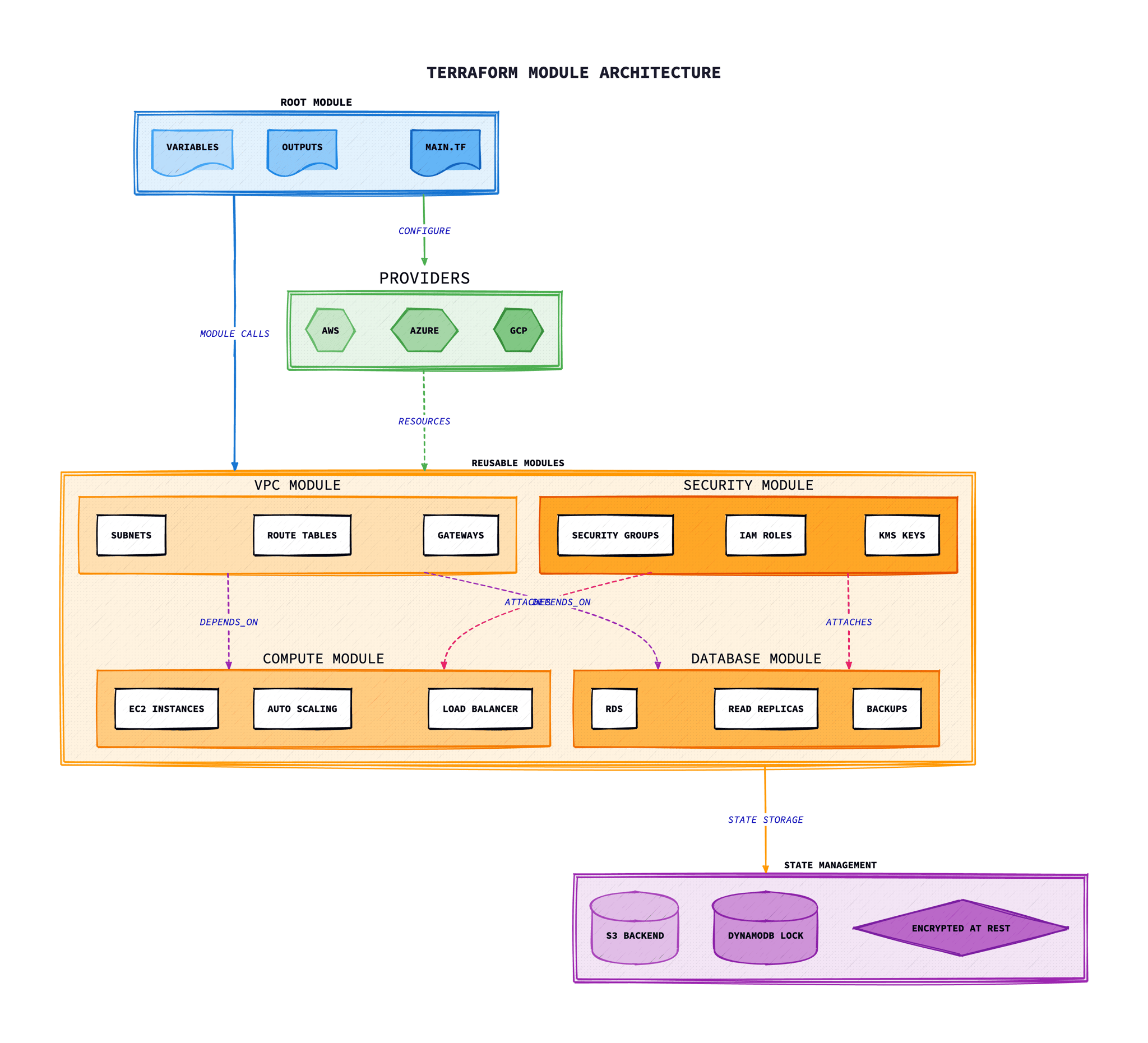
Think of modules as functions in programming: they accept inputs (variables), perform operations (create resources), and return outputs. This abstraction allows you to encapsulate complexity, create reusable components, and maintain consistency across your infrastructure.
“Modules are containers for multiple resources that are used together. A module consists of a collection of .tf files kept together in a directory.”
— HashiCorp Terraform Documentation
Why Use Modules?
Modules solve several critical challenges in infrastructure management:
Code Reusability
Define infrastructure patterns once and reuse them across projects, environments, and teams. No more copying and pasting configurations.
Consistency
Ensure that all environments use the same vetted configurations. Updates to a module automatically propagate to all consumers.
Encapsulation
Hide complex implementation details behind simple interfaces. Users don't need to understand every resource to use a module effectively.
Team Collaboration
Enable platform teams to create approved infrastructure patterns that application teams can consume without deep cloud expertise.
Module Structure and Best Practices
A well-structured module follows consistent conventions that make it easy to understand and maintain:
modules/
└── vpc/
    ├── main.tf          # Primary resource definitions
    ├── variables.tf     # Input variable declarations
    ├── outputs.tf       # Output value declarations
    ├── versions.tf      # Provider and Terraform version constraints
    ├── locals.tf        # Local values and computed expressions
    ├── data.tf          # Data source definitions
    ├── README.md        # Module documentation
    ├── examples/        # Example configurations
    │   ├── basic/
    │   │   └── main.tf
    │   └── complete/
    │       └── main.tf
    └── tests/           # Test configurations
        └── vpc_test.go
Structure Best Practices
- Use consistent file naming: main.tf, variables.tf, outputs.tf
- Include a README.md with usage examples
- Add examples/ directory with working configurations
- Keep modules focused on a single responsibility
Variables Best Practices
- Provide sensible defaults where appropriate
- Use descriptive variable names and descriptions
- Implement validation rules for critical inputs
- Group related variables logically
Outputs Best Practices
- Export all values that consumers might need
- Use clear, descriptive output names
- Add descriptions to all outputs
- Consider sensitive outputs for secrets
Documentation Best Practices
- Document all variables and outputs
- Include architecture diagrams where helpful
- Provide upgrade guides for breaking changes
- Use terraform-docs for automated documentation
Input Variables and Outputs
Variables and outputs form the interface of your module. Well-designed interfaces make modules easy to use and maintain.
Input Variables
# variables.tf

variable "vpc_name" {
  description = "Name of the VPC. Used for tagging and naming resources."
  type        = string

  validation {
    condition     = length(var.vpc_name) <= 32
    error_message = "VPC name must be 32 characters or less."
  }
}

variable "cidr_block" {
  description = "CIDR block for the VPC."
  type        = string
  default     = "10.0.0.0/16"

  validation {
    condition     = can(cidrhost(var.cidr_block, 0))
    error_message = "Must be a valid CIDR block."
  }
}

variable "availability_zones" {
  description = "List of availability zones for subnet distribution."
  type        = list(string)
  default     = []
}

variable "enable_dns_hostnames" {
  description = "Enable DNS hostnames in the VPC."
  type        = bool
  default     = true
}

variable "tags" {
  description = "Map of tags to apply to all resources."
  type        = map(string)
  default     = {}
}
Outputs
# outputs.tf

output "vpc_id" {
  description = "The ID of the VPC."
  value       = aws_vpc.main.id
}

output "vpc_cidr_block" {
  description = "The CIDR block of the VPC."
  value       = aws_vpc.main.cidr_block
}

output "public_subnet_ids" {
  description = "List of public subnet IDs."
  value       = aws_subnet.public[*].id
}

output "private_subnet_ids" {
  description = "List of private subnet IDs."
  value       = aws_subnet.private[*].id
}

output "nat_gateway_ips" {
  description = "List of Elastic IPs for NAT Gateways."
  value       = aws_eip.nat[*].public_ip
  sensitive   = false
}
Module Sources
Terraform supports multiple module sources, each suited for different workflows and requirements:
Local Path
Modules stored within the same repository or filesystem. Ideal for project-specific modules.
source = "./modules/vpc"Best for: Internal project modules, rapid development
Terraform Registry
Public or private registry hosting versioned modules. The official source for community modules.
source = "hashicorp/consul/aws"Best for: Production-ready, community-maintained modules
GitHub
Modules hosted in GitHub repositories. Supports branches, tags, and subdirectories.
source = "github.com/org/repo//modules/vpc"Best for: Private modules, organisation-wide sharing
S3 Bucket
Modules stored in AWS S3. Useful for private, versioned module distribution.
source = "s3::https://s3.amazonaws.com/bucket/module.zip"Best for: Air-gapped environments, AWS-centric organisations
Git (Generic)
Any Git repository over HTTPS or SSH. Maximum flexibility for version control.
source = "git::https://example.com/repo.git"Best for: Self-hosted Git, GitLab, Bitbucket
Creating Your First Module
Here is a practical S3 bucket module that encapsulates common configurations:
Module: modules/s3-bucket/main.tf
# modules/s3-bucket/main.tf

resource "aws_s3_bucket" "this" {
  bucket = var.bucket_name

  tags = merge(
    var.tags,
    {
      Name        = var.bucket_name
      Environment = var.environment
      ManagedBy   = "Terraform"
    }
  )
}

resource "aws_s3_bucket_versioning" "this" {
  bucket = aws_s3_bucket.this.id

  versioning_configuration {
    status = var.enable_versioning ? "Enabled" : "Suspended"
  }
}

resource "aws_s3_bucket_server_side_encryption_configuration" "this" {
  bucket = aws_s3_bucket.this.id

  rule {
    apply_server_side_encryption_by_default {
      sse_algorithm     = var.sse_algorithm
      kms_master_key_id = var.kms_key_arn
    }
    bucket_key_enabled = var.bucket_key_enabled
  }
}

resource "aws_s3_bucket_public_access_block" "this" {
  bucket = aws_s3_bucket.this.id

  block_public_acls       = var.block_public_access
  block_public_policy     = var.block_public_access
  ignore_public_acls      = var.block_public_access
  restrict_public_buckets = var.block_public_access
}

resource "aws_s3_bucket_lifecycle_configuration" "this" {
  count  = length(var.lifecycle_rules) > 0 ? 1 : 0
  bucket = aws_s3_bucket.this.id

  dynamic "rule" {
    for_each = var.lifecycle_rules
    content {
      id     = rule.value.id
      status = rule.value.enabled ? "Enabled" : "Disabled"

      filter {
        prefix = rule.value.prefix
      }

      expiration {
        days = rule.value.expiration_days
      }

      dynamic "transition" {
        for_each = rule.value.transitions
        content {
          days          = transition.value.days
          storage_class = transition.value.storage_class
        }
      }
    }
  }
}
Using the Module
# main.tf - Root module consuming the S3 module# Access module outputs# Access module outputs# Access module outputs# Access module outputs# Access module outputs# Access module outputs# Access module outputs# Access module outputs# Access module outputs# Access module outputs# Access module outputs# Access module outputs# Access module outputs# Access module outputs# Access module outputs# Access module outputs# Access module outputs# Access module outputs# Access module outputs# Access module outputs# Access module outputs# Access module outputs# Access module outputs# Access module outputs# Access module outputs# Access module outputs# Access module outputs# Access module outputs# Access module outputs# Access module outputs# Access module outputs# Access module outputs# Access module outputs# Access module outputsss module outputs
output "bucket_arn" {
  value = module.app_bucket.bucket_arn
}
Module Composition and Nesting
Complex infrastructure often requires composing multiple modules together. This pattern creates higher-level abstractions that encapsulate complete solutions.
# modules/application-stack/main.tf# A composed module that creates a complete application infrastructure# Outputs expose composed values# Outputs expose composed values# Outputs expose composed values# Outputs expose composed values# Outputs expose composed values# Outputs expose composed values# Outputs expose composed values# Outputs expose composed values# Outputs expose composed values# Outputs expose composed values# Outputs expose composed values# Outputs expose composed values# Outputs expose composed values# Outputs expose composed values# Outputs expose composed values# Outputs expose composed values# Outputs expose composed values# Outputs expose composed values# Outputs expose composed values# Outputs expose composed values# Outputs expose composed values# Outputs expose composed values# Outputs expose composed values# Outputs expose composed values# Outputs expose composed values# Outputs expose composed values expose composed values
output "cluster_endpoint" {
  value = module.eks.cluster_endpoint
}

output "database_endpoint" {
  value = module.rds.endpoint
}
Composition Guidelines
- • Keep nesting depth shallow (2-3 levels maximum)
- • Pass outputs from child modules as inputs to dependent modules
- • Use locals to compute shared values
- • Document the relationships between composed modules
Publishing to Terraform Registry
The Terraform Registry is the official distribution mechanism for public modules. Publishing makes your modules discoverable and provides versioning, documentation, and usage examples.
Requirements for Publishing
Repository Naming
Must follow: terraform-<PROVIDER>-<NAME>
Standard Structure
Include main.tf, variables.tf, outputs.tf, and README.md at root level.
Semantic Versioning
Use Git tags with semantic versions: v1.0.0, v1.1.0, v2.0.0
Public Repository
Repository must be public on GitHub (for public registry).
Publishing Steps
# 1. Create repository with correct naming# Example: terraform-aws-vpc# 2. Structure your module# 3. Create a semantic version tag# 3. Create a semantic version tag# 3. Create a semantic version tag# 3. Create a semantic version tag# 3. Create a semantic version tag# 3. Create a semantic version tag# 4. Sign in to registry.terraform.io with GitHub# 4. Sign in to registry.terraform.io with GitHub# 5. Select "Publish" → "Module"# 6. Select your repository# 6. Select your repository# Using published moduleule
module "vpc" {
  source  = "your-org/vpc/aws"
  version = "~> 1.0"

  # ... variables
}
Versioning Modules
Proper versioning enables safe updates and rollbacks. Follow semantic versioning (SemVer) to communicate the nature of changes to module consumers.
| Version Type | When to Increment | Example |
|---|---|---|
| Major (X.0.0) | Breaking changes that require configuration updates | Removing a variable, changing output structure |
| Minor (0.X.0) | New features, backward-compatible additions | Adding new optional variable, new output |
| Patch (0.0.X) | Bug fixes, documentation updates | Fixing a resource configuration bug |
Version Constraints
# Exact version# Pessimistic constraint (recommended)# Pessimistic constraint (recommended)# Pessimistic constraint (recommended)# Allows 5.1.x but not 5.2.0# Range constraint# Range constraint# Range constraint# Range constraint# Range constraint# Range constraint# For Git sources, use ref# For Git sources, use ref# For Git sources, use ref# For Git sources, use ref Git sources, use ref
module "vpc" {
  source = "git::https://github.com/org/terraform-aws-vpc.git?ref=v1.2.0"
}
Testing Modules
Testing Terraform modules ensures they work correctly and don't introduce regressions. Multiple tools and approaches provide different levels of confidence.
Terratest
Go library for writing automated tests for Terraform code. Deploys real infrastructure for testing.
terraform validate
Built-in command to check syntax and internal consistency of Terraform configurations.
tflint
Linter for Terraform code that catches errors and enforces best practices.
Checkov
Policy-as-code tool for detecting security and compliance misconfigurations.
terraform-compliance
BDD-style testing framework for Terraform using Gherkin syntax.
Terratest Example
// tests/vpc_test.go
package test

import (
    "testing"

    "github.com/gruntwork-io/terratest/modules/terraform"
    "github.com/stretchr/testify/assert"
)

func TestVpcModule(t *testing.T) {
    t.Parallel()

    terraformOptions := terraform.WithDefaultRetryableErrors(t, &terraform.Options{
        TerraformDir: "../examples/basic",
        Vars: map[string]interface{}{
            "vpc_name":   "test-vpc",
            "cidr_block": "10.0.0.0/16",
        },
    })

    // Clean up resources after test
    defer terraform.Destroy(t, terraformOptions)

    // Deploy the module
    terraform.InitAndApply(t, terraformOptions)

    // Validate outputs
    vpcId := terraform.Output(t, terraformOptions, "vpc_id")
    assert.NotEmpty(t, vpcId)

    cidrBlock := terraform.Output(t, terraformOptions, "vpc_cidr_block")
    assert.Equal(t, "10.0.0.0/16", cidrBlock)
}
Real-World Module Examples
The Terraform Registry hosts thousands of community modules. Here are some commonly used modules for AWS infrastructure:
AWS VPC Module
module "vpc" {
  source  = "terraform-aws-modules/vpc/aws"
  version = "~> 5.0"

  name = "production-vpc"
  cidr = "10.0.0.0/16"

  azs             = ["eu-west-2a", "eu-west-2b", "eu-west-2c"]
  private_subnets = ["10.0.1.0/24", "10.0.2.0/24", "10.0.3.0/24"]
  public_subnets  = ["10.0.101.0/24", "10.0.102.0/24", "10.0.103.0/24"]

  enable_nat_gateway     = true
  single_nat_gateway     = false
  one_nat_gateway_per_az = true

  enable_dns_hostnames = true
  enable_dns_support   = true

  tags = {
    Environment = "production"
    Terraform   = "true"
  }
}
AWS EKS Module
module "eks" {
  source  = "terraform-aws-modules/eks/aws"
  version = "~> 19.0"

  cluster_name    = "production-cluster"
  cluster_version = "1.28"

  vpc_id     = module.vpc.vpc_id
  subnet_ids = module.vpc.private_subnets

  cluster_endpoint_public_access = true

  eks_managed_node_groups = {
    general = {
      desired_size = 3
      min_size     = 2
      max_size     = 10

      instance_types = ["m5.large"]
      capacity_type  = "ON_DEMAND"

      labels = {
        role = "general"
      }
    }

    spot = {
      desired_size = 2
      min_size     = 1
      max_size     = 10

      instance_types = ["m5.large", "m5a.large", "m5n.large"]
      capacity_type  = "SPOT"

      labels = {
        role = "spot-workloads"
      }
    }
  }

  tags = {
    Environment = "production"
  }
}
AWS RDS Module
module "rds" {
  source  = "terraform-aws-modules/rds/aws"
  version = "~> 6.0"

  identifier = "production-postgres"

  engine               = "postgres"
  engine_version       = "15.4"
  family               = "postgres15"
  major_engine_version = "15"
  instance_class       = "db.r6g.large"

  allocated_storage     = 100
  max_allocated_storage = 500

  db_name  = "application"
  username = "admin"
  port     = 5432

  multi_az               = true
  db_subnet_group_name   = module.vpc.database_subnet_group_name
  vpc_security_group_ids = [module.security_group.security_group_id]

  backup_retention_period = 7
  skip_final_snapshot     = false
  deletion_protection     = true

  performance_insights_enabled = true
  create_cloudwatch_log_group  = true

  tags = {
    Environment = "production"
  }
}
Troubleshooting
Common issues and solutions when working with Terraform modules.
Module not found or version mismatch
Error: “Module not found” or “No version constraints”
Common causes:
- Module source path is incorrect
- Private registry authentication failed
- Version constraint cannot be satisfied
- Network issues reaching the registry
Solution:
# Clear cache and reinitialise# For private registries, check authentication# Check available versions# Check available versions# Check available versions# Use -upgrade to get latest allowed versions# Use -upgrade to get latest allowed versionsatest allowed versions
terraform init -upgrade
Breaking changes after module upgrade
Symptoms: Resources being destroyed/recreated after module version update
Common causes:
- Resource addresses changed within module
- Variable names or types changed
- Default values modified
- Provider version incompatibilities
Solution:
# Always check CHANGELOG before upgrading# Test in non-production environment first# Use moved blocks for resource address changes# Pin versions in production# Pin versions in production# Pin versions in production# Pin versions in productions in production
module "vpc" {
  source  = "terraform-aws-modules/vpc/aws"
  version = "~> 5.0"  # Only patch updates
}
Module output not available
Error: “Reference to undeclared output” or empty outputs
Common causes:
- Output not defined in module's outputs.tf
- Typo in output name reference
- Output depends on resource that wasn't created
- Conditional resource with count = 0
Solution:
# Check what outputs are available# Handle conditional resources in outputs# Handle conditional resources in outputs# Use try() for potentially missing values# Use try() for potentially missing values# Use try() for potentially missing valuestially missing values
output "endpoint" {
  value = try(aws_lb.main[0].dns_name, "")
}
For_each or count issues with modules
Error: “The for_each value depends on resource attributes that cannot be determined”
Common causes:
- for_each key derived from a resource that doesn't exist yet
- Using computed values as map keys
- Dynamic instance counts causing plan issues
Solution:
# Use static values for for_each keys# Avoid this - computed values# Avoid this - computed values# Avoid this - computed values# Avoid this - computed values# Avoid this - computed values# Avoid this - computed valuesid this - computed values
module "bad" {
  for_each = aws_subnet.main  # Fails - not known until apply
}
Terratest failures
Symptoms: Tests pass locally but fail in CI/CD
Common causes:
- Missing credentials in CI environment
- Resource naming collisions from parallel runs
- Timeout too short for resource creation
- Region or quota limitations
Solution:
// Use unique names with random suffix// Increase timeouts for slow resources// Increase timeouts for slow resources// Increase timeouts for slow resources// Increase timeouts for slow resources// Increase timeouts for slow resources// Increase timeouts for slow resources// Retry for eventual consistency// Retry for eventual consistency// Retry for eventual consistency// Retry for eventual consistencycy
retry.DoWithRetry(t, "Check endpoint", 10, 5*time.Second, func() (string, error) {
  return http.Get(endpoint)
})
Conclusion
Terraform modules are essential building blocks for scalable, maintainable infrastructure as code. By encapsulating complexity, promoting reuse, and enforcing consistency, modules enable teams to manage infrastructure more effectively.
Key principles for success with Terraform modules include:
- Start simple: Begin with focused modules that do one thing well, then compose them into larger solutions.
- Invest in documentation: Clear README files, examples, and variable descriptions make modules accessible to all team members.
- Version everything: Semantic versioning enables safe updates and rollbacks across environments.
- Test rigorously: Automated testing catches issues before they reach production and builds confidence in module quality.
Whether you're building internal modules for your organisation or contributing to the Terraform community, following these practices will help you create modules that are reliable, reusable, and maintainable for years to come.